Reading RPLS is free for the whole profession. Members post, reply, and get the members-only rooms.


Notifications
Clear all

Topic starter
Translate
▼
English
Spanish
French
German
Italian
Portuguese
Russian
Chinese
Japanese
Korean
Arabic
Hindi
Dutch
Polish
Turkish
Vietnamese
Thai
Swedish
Danish
Finnish
Norwegian
Czech
Hungarian
Romanian
Greek
Hebrew
Indonesian
Malay
Ukrainian
Bulgarian
Croatian
Slovak
Slovenian
Serbian
Lithuanian
Latvian
Estonian
Hello,
Can someone please step me through downloading photos from a TSC3?
Thanks, Paul
Posted : January 26, 2016 1:34 pm

Translate
▼
English
Spanish
French
German
Italian
Portuguese
Russian
Chinese
Japanese
Korean
Arabic
Hindi
Dutch
Polish
Turkish
Vietnamese
Thai
Swedish
Danish
Finnish
Norwegian
Czech
Hungarian
Romanian
Greek
Hebrew
Indonesian
Malay
Ukrainian
Bulgarian
Croatian
Slovak
Slovenian
Serbian
Lithuanian
Latvian
Estonian
Mobile Sync? 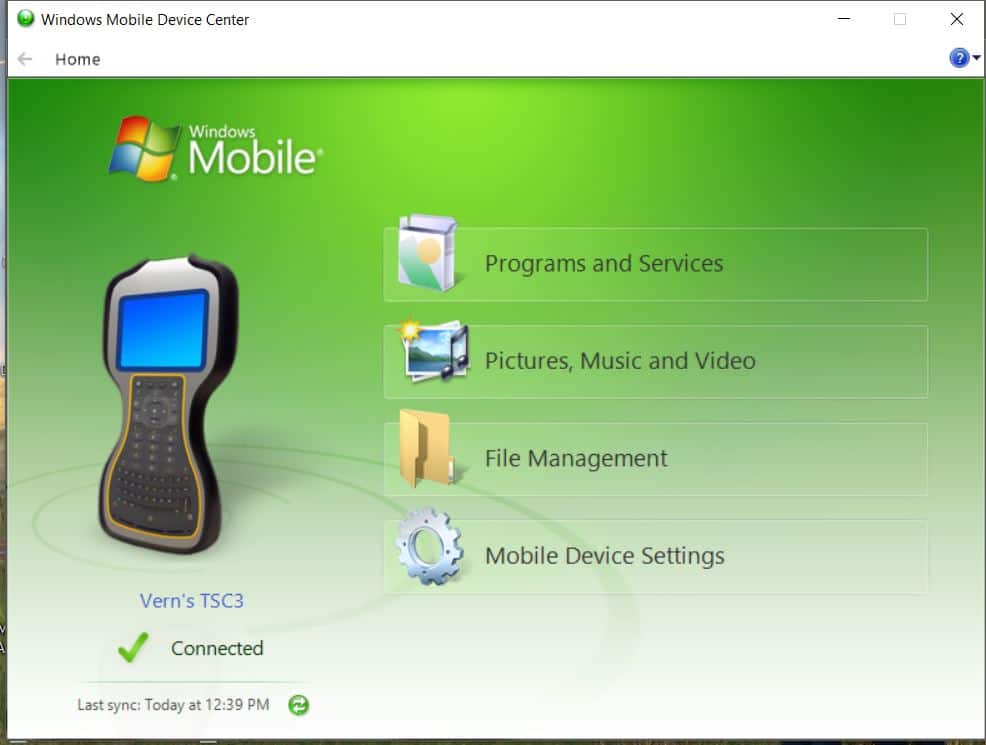
Posted : January 26, 2016 1:43 pm

Translate
▼
English
Spanish
French
German
Italian
Portuguese
Russian
Chinese
Japanese
Korean
Arabic
Hindi
Dutch
Polish
Turkish
Vietnamese
Thai
Swedish
Danish
Finnish
Norwegian
Czech
Hungarian
Romanian
Greek
Hebrew
Indonesian
Malay
Ukrainian
Bulgarian
Croatian
Slovak
Slovenian
Serbian
Lithuanian
Latvian
Estonian
Are you running the latest version of Access? The photos are now stored in a subfolder of the job folder.
Screenshots can also be taken using CTRL+S and I think these are stored in the user folder.
All of that is in the Trimble Data folder.
Connecting using to the computer using a USB lead required Windows Mobile Device Center since Vista.
Google WMDC 64 bit (or 32 bit if that is what you require).
Ignore the fact that is says for Vista, it works on Windows 7 at least.
The device becomes visible in the filemanager as a drive once the drivers have installed.
Posted : January 26, 2016 2:23 pm
Topic starter
Translate
▼
English
Spanish
French
German
Italian
Portuguese
Russian
Chinese
Japanese
Korean
Arabic
Hindi
Dutch
Polish
Turkish
Vietnamese
Thai
Swedish
Danish
Finnish
Norwegian
Czech
Hungarian
Romanian
Greek
Hebrew
Indonesian
Malay
Ukrainian
Bulgarian
Croatian
Slovak
Slovenian
Serbian
Lithuanian
Latvian
Estonian
vern, post: 354999, member: 3436 wrote: Mobile Sync?
Hello Vern, same version....if I had an excuse it would be I need more sleep.......seen that screen a thousand times, found them thanks. Do you use the camera for video? Anything that works better than another? Thanks for getting back, Paul
Posted : January 26, 2016 6:38 pm
Topic starter
Translate
▼
English
Spanish
French
German
Italian
Portuguese
Russian
Chinese
Japanese
Korean
Arabic
Hindi
Dutch
Polish
Turkish
Vietnamese
Thai
Swedish
Danish
Finnish
Norwegian
Czech
Hungarian
Romanian
Greek
Hebrew
Indonesian
Malay
Ukrainian
Bulgarian
Croatian
Slovak
Slovenian
Serbian
Lithuanian
Latvian
Estonian
squowse, post: 355008, member: 7109 wrote: Are you running the latest version of Access? The photos are now stored in a subfolder of the job folder.
Screenshots can also be taken using CTRL+S and I think these are stored in the user folder.
All of that is in the Trimble Data folder.Connecting using to the computer using a USB lead required Windows Mobile Device Center since Vista.
Google WMDC 64 bit (or 32 bit if that is what you require).
Ignore the fact that is says for Vista, it works on Windows 7 at least.
The device becomes visible in the filemanager as a drive once the drivers have installed.
Hello squowse, Thanks, I found them where you pointed, do you use this much? Take video? Any advice? Thanks Again, Paul
Posted : January 26, 2016 6:41 pm
Translate
▼
English
Spanish
French
German
Italian
Portuguese
Russian
Chinese
Japanese
Korean
Arabic
Hindi
Dutch
Polish
Turkish
Vietnamese
Thai
Swedish
Danish
Finnish
Norwegian
Czech
Hungarian
Romanian
Greek
Hebrew
Indonesian
Malay
Ukrainian
Bulgarian
Croatian
Slovak
Slovenian
Serbian
Lithuanian
Latvian
Estonian
rlshound, post: 355042, member: 6800 wrote: Hello Vern, same version....if I had an excuse it would be I need more sleep.......seen that screen a thousand times, found them thanks. Do you use the camera for video? Anything that works better than another? Thanks for getting back, Paul
I have found the TSC3 camera lacking in many ways. If I want a good picture I pull out my iphone for the task.
Posted : January 26, 2016 6:45 pm

Translate
▼
English
Spanish
French
German
Italian
Portuguese
Russian
Chinese
Japanese
Korean
Arabic
Hindi
Dutch
Polish
Turkish
Vietnamese
Thai
Swedish
Danish
Finnish
Norwegian
Czech
Hungarian
Romanian
Greek
Hebrew
Indonesian
Malay
Ukrainian
Bulgarian
Croatian
Slovak
Slovenian
Serbian
Lithuanian
Latvian
Estonian
Vern did you check the settings on the camera? It defaults to very low resolution, it's much better if you bump it up to the full 5MP. It's still not the greatest, it doesn't have good light gathering, which I guess is the trade off with having a lens that is robust and protected.
Posted : January 26, 2016 9:07 pm
Translate
▼
English
Spanish
French
German
Italian
Portuguese
Russian
Chinese
Japanese
Korean
Arabic
Hindi
Dutch
Polish
Turkish
Vietnamese
Thai
Swedish
Danish
Finnish
Norwegian
Czech
Hungarian
Romanian
Greek
Hebrew
Indonesian
Malay
Ukrainian
Bulgarian
Croatian
Slovak
Slovenian
Serbian
Lithuanian
Latvian
Estonian
rlshound, post: 355043, member: 6800 wrote: Hello squowse, Thanks, I found them where you pointed, do you use this much? Take video? Any advice? Thanks Again, Paul
No don't have much need for it. Or at least I have never thought of any.
I generally whip the phone out if I need a photo.
Posted : January 27, 2016 3:43 pm

Translate
▼
English
Spanish
French
German
Italian
Portuguese
Russian
Chinese
Japanese
Korean
Arabic
Hindi
Dutch
Polish
Turkish
Vietnamese
Thai
Swedish
Danish
Finnish
Norwegian
Czech
Hungarian
Romanian
Greek
Hebrew
Indonesian
Malay
Ukrainian
Bulgarian
Croatian
Slovak
Slovenian
Serbian
Lithuanian
Latvian
Estonian
If you download your *.job file using the Data Transfer utility, it downloads any photos you took during that job automatically.
Posted : January 28, 2016 11:08 am

Translate
▼
English
Spanish
French
German
Italian
Portuguese
Russian
Chinese
Japanese
Korean
Arabic
Hindi
Dutch
Polish
Turkish
Vietnamese
Thai
Swedish
Danish
Finnish
Norwegian
Czech
Hungarian
Romanian
Greek
Hebrew
Indonesian
Malay
Ukrainian
Bulgarian
Croatian
Slovak
Slovenian
Serbian
Lithuanian
Latvian
Estonian
Bumping an older thread for the same question.
Anyone know of a way to export photos from Access on a TSC7 that doesn't involve exporting the entire job?
For example, our normal workflow is to export a .jxl and a .csv with attributes.?ÿ I'm wondering if there's a convenient way to add pictures taken to this package.
Posted : August 11, 2021 10:55 am