Reading RPLS is free for the whole profession. Members post, reply, and get the members-only rooms.


Notifications
Clear all
Software, CAD & Mapping
7
Posts
5
Users
0
Reactions
1,711
Views

Topic starter
Translate
▼
English
Spanish
French
German
Italian
Portuguese
Russian
Chinese
Japanese
Korean
Arabic
Hindi
Dutch
Polish
Turkish
Vietnamese
Thai
Swedish
Danish
Finnish
Norwegian
Czech
Hungarian
Romanian
Greek
Hebrew
Indonesian
Malay
Ukrainian
Bulgarian
Croatian
Slovak
Slovenian
Serbian
Lithuanian
Latvian
Estonian
TBC defaults to the antenna phase center as the height measurement point when importing GPS data files. I always measure to the bottom of the antenna mount, so I have to change the reference point for each file. TBC takes several seconds to register each change, so when dozens of files are involved it's a real time-waster, and tedious to boot. Is there a way to change the default reference point?
Posted : May 25, 2016 9:46 pm

Translate
▼
English
Spanish
French
German
Italian
Portuguese
Russian
Chinese
Japanese
Korean
Arabic
Hindi
Dutch
Polish
Turkish
Vietnamese
Thai
Swedish
Danish
Finnish
Norwegian
Czech
Hungarian
Romanian
Greek
Hebrew
Indonesian
Malay
Ukrainian
Bulgarian
Croatian
Slovak
Slovenian
Serbian
Lithuanian
Latvian
Estonian
I dunno Jim...
That seems like a very poor default setting from the get go.
A vertical value GRP to ARP has become the "standard" as near as I can tell these days (combined with the IGS Absolute Antenna Calibration data before processing)..
Loyal
Posted : May 25, 2016 10:16 pm

Translate
▼
English
Spanish
French
German
Italian
Portuguese
Russian
Chinese
Japanese
Korean
Arabic
Hindi
Dutch
Polish
Turkish
Vietnamese
Thai
Swedish
Danish
Finnish
Norwegian
Czech
Hungarian
Romanian
Greek
Hebrew
Indonesian
Malay
Ukrainian
Bulgarian
Croatian
Slovak
Slovenian
Serbian
Lithuanian
Latvian
Estonian
Why do you find it necessary to change it? TBC (or any other GPS software) is going to apply its antenna model to the height to the ARP regardless, baselines are phase center to phase center not ARP to ARP.
In any case, you can change them all at once in an Occupation Spreadsheet.
Posted : May 26, 2016 6:25 am
Topic starter
Translate
▼
English
Spanish
French
German
Italian
Portuguese
Russian
Chinese
Japanese
Korean
Arabic
Hindi
Dutch
Polish
Turkish
Vietnamese
Thai
Swedish
Danish
Finnish
Norwegian
Czech
Hungarian
Romanian
Greek
Hebrew
Indonesian
Malay
Ukrainian
Bulgarian
Croatian
Slovak
Slovenian
Serbian
Lithuanian
Latvian
Estonian
Lee D, post: 373985, member: 7971 wrote: Why do you find it necessary to change it?
Because I don't measure antenna heights to the phase center, I measure them to the ARP (bottom of the antenna mount in my case).
Lee D, post: 373985, member: 7971 wrote: In any case, you can change them all at once in an Occupation Spreadsheet.
That's what I've been doing, but unless I misunderstand the interface, I have to change it for each occupation separately. The project I'm working on currently -- which is typical for me -- involves dozens of occupations. It would be so much easier if I could specify the bottom of the antenna mount as the default in the project settings.
Posted : May 26, 2016 6:47 am

Translate
▼
English
Spanish
French
German
Italian
Portuguese
Russian
Chinese
Japanese
Korean
Arabic
Hindi
Dutch
Polish
Turkish
Vietnamese
Thai
Swedish
Danish
Finnish
Norwegian
Czech
Hungarian
Romanian
Greek
Hebrew
Indonesian
Malay
Ukrainian
Bulgarian
Croatian
Slovak
Slovenian
Serbian
Lithuanian
Latvian
Estonian
Not in front of TBC at the moment, but from memory if you select all the occupations then click on the drop down for changing the antenna reference point it will give you a choice of applying only to that reading or to all selected readings
Sent from my SM-G935F using Tapatalk
Posted : May 26, 2016 8:26 am
Translate
▼
English
Spanish
French
German
Italian
Portuguese
Russian
Chinese
Japanese
Korean
Arabic
Hindi
Dutch
Polish
Turkish
Vietnamese
Thai
Swedish
Danish
Finnish
Norwegian
Czech
Hungarian
Romanian
Greek
Hebrew
Indonesian
Malay
Ukrainian
Bulgarian
Croatian
Slovak
Slovenian
Serbian
Lithuanian
Latvian
Estonian
I thought it was in the Occupation Spreadsheet - that would be a LOGICAL place for it to be - but it's actually in the Raw Data Check In dialogue:
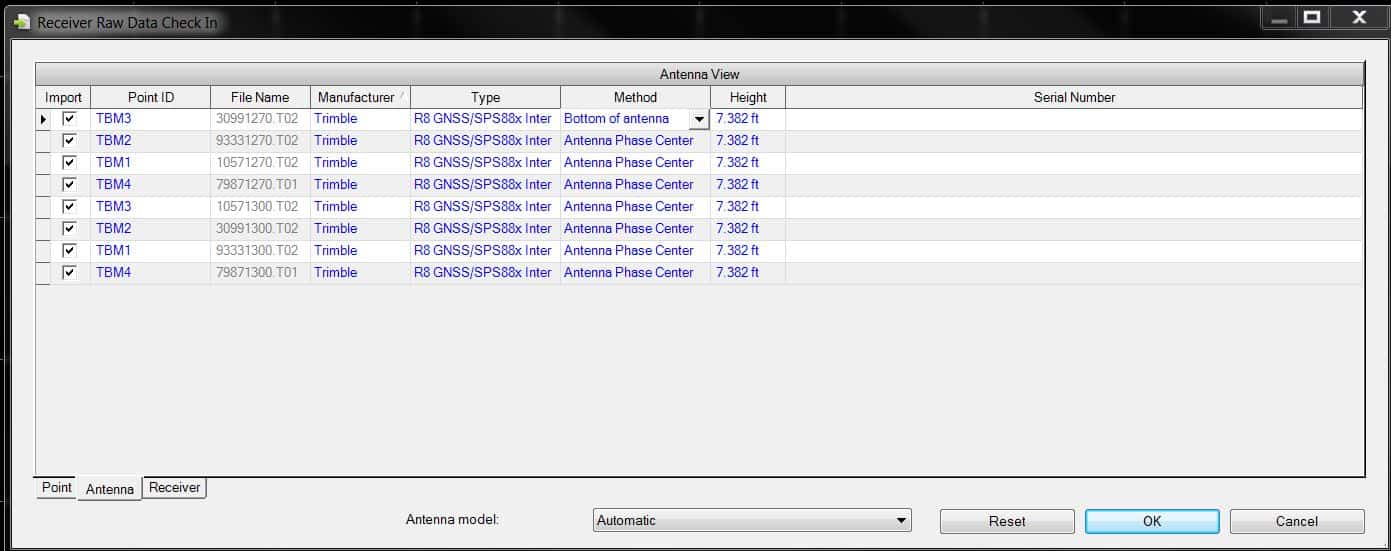
As you can see above, I brought in several files and then went to the Antenna tab and changed the top one from Antenna Phase Center to Bottom of Antenna Mount. If I now right-click on that box I get the option to use Bottom of Mount for all occupations. Same goes for antenna height, type, etc.
Posted : May 26, 2016 3:26 pm

Translate
▼
English
Spanish
French
German
Italian
Portuguese
Russian
Chinese
Japanese
Korean
Arabic
Hindi
Dutch
Polish
Turkish
Vietnamese
Thai
Swedish
Danish
Finnish
Norwegian
Czech
Hungarian
Romanian
Greek
Hebrew
Indonesian
Malay
Ukrainian
Bulgarian
Croatian
Slovak
Slovenian
Serbian
Lithuanian
Latvian
Estonian
Jim Frame, post: 373957, member: 10 wrote: TBC defaults to the antenna phase center as the height measurement point when importing GPS data files. I always measure to the bottom of the antenna mount, so I have to change the reference point for each file. TBC takes several seconds to register each change, so when dozens of files are involved it's a real time-waster, and tedious to boot. Is there a way to change the default reference point?
Right click in the method, gives you the option to use for all occupations, same with height.
Posted : August 10, 2017 3:17 pm