Reading RPLS is free for the whole profession. Members post, reply, and get the members-only rooms.

Notifications
Clear all
Software, CAD & Mapping
9
Posts
3
Users
0
Reactions
1,027
Views

Topic starter
Translate
▼
English
Spanish
French
German
Italian
Portuguese
Russian
Chinese
Japanese
Korean
Arabic
Hindi
Dutch
Polish
Turkish
Vietnamese
Thai
Swedish
Danish
Finnish
Norwegian
Czech
Hungarian
Romanian
Greek
Hebrew
Indonesian
Malay
Ukrainian
Bulgarian
Croatian
Slovak
Slovenian
Serbian
Lithuanian
Latvian
Estonian
I was doing a base-rover rtk, and set the base unit to a known control point. I selected base is on a known point and punched in the coordinates based on the projection system they were on. I named the point base_1 and then i got the following message and an additional point storted on my database named base_1_GNSS. What does this message tell and what is the purpose of the new point it created
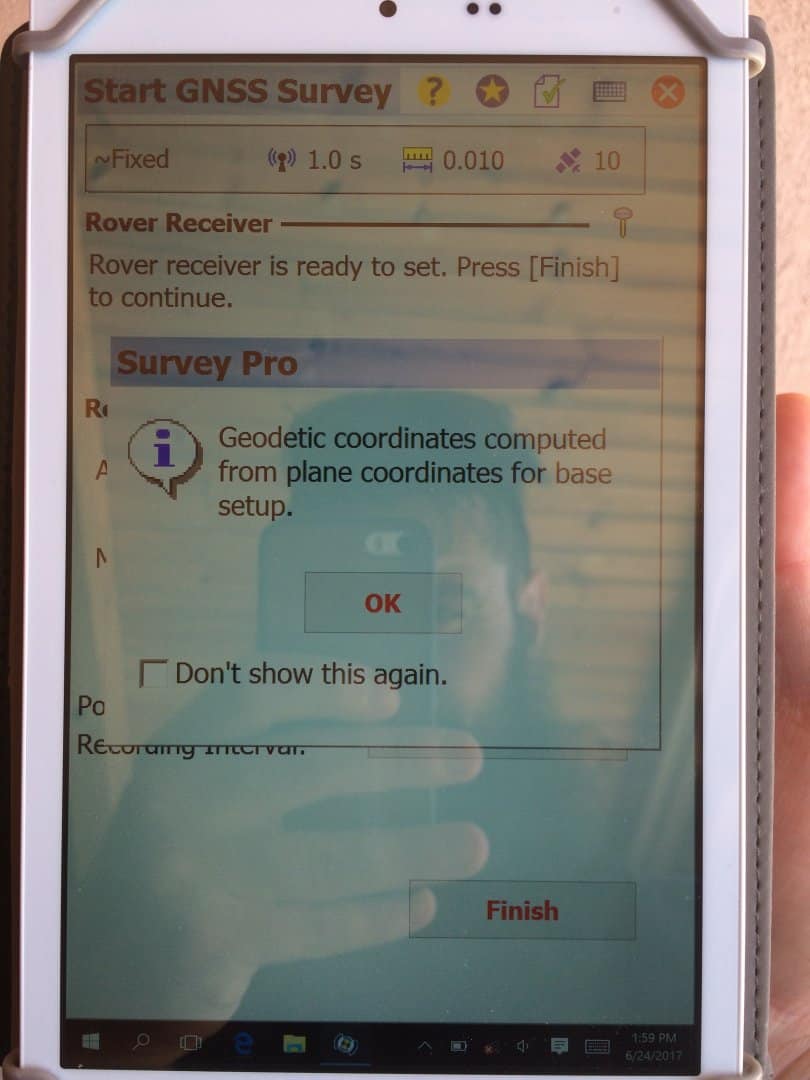
Posted : June 26, 2017 9:25 am

Translate
▼
English
Spanish
French
German
Italian
Portuguese
Russian
Chinese
Japanese
Korean
Arabic
Hindi
Dutch
Polish
Turkish
Vietnamese
Thai
Swedish
Danish
Finnish
Norwegian
Czech
Hungarian
Romanian
Greek
Hebrew
Indonesian
Malay
Ukrainian
Bulgarian
Croatian
Slovak
Slovenian
Serbian
Lithuanian
Latvian
Estonian
How do you have it configured under the "scale factor" tab
Posted : June 26, 2017 11:58 am
Topic starter
Translate
▼
English
Spanish
French
German
Italian
Portuguese
Russian
Chinese
Japanese
Korean
Arabic
Hindi
Dutch
Polish
Turkish
Vietnamese
Thai
Swedish
Danish
Finnish
Norwegian
Czech
Hungarian
Romanian
Greek
Hebrew
Indonesian
Malay
Ukrainian
Bulgarian
Croatian
Slovak
Slovenian
Serbian
Lithuanian
Latvian
Estonian
It is set on its own as automatic mapping plane (Grid), but i tried a new project and set it with no scale factor 1:1 and still got the same behavior. Any ideas
Posted : June 27, 2017 3:26 am
Topic starter
Translate
▼
English
Spanish
French
German
Italian
Portuguese
Russian
Chinese
Japanese
Korean
Arabic
Hindi
Dutch
Polish
Turkish
Vietnamese
Thai
Swedish
Danish
Finnish
Norwegian
Czech
Hungarian
Romanian
Greek
Hebrew
Indonesian
Malay
Ukrainian
Bulgarian
Croatian
Slovak
Slovenian
Serbian
Lithuanian
Latvian
Estonian
And heres a video step by step, just in case
[MEDIA=youtube]IQ-_9762Fgc[/MEDIA]
Posted : June 27, 2017 4:16 am
Translate
▼
English
Spanish
French
German
Italian
Portuguese
Russian
Chinese
Japanese
Korean
Arabic
Hindi
Dutch
Polish
Turkish
Vietnamese
Thai
Swedish
Danish
Finnish
Norwegian
Czech
Hungarian
Romanian
Greek
Hebrew
Indonesian
Malay
Ukrainian
Bulgarian
Croatian
Slovak
Slovenian
Serbian
Lithuanian
Latvian
Estonian
I would guess that base_1 was a manually or through ascii entered point and did not have a LLH associated with it and Survey Pro created a paired point. This is the same way it handles calibrations/localizations. This is speculation because I haven't used a base since before version 5.0 which handled GNSS differently.
Posted : June 27, 2017 4:29 am
Topic starter
Translate
▼
English
Spanish
French
German
Italian
Portuguese
Russian
Chinese
Japanese
Korean
Arabic
Hindi
Dutch
Polish
Turkish
Vietnamese
Thai
Swedish
Danish
Finnish
Norwegian
Czech
Hungarian
Romanian
Greek
Hebrew
Indonesian
Malay
Ukrainian
Bulgarian
Croatian
Slovak
Slovenian
Serbian
Lithuanian
Latvian
Estonian
How do i create a point then with LLH association? If i key-in the position of a known point, can i at least delete it after it creates the LLH counterpart?
mvanhank222, post: 434218, member: 8673 wrote: This is speculation because I haven't used a base since before version 5.0 which handled GNSS differently.
How do you work without setting up a base? Do you only practice network RTK then
Posted : June 27, 2017 5:09 am
Translate
▼
English
Spanish
French
German
Italian
Portuguese
Russian
Chinese
Japanese
Korean
Arabic
Hindi
Dutch
Polish
Turkish
Vietnamese
Thai
Swedish
Danish
Finnish
Norwegian
Czech
Hungarian
Romanian
Greek
Hebrew
Indonesian
Malay
Ukrainian
Bulgarian
Croatian
Slovak
Slovenian
Serbian
Lithuanian
Latvian
Estonian
All network corrections
Posted : June 27, 2017 9:01 am

Translate
▼
English
Spanish
French
German
Italian
Portuguese
Russian
Chinese
Japanese
Korean
Arabic
Hindi
Dutch
Polish
Turkish
Vietnamese
Thai
Swedish
Danish
Finnish
Norwegian
Czech
Hungarian
Romanian
Greek
Hebrew
Indonesian
Malay
Ukrainian
Bulgarian
Croatian
Slovak
Slovenian
Serbian
Lithuanian
Latvian
Estonian
I'm guessing that you entered your point in SPC. Since GNSS works in geodetic coordinates, it has to compute lat and long to work off of, based on the SPC that you entered. The new point it created should have identical SPC values as the point you entered.
Also, if you insert a point and then try to use it for a base point for your setup, you will need to go under the geodetic tab and uncheck the box that says "has geodetic", because it will have assigned it the SPC and geodetic coords from the previously stored point. When you change the SPC to the new point, it will not change the lat and long and will give you an error message asking if you want to rectify the coords.
Hope this is helpful.
Posted : June 27, 2017 10:38 am
Topic starter
Translate
▼
English
Spanish
French
German
Italian
Portuguese
Russian
Chinese
Japanese
Korean
Arabic
Hindi
Dutch
Polish
Turkish
Vietnamese
Thai
Swedish
Danish
Finnish
Norwegian
Czech
Hungarian
Romanian
Greek
Hebrew
Indonesian
Malay
Ukrainian
Bulgarian
Croatian
Slovak
Slovenian
Serbian
Lithuanian
Latvian
Estonian
Good Morning. Are you talking Survey Pro or Trimble Access, cause i dont see a geodetic tab and "has geodetic" option. Project is not in US, so not in State plane, but on a Grid Plane nevertheless and coordinates are key-in as grid based on a post-processing that has been previously performed on office that gives the base position.
I even tried to enter location WGS84 format instead of grid when creating the base point, behavior was the same. I also exported the point it creates as a geodetic calculation then imported that point on a new project and same thing once again.
Thing is i'm trying the demo that has 25 point limitation. ! is for the base so actually 24 points on the project. And now i get a base and a point it calculates for the base and it makes experimenting with a project difficult with 23 points, until i get a fully working version.
Posted : June 28, 2017 1:25 am