Reading RPLS is free for the whole profession. Members post, reply, and get the members-only rooms.


Notifications
Clear all

Topic starter
Translate
▼
English
Spanish
French
German
Italian
Portuguese
Russian
Chinese
Japanese
Korean
Arabic
Hindi
Dutch
Polish
Turkish
Vietnamese
Thai
Swedish
Danish
Finnish
Norwegian
Czech
Hungarian
Romanian
Greek
Hebrew
Indonesian
Malay
Ukrainian
Bulgarian
Croatian
Slovak
Slovenian
Serbian
Lithuanian
Latvian
Estonian
I'm trying to gather into a single directory that I can .zip and email, all the Starnet files related to a single project. I thought the .snproj file was it, but apparently not...I see .err, .lst, .pts, and .sbf files as well as the individual .dat files. What is needed to be able to open the project in another seat of the program?
Posted : January 10, 2016 6:21 pm

Translate
▼
English
Spanish
French
German
Italian
Portuguese
Russian
Chinese
Japanese
Korean
Arabic
Hindi
Dutch
Polish
Turkish
Vietnamese
Thai
Swedish
Danish
Finnish
Norwegian
Czech
Hungarian
Romanian
Greek
Hebrew
Indonesian
Malay
Ukrainian
Bulgarian
Croatian
Slovak
Slovenian
Serbian
Lithuanian
Latvian
Estonian
The ones I normally send over to my clients are the
.prj
.sbf
.dat
I would presume that is what is needed as those are what are asked for in the specs.
The .lst is given upon request.
Jan
Posted : January 10, 2016 7:54 pm
Topic starter
Translate
▼
English
Spanish
French
German
Italian
Portuguese
Russian
Chinese
Japanese
Korean
Arabic
Hindi
Dutch
Polish
Turkish
Vietnamese
Thai
Swedish
Danish
Finnish
Norwegian
Czech
Hungarian
Romanian
Greek
Hebrew
Indonesian
Malay
Ukrainian
Bulgarian
Croatian
Slovak
Slovenian
Serbian
Lithuanian
Latvian
Estonian
I'm confused. I have (10) .dat files. All you can do in Starnet is "save". There's no "save as". There are a few I can't find at all. How is one to manage Starnet projects if you can include .dat files from all over the place (I know, shame on me for not putting them all in one place in the first place, but I didn't), so now what? I'm doing a Windows search, but there must be an easier way.
Posted : January 11, 2016 3:37 pm

Translate
▼
English
Spanish
French
German
Italian
Portuguese
Russian
Chinese
Japanese
Korean
Arabic
Hindi
Dutch
Polish
Turkish
Vietnamese
Thai
Swedish
Danish
Finnish
Norwegian
Czech
Hungarian
Romanian
Greek
Hebrew
Indonesian
Malay
Ukrainian
Bulgarian
Croatian
Slovak
Slovenian
Serbian
Lithuanian
Latvian
Estonian
I'm a few revs behind (v6), but saves always default to the star directory for me. (The default directory might be configurable in the general options, but I'm not at my desk right now so can't check.)
Posted : January 11, 2016 4:02 pm
Translate
▼
English
Spanish
French
German
Italian
Portuguese
Russian
Chinese
Japanese
Korean
Arabic
Hindi
Dutch
Polish
Turkish
Vietnamese
Thai
Swedish
Danish
Finnish
Norwegian
Czech
Hungarian
Romanian
Greek
Hebrew
Indonesian
Malay
Ukrainian
Bulgarian
Croatian
Slovak
Slovenian
Serbian
Lithuanian
Latvian
Estonian
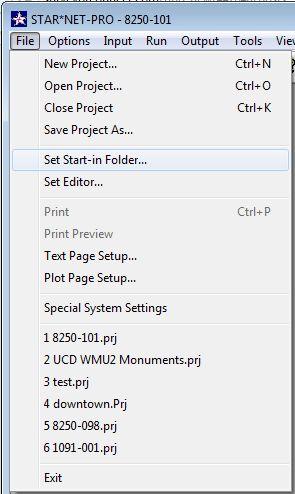
Posted : January 11, 2016 4:34 pm

Translate
▼
English
Spanish
French
German
Italian
Portuguese
Russian
Chinese
Japanese
Korean
Arabic
Hindi
Dutch
Polish
Turkish
Vietnamese
Thai
Swedish
Danish
Finnish
Norwegian
Czech
Hungarian
Romanian
Greek
Hebrew
Indonesian
Malay
Ukrainian
Bulgarian
Croatian
Slovak
Slovenian
Serbian
Lithuanian
Latvian
Estonian
rfc, post: 352676, member: 8882 wrote: How is one to manage Starnet projects if you can include .dat files from all over the place
That the power of StarNet. It allows you the freedom to do whatever you want. But you have to do the managing yourself.
You need the .snprj file, and your data files. Remember that data files can be .dat, .gps, .txt ,and anything else as long as it is an ascii format file. The other files- the output files (.lst, etc.) - will be generated the first time you run StarNet in it's new location.
Posted : January 11, 2016 4:38 pm
Topic starter
Translate
▼
English
Spanish
French
German
Italian
Portuguese
Russian
Chinese
Japanese
Korean
Arabic
Hindi
Dutch
Polish
Turkish
Vietnamese
Thai
Swedish
Danish
Finnish
Norwegian
Czech
Hungarian
Romanian
Greek
Hebrew
Indonesian
Malay
Ukrainian
Bulgarian
Croatian
Slovak
Slovenian
Serbian
Lithuanian
Latvian
Estonian
Jim Frame, post: 352683, member: 10 wrote:
My options look very different:
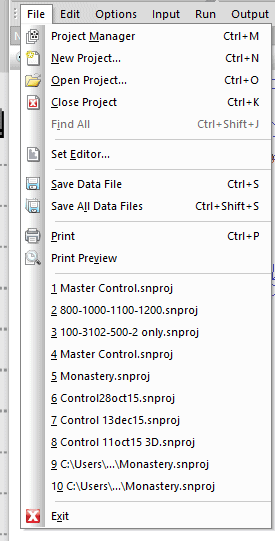
I'll keep hunting for all the .dat files. Moving the snproj file alone doesn't appear to do anything to the .dats.
Posted : January 11, 2016 5:21 pm
Topic starter
Translate
▼
English
Spanish
French
German
Italian
Portuguese
Russian
Chinese
Japanese
Korean
Arabic
Hindi
Dutch
Polish
Turkish
Vietnamese
Thai
Swedish
Danish
Finnish
Norwegian
Czech
Hungarian
Romanian
Greek
Hebrew
Indonesian
Malay
Ukrainian
Bulgarian
Croatian
Slovak
Slovenian
Serbian
Lithuanian
Latvian
Estonian
Mark Mayer, post: 352684, member: 424 wrote: That the power of StarNet. It allows you the freedom to do whatever you want. But you have to do the managing yourself.
You need the .snprj file, and your data files. Remember that data files can be .dat, .gps, .txt ,and anything else as long as it is an ascii format file. The other files- the output files (.lst, etc.) - will be generated the first time you run StarNet in it's new location.
I think I got them all. I didn't realize that about the file suffixes. Definitely learned yet another file management lesson. Please check email.
Posted : January 11, 2016 6:10 pm
Translate
▼
English
Spanish
French
German
Italian
Portuguese
Russian
Chinese
Japanese
Korean
Arabic
Hindi
Dutch
Polish
Turkish
Vietnamese
Thai
Swedish
Danish
Finnish
Norwegian
Czech
Hungarian
Romanian
Greek
Hebrew
Indonesian
Malay
Ukrainian
Bulgarian
Croatian
Slovak
Slovenian
Serbian
Lithuanian
Latvian
Estonian
rfc, post: 352676, member: 8882 wrote: I'm confused. I have (10) .dat files. All you can do in Starnet is "save". There's no "save as". There are a few I can't find at all. How is one to manage Starnet projects if you can include .dat files from all over the place (I know, shame on me for not putting them all in one place in the first place, but I didn't), so now what? I'm doing a Windows search, but there must be an easier way.
In the listing file there is a list of the DAT files used and I think the full path is given.
I generally work with all the starnet input and output files in one folder and nothing else.
Posted : January 12, 2016 12:07 pm