Reading RPLS is free for the whole profession. Members post, reply, and get the members-only rooms.


Notifications
Clear all
Software, CAD & Mapping
14
Posts
7
Users
0
Reactions
1,066
Views

Topic starter
Translate
▼
English
Spanish
French
German
Italian
Portuguese
Russian
Chinese
Japanese
Korean
Arabic
Hindi
Dutch
Polish
Turkish
Vietnamese
Thai
Swedish
Danish
Finnish
Norwegian
Czech
Hungarian
Romanian
Greek
Hebrew
Indonesian
Malay
Ukrainian
Bulgarian
Croatian
Slovak
Slovenian
Serbian
Lithuanian
Latvian
Estonian
I have a older HP1050C Plotter and am trying to get it to talk a new Windows 10 computer. I already know that I am going to have to use a different driver as a work around since HP does not support the older plotters even though they work fine. They are trying to force you to upgrade.
Here is what I need, some of the advice on the forums has said to ping the plotter to get the IP address but I have no bloody clue how to do that.
So how do you ping a plotter for a IP address when it is plugged in the back of my computer?
Posted : August 11, 2017 6:20 pm

Translate
▼
English
Spanish
French
German
Italian
Portuguese
Russian
Chinese
Japanese
Korean
Arabic
Hindi
Dutch
Polish
Turkish
Vietnamese
Thai
Swedish
Danish
Finnish
Norwegian
Czech
Hungarian
Romanian
Greek
Hebrew
Indonesian
Malay
Ukrainian
Bulgarian
Croatian
Slovak
Slovenian
Serbian
Lithuanian
Latvian
Estonian
Just A. Surveyor, post: 441566, member: 12855 wrote: I have a older HP1050C Plotter and am trying to get it to talk a new Windows 10 computer. I already know that I am going to have to use a different driver as a work around since HP does not support the older plotters even though they work fine. They are trying to force you to upgrade.
Here is what I need, some of the advice on the forums has said to ping the plotter to get the IP address but I have no bloody clue how to do that.
So how do you ping a plotter for a IP address when it is plugged in the back of my computer?
What type of cable are you using to hook it to your computer? Network, parallel, or USB?
Posted : August 11, 2017 6:23 pm
Topic starter
Translate
▼
English
Spanish
French
German
Italian
Portuguese
Russian
Chinese
Japanese
Korean
Arabic
Hindi
Dutch
Polish
Turkish
Vietnamese
Thai
Swedish
Danish
Finnish
Norwegian
Czech
Hungarian
Romanian
Greek
Hebrew
Indonesian
Malay
Ukrainian
Bulgarian
Croatian
Slovak
Slovenian
Serbian
Lithuanian
Latvian
Estonian
I went from I believe a 25 pin serial down to a USB, however I just learned that they must be a 2 way cable and I do not know if mine is a 2 way cable.
Posted : August 11, 2017 6:28 pm
Topic starter
Translate
▼
English
Spanish
French
German
Italian
Portuguese
Russian
Chinese
Japanese
Korean
Arabic
Hindi
Dutch
Polish
Turkish
Vietnamese
Thai
Swedish
Danish
Finnish
Norwegian
Czech
Hungarian
Romanian
Greek
Hebrew
Indonesian
Malay
Ukrainian
Bulgarian
Croatian
Slovak
Slovenian
Serbian
Lithuanian
Latvian
Estonian
I will be going upstairs and will check in on this in the morning. SWMBO is calling.
Posted : August 11, 2017 6:31 pm
Translate
▼
English
Spanish
French
German
Italian
Portuguese
Russian
Chinese
Japanese
Korean
Arabic
Hindi
Dutch
Polish
Turkish
Vietnamese
Thai
Swedish
Danish
Finnish
Norwegian
Czech
Hungarian
Romanian
Greek
Hebrew
Indonesian
Malay
Ukrainian
Bulgarian
Croatian
Slovak
Slovenian
Serbian
Lithuanian
Latvian
Estonian
I've not run a Designjet off of a 25-pin in over 15 years and never with a USB adapter so I'm probably useless to you in this case. Does it even have a network port?
Posted : August 11, 2017 6:45 pm
Topic starter
Translate
▼
English
Spanish
French
German
Italian
Portuguese
Russian
Chinese
Japanese
Korean
Arabic
Hindi
Dutch
Polish
Turkish
Vietnamese
Thai
Swedish
Danish
Finnish
Norwegian
Czech
Hungarian
Romanian
Greek
Hebrew
Indonesian
Malay
Ukrainian
Bulgarian
Croatian
Slovak
Slovenian
Serbian
Lithuanian
Latvian
Estonian
Yes and a connection for a 9 pin serial.
I know it works, prints tests pages and such. But as you may be aware some of the internet forums are full of computer geeks and I am not one.
Posted : August 11, 2017 6:52 pm
Translate
▼
English
Spanish
French
German
Italian
Portuguese
Russian
Chinese
Japanese
Korean
Arabic
Hindi
Dutch
Polish
Turkish
Vietnamese
Thai
Swedish
Danish
Finnish
Norwegian
Czech
Hungarian
Romanian
Greek
Hebrew
Indonesian
Malay
Ukrainian
Bulgarian
Croatian
Slovak
Slovenian
Serbian
Lithuanian
Latvian
Estonian
If your office is networked, I would hook it up with a network cable. Every HP that I've used has a way to print the current configuration from the screen or buttons on the printer. This configuration printout will show you the IP address as well as a bunch of other useful information.
Posted : August 11, 2017 7:07 pm

Translate
▼
English
Spanish
French
German
Italian
Portuguese
Russian
Chinese
Japanese
Korean
Arabic
Hindi
Dutch
Polish
Turkish
Vietnamese
Thai
Swedish
Danish
Finnish
Norwegian
Czech
Hungarian
Romanian
Greek
Hebrew
Indonesian
Malay
Ukrainian
Bulgarian
Croatian
Slovak
Slovenian
Serbian
Lithuanian
Latvian
Estonian
My suggestion:
You are doomed.
It's a 32 bit device.
So....
Get an older 32 bit computer, with xp.
Install the driver on it.
Hook it up with LAN wire, or set it up with wireless network.
Print with "network printer".
That's what works, according to another surveyor, who does this. Btw, it's a serial wire connection, or parallel...
N
Posted : August 11, 2017 7:14 pm

Translate
▼
English
Spanish
French
German
Italian
Portuguese
Russian
Chinese
Japanese
Korean
Arabic
Hindi
Dutch
Polish
Turkish
Vietnamese
Thai
Swedish
Danish
Finnish
Norwegian
Czech
Hungarian
Romanian
Greek
Hebrew
Indonesian
Malay
Ukrainian
Bulgarian
Croatian
Slovak
Slovenian
Serbian
Lithuanian
Latvian
Estonian
I cannot recall if we upgraded the computer to 10, but when we got it working we shared the 1050 and now every other computer prints through the one we got to work. It is either 64 bit 7 or 64 bit 10.
Posted : August 12, 2017 7:46 am

Translate
▼
English
Spanish
French
German
Italian
Portuguese
Russian
Chinese
Japanese
Korean
Arabic
Hindi
Dutch
Polish
Turkish
Vietnamese
Thai
Swedish
Danish
Finnish
Norwegian
Czech
Hungarian
Romanian
Greek
Hebrew
Indonesian
Malay
Ukrainian
Bulgarian
Croatian
Slovak
Slovenian
Serbian
Lithuanian
Latvian
Estonian
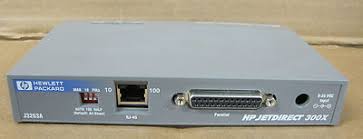
This might be your solution. We used these to network some older HP laser printers for a time. They essentially act as a print server and are readily available on ebay. Good luck.
Posted : August 12, 2017 8:59 am

Translate
▼
English
Spanish
French
German
Italian
Portuguese
Russian
Chinese
Japanese
Korean
Arabic
Hindi
Dutch
Polish
Turkish
Vietnamese
Thai
Swedish
Danish
Finnish
Norwegian
Czech
Hungarian
Romanian
Greek
Hebrew
Indonesian
Malay
Ukrainian
Bulgarian
Croatian
Slovak
Slovenian
Serbian
Lithuanian
Latvian
Estonian
Plot from your CAD to a pdf file. Then see if Adobe will talk to the older HP.
Other choice is to save drawings to a network drive, then access from an older computer to plot. Neither is elegant but can keep you going for a while.
Paul in PA
Posted : August 12, 2017 9:26 am

Translate
▼
English
Spanish
French
German
Italian
Portuguese
Russian
Chinese
Japanese
Korean
Arabic
Hindi
Dutch
Polish
Turkish
Vietnamese
Thai
Swedish
Danish
Finnish
Norwegian
Czech
Hungarian
Romanian
Greek
Hebrew
Indonesian
Malay
Ukrainian
Bulgarian
Croatian
Slovak
Slovenian
Serbian
Lithuanian
Latvian
Estonian
Cameron Watson PLS, post: 441666, member: 11407 wrote: This might be your solution. We used these to network some older HP laser printers for a time. They essentially act as a print server and are readily available on ebay. Good luck.
I second the print server approach. I'm running a DesignJet 450C through a 170X print server from Windows 10. I tell Windows that the plotter is a DesignJet 1050C, and everybody's happy.
Posted : August 12, 2017 9:47 am
Topic starter
Translate
▼
English
Spanish
French
German
Italian
Portuguese
Russian
Chinese
Japanese
Korean
Arabic
Hindi
Dutch
Polish
Turkish
Vietnamese
Thai
Swedish
Danish
Finnish
Norwegian
Czech
Hungarian
Romanian
Greek
Hebrew
Indonesian
Malay
Ukrainian
Bulgarian
Croatian
Slovak
Slovenian
Serbian
Lithuanian
Latvian
Estonian
Success......It lives.
I managed to get a test print and send a couple of PDF's to the plotter.
I used a driver for the DesignJet 5500 Plotter and connected it to the computer with an Ethernet cord. I just basically tricked it.
Posted : August 12, 2017 10:46 am
Topic starter
Translate
▼
English
Spanish
French
German
Italian
Portuguese
Russian
Chinese
Japanese
Korean
Arabic
Hindi
Dutch
Polish
Turkish
Vietnamese
Thai
Swedish
Danish
Finnish
Norwegian
Czech
Hungarian
Romanian
Greek
Hebrew
Indonesian
Malay
Ukrainian
Bulgarian
Croatian
Slovak
Slovenian
Serbian
Lithuanian
Latvian
Estonian
Nate The Surveyor, post: 441581, member: 291 wrote: My suggestion:
You are doomed.
Oh Yea of No Faith......Go forth and doubt no more!
Incidentally the issue is the driver and not the 32 bit or 64 bit. Just had to find a driver to substitute. And it must be signed also.
Posted : August 12, 2017 12:05 pm