Reading RPLS is free for the whole profession. Members post, reply, and get the members-only rooms.


Notifications
Clear all
Software, CAD & Mapping
7
Posts
6
Users
0
Reactions
1,295
Views

Topic starter
Translate
▼
English
Spanish
French
German
Italian
Portuguese
Russian
Chinese
Japanese
Korean
Arabic
Hindi
Dutch
Polish
Turkish
Vietnamese
Thai
Swedish
Danish
Finnish
Norwegian
Czech
Hungarian
Romanian
Greek
Hebrew
Indonesian
Malay
Ukrainian
Bulgarian
Croatian
Slovak
Slovenian
Serbian
Lithuanian
Latvian
Estonian
Is there a way to convert (or more specifically to add vector properties) pdf's to autocad?
I've heard of software that does this, but would like to know of anyone's experiences. Does it save time, if so, how much (when compared to manually re-creating a drawing)?
Thanks in advance,
Mark O
Posted : May 12, 2016 10:51 am

Translate
▼
English
Spanish
French
German
Italian
Portuguese
Russian
Chinese
Japanese
Korean
Arabic
Hindi
Dutch
Polish
Turkish
Vietnamese
Thai
Swedish
Danish
Finnish
Norwegian
Czech
Hungarian
Romanian
Greek
Hebrew
Indonesian
Malay
Ukrainian
Bulgarian
Croatian
Slovak
Slovenian
Serbian
Lithuanian
Latvian
Estonian
2017 Autodesk has native pdf import, have not used it yet.
Posted : May 12, 2016 11:55 am

Translate
▼
English
Spanish
French
German
Italian
Portuguese
Russian
Chinese
Japanese
Korean
Arabic
Hindi
Dutch
Polish
Turkish
Vietnamese
Thai
Swedish
Danish
Finnish
Norwegian
Czech
Hungarian
Romanian
Greek
Hebrew
Indonesian
Malay
Ukrainian
Bulgarian
Croatian
Slovak
Slovenian
Serbian
Lithuanian
Latvian
Estonian
Here's a snip of a PDF import I just did using C3D 2017. It did pretty well with the lines but appears to have struggled some with the text. I mostly use Calibri fonts though which is probably why. Simplex text I bet it would do much better with. The after import distances were about 0.02' off from actual. This was a CAD generated PDF originally. Scans of an original I'm sure would be much sloppier. Raster Design does this too I believe... 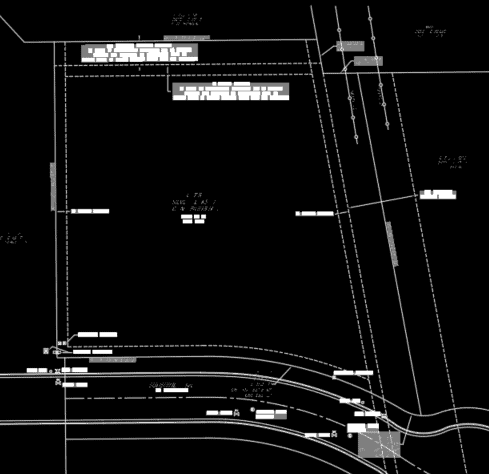
Posted : May 12, 2016 6:05 pm

Translate
▼
English
Spanish
French
German
Italian
Portuguese
Russian
Chinese
Japanese
Korean
Arabic
Hindi
Dutch
Polish
Turkish
Vietnamese
Thai
Swedish
Danish
Finnish
Norwegian
Czech
Hungarian
Romanian
Greek
Hebrew
Indonesian
Malay
Ukrainian
Bulgarian
Croatian
Slovak
Slovenian
Serbian
Lithuanian
Latvian
Estonian
Trimble Business Center-HCE with the Image Manager module can do this and work really well... I cant post links to the videos so Search YouTube for: "Trimble Business Center ÛÒ HCE: Convert PDF to CAD" The issues typically come from how the CAD file was originally published to a PDF. Some firms publish the PDF and turn off the store Layer Option so the PDF converts to CAD by style, BC-HCE has tools to quickly fix this... Here is another video showing the accuracy of the PDF to CAD - Search YouTube for "Trimble Business Center ÛÒ HCE for the Small Site Contractor". Hope that helps.
Posted : May 12, 2016 6:55 pm
Topic starter
Translate
▼
English
Spanish
French
German
Italian
Portuguese
Russian
Chinese
Japanese
Korean
Arabic
Hindi
Dutch
Polish
Turkish
Vietnamese
Thai
Swedish
Danish
Finnish
Norwegian
Czech
Hungarian
Romanian
Greek
Hebrew
Indonesian
Malay
Ukrainian
Bulgarian
Croatian
Slovak
Slovenian
Serbian
Lithuanian
Latvian
Estonian
Well it's good to know there's a software solution in 2017. I guess if I land this job I'll be upgrading to '17.
Posted : May 12, 2016 8:46 pm

Translate
▼
English
Spanish
French
German
Italian
Portuguese
Russian
Chinese
Japanese
Korean
Arabic
Hindi
Dutch
Polish
Turkish
Vietnamese
Thai
Swedish
Danish
Finnish
Norwegian
Czech
Hungarian
Romanian
Greek
Hebrew
Indonesian
Malay
Ukrainian
Bulgarian
Croatian
Slovak
Slovenian
Serbian
Lithuanian
Latvian
Estonian
You can bring a pdf into C3D 2015 as an underlay. If the pdf was created in CAD or a similar program, you will be able to snap to endpoints, intersections, etc... I think that you still have to scale the pdf to get it to the correct size.
Posted : May 13, 2016 4:43 am

Translate
▼
English
Spanish
French
German
Italian
Portuguese
Russian
Chinese
Japanese
Korean
Arabic
Hindi
Dutch
Polish
Turkish
Vietnamese
Thai
Swedish
Danish
Finnish
Norwegian
Czech
Hungarian
Romanian
Greek
Hebrew
Indonesian
Malay
Ukrainian
Bulgarian
Croatian
Slovak
Slovenian
Serbian
Lithuanian
Latvian
Estonian
Cadnet module from Carlson will convert pdf to dwg
Autodesk Raster Design should do it as well (Part of Infrastructure Design Suite)
I have not tried either of these
Posted : May 13, 2016 8:43 am