Reading RPLS is free for the whole profession. Members post, reply, and get the members-only rooms.


Notifications
Clear all
Software, CAD & Mapping
9
Posts
5
Users
0
Reactions
1,044
Views

Topic starter
Translate
▼
English
Spanish
French
German
Italian
Portuguese
Russian
Chinese
Japanese
Korean
Arabic
Hindi
Dutch
Polish
Turkish
Vietnamese
Thai
Swedish
Danish
Finnish
Norwegian
Czech
Hungarian
Romanian
Greek
Hebrew
Indonesian
Malay
Ukrainian
Bulgarian
Croatian
Slovak
Slovenian
Serbian
Lithuanian
Latvian
Estonian
I have a new HP Envy Laptop which came with a 1 TB HDD. I want to migrate/clone the whole shootin’ match to a new 256GB SSD. In order to make things fit can I simply change the size of the OS partition on the 1 TB drive so it will fit? There is absolutely nothing on the laptop in the OS partition except Win 8. The current partition is about 900GB. None of the free cloning software addresses this size problem. TIA. B-)
Posted : July 11, 2014 8:50 am

Translate
▼
English
Spanish
French
German
Italian
Portuguese
Russian
Chinese
Japanese
Korean
Arabic
Hindi
Dutch
Polish
Turkish
Vietnamese
Thai
Swedish
Danish
Finnish
Norwegian
Czech
Hungarian
Romanian
Greek
Hebrew
Indonesian
Malay
Ukrainian
Bulgarian
Croatian
Slovak
Slovenian
Serbian
Lithuanian
Latvian
Estonian
I believe that you can clone the existing 900gb system partition onto the SSD then once you've booted off the SSD use the disk management tools in Windows to expand the partition on the SSD to include the remaining space.
Posted : July 11, 2014 8:59 am

Translate
▼
English
Spanish
French
German
Italian
Portuguese
Russian
Chinese
Japanese
Korean
Arabic
Hindi
Dutch
Polish
Turkish
Vietnamese
Thai
Swedish
Danish
Finnish
Norwegian
Czech
Hungarian
Romanian
Greek
Hebrew
Indonesian
Malay
Ukrainian
Bulgarian
Croatian
Slovak
Slovenian
Serbian
Lithuanian
Latvian
Estonian
What about Macrium Reflect?
http://www.macrium.com/reflectfree.aspx
Posted : July 11, 2014 10:42 am

Translate
▼
English
Spanish
French
German
Italian
Portuguese
Russian
Chinese
Japanese
Korean
Arabic
Hindi
Dutch
Polish
Turkish
Vietnamese
Thai
Swedish
Danish
Finnish
Norwegian
Czech
Hungarian
Romanian
Greek
Hebrew
Indonesian
Malay
Ukrainian
Bulgarian
Croatian
Slovak
Slovenian
Serbian
Lithuanian
Latvian
Estonian
> I have a new HP Envy Laptop which came with a 1 TB HDD. I want to migrate/clone the whole shootin’ match to a new 256GB SSD. In order to make things fit can I simply change the size of the OS partition on the 1 TB drive so it will fit? There is absolutely nothing on the laptop in the OS partition except Win 8. The current partition is about 900GB. None of the free cloning software addresses this size problem. TIA. B-)
Two steps:
first shrink the existing partitions to a size small enough to fit.
http://www.dedoimedo.com/computers/gparted.html
then clone the resulting partitions using Clonezilla
http://clonezilla.org/
windows is tricky and a SDD is a different animal that a spinning disk.
you are probably better off just swapping the drives and installing your favorite OS.
You may even have hidden partitions: 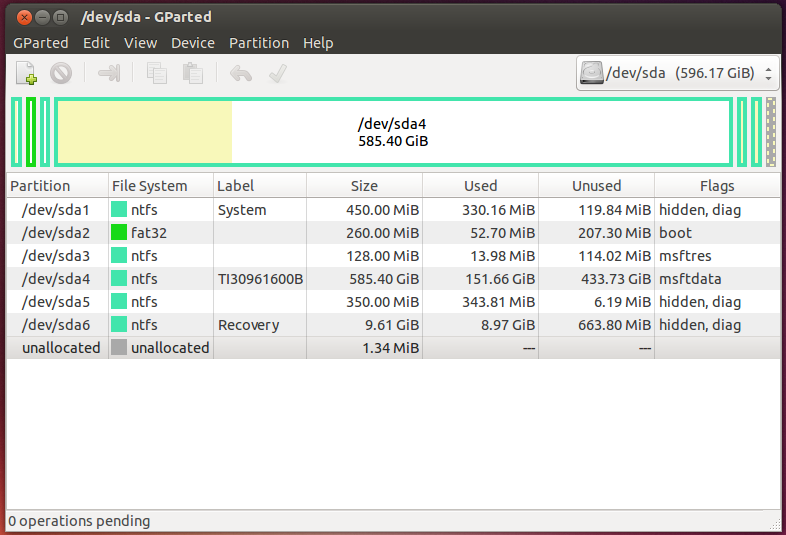
https://en.wikipedia.org/wiki/GUID_Partition_Table
Posted : July 11, 2014 1:47 pm

Translate
▼
English
Spanish
French
German
Italian
Portuguese
Russian
Chinese
Japanese
Korean
Arabic
Hindi
Dutch
Polish
Turkish
Vietnamese
Thai
Swedish
Danish
Finnish
Norwegian
Czech
Hungarian
Romanian
Greek
Hebrew
Indonesian
Malay
Ukrainian
Bulgarian
Croatian
Slovak
Slovenian
Serbian
Lithuanian
Latvian
Estonian
This thread is giving me a headache.
Thank God you guys are willing to do these computer type thingys.
Nerds. (High compliment in our house)
But whether you take it as a compliment or not, I still say,
Nerds!
Posted : July 11, 2014 3:02 pm
Topic starter
Translate
▼
English
Spanish
French
German
Italian
Portuguese
Russian
Chinese
Japanese
Korean
Arabic
Hindi
Dutch
Polish
Turkish
Vietnamese
Thai
Swedish
Danish
Finnish
Norwegian
Czech
Hungarian
Romanian
Greek
Hebrew
Indonesian
Malay
Ukrainian
Bulgarian
Croatian
Slovak
Slovenian
Serbian
Lithuanian
Latvian
Estonian
Stephen, The SSD is 256GB and refuses to accept any partition in excess of 240GB
spledus, Will try it again, after reading the “instructions”
Peter, Going to go through your suggestions now and hope for the best.
Brad, I am too stupid to be a "Nerd" dammit! 😉
Thanks Y’all B-)
Posted : July 11, 2014 4:18 pm
Translate
▼
English
Spanish
French
German
Italian
Portuguese
Russian
Chinese
Japanese
Korean
Arabic
Hindi
Dutch
Polish
Turkish
Vietnamese
Thai
Swedish
Danish
Finnish
Norwegian
Czech
Hungarian
Romanian
Greek
Hebrew
Indonesian
Malay
Ukrainian
Bulgarian
Croatian
Slovak
Slovenian
Serbian
Lithuanian
Latvian
Estonian
:good: :good: :good:
Posted : July 11, 2014 7:26 pm
Translate
▼
English
Spanish
French
German
Italian
Portuguese
Russian
Chinese
Japanese
Korean
Arabic
Hindi
Dutch
Polish
Turkish
Vietnamese
Thai
Swedish
Danish
Finnish
Norwegian
Czech
Hungarian
Romanian
Greek
Hebrew
Indonesian
Malay
Ukrainian
Bulgarian
Croatian
Slovak
Slovenian
Serbian
Lithuanian
Latvian
Estonian
WoopMigrating a 1 TB HDD to 256 GB SSD
900GB onto a 240GB drive what was I thinking? I better go double check those vertical profiles I keyed into the DC right after I posted that response. 😛
Posted : July 11, 2014 7:48 pm
Translate
▼
English
Spanish
French
German
Italian
Portuguese
Russian
Chinese
Japanese
Korean
Arabic
Hindi
Dutch
Polish
Turkish
Vietnamese
Thai
Swedish
Danish
Finnish
Norwegian
Czech
Hungarian
Romanian
Greek
Hebrew
Indonesian
Malay
Ukrainian
Bulgarian
Croatian
Slovak
Slovenian
Serbian
Lithuanian
Latvian
Estonian
WoopMigrating a 1 TB HDD to 256 GB SSD
> 900GB onto a 240GB drive what was I thinking? I better go double check those vertical profiles I keyed into the DC right after I posted that response. 😛
My windows 7 only has a 75GB NTFS main partition (4.1 GB free (94.5% full)) and a 367MB HPFS/NTFS boot partition. I keep all Data on other drives and other partitions.
The OP said "There is absolutely nothing on the laptop in the OS partition except Win 8."
no problem! shrink the OS partition and Bob's Your Uncle...
Posted : July 12, 2014 3:00 pm