Reading RPLS is free for the whole profession. Members post, reply, and get the members-only rooms.


Notifications
Clear all

Topic starter
Translate
▼
English
Spanish
French
German
Italian
Portuguese
Russian
Chinese
Japanese
Korean
Arabic
Hindi
Dutch
Polish
Turkish
Vietnamese
Thai
Swedish
Danish
Finnish
Norwegian
Czech
Hungarian
Romanian
Greek
Hebrew
Indonesian
Malay
Ukrainian
Bulgarian
Croatian
Slovak
Slovenian
Serbian
Lithuanian
Latvian
Estonian
Hi,
I've measured some manholes and taken pictures along with the points measured.
When i export everything in magnet tools i can see the pictures but am not able to export them individually to include hem in another report. Does anyone have an idea how this can be accomplished? Or export them from magnet field itself?
Greetings
Posted : February 3, 2017 8:21 am

Translate
▼
English
Spanish
French
German
Italian
Portuguese
Russian
Chinese
Japanese
Korean
Arabic
Hindi
Dutch
Polish
Turkish
Vietnamese
Thai
Swedish
Danish
Finnish
Norwegian
Czech
Hungarian
Romanian
Greek
Hebrew
Indonesian
Malay
Ukrainian
Bulgarian
Croatian
Slovak
Slovenian
Serbian
Lithuanian
Latvian
Estonian
The photos are store under a folder that is the same name as your project file, and a subfolder called photos. Copy the images from that folder.
Posted : February 3, 2017 8:54 am
Topic starter
Translate
▼
English
Spanish
French
German
Italian
Portuguese
Russian
Chinese
Japanese
Korean
Arabic
Hindi
Dutch
Polish
Turkish
Vietnamese
Thai
Swedish
Danish
Finnish
Norwegian
Czech
Hungarian
Romanian
Greek
Hebrew
Indonesian
Malay
Ukrainian
Bulgarian
Croatian
Slovak
Slovenian
Serbian
Lithuanian
Latvian
Estonian
Lee,
I've got the directories Backups, Cache, Notes and Vectorbackgrounds.
All are empty. is there a setting in field to give the directory to put the pictures?
Posted : February 3, 2017 9:16 am
Translate
▼
English
Spanish
French
German
Italian
Portuguese
Russian
Chinese
Japanese
Korean
Arabic
Hindi
Dutch
Polish
Turkish
Vietnamese
Thai
Swedish
Danish
Finnish
Norwegian
Czech
Hungarian
Romanian
Greek
Hebrew
Indonesian
Malay
Ukrainian
Bulgarian
Croatian
Slovak
Slovenian
Serbian
Lithuanian
Latvian
Estonian
I don't know how to change the default.
Look under your users folder as shown below.
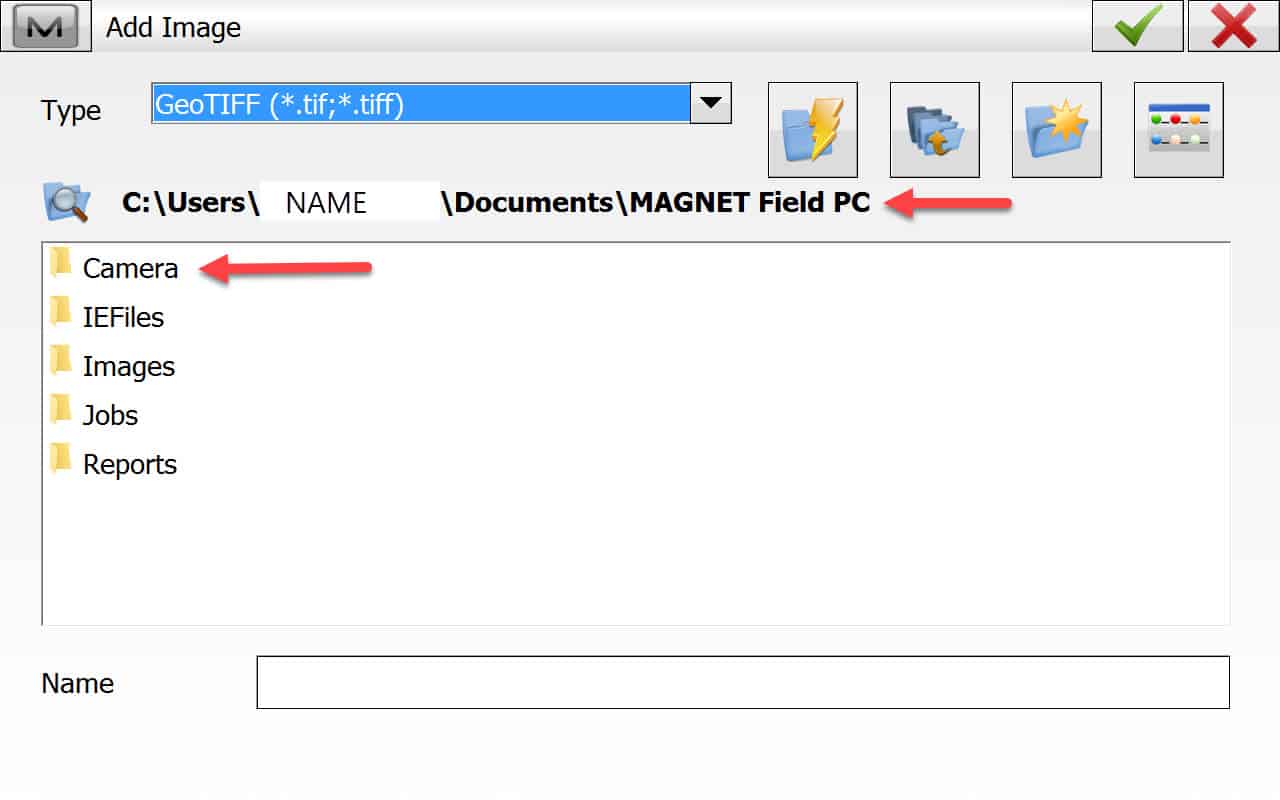
Posted : February 3, 2017 9:40 am
Topic starter
Translate
▼
English
Spanish
French
German
Italian
Portuguese
Russian
Chinese
Japanese
Korean
Arabic
Hindi
Dutch
Polish
Turkish
Vietnamese
Thai
Swedish
Danish
Finnish
Norwegian
Czech
Hungarian
Romanian
Greek
Hebrew
Indonesian
Malay
Ukrainian
Bulgarian
Croatian
Slovak
Slovenian
Serbian
Lithuanian
Latvian
Estonian
Lee,
I have the same directories but the images directory is empty. It (the map itself) does show the date my last picture was taken. This is very strange. If i search for jpg or tiff on the tablet i have no results. It looks like a setting which i don't find.
Posted : February 4, 2017 2:25 am
Translate
▼
English
Spanish
French
German
Italian
Portuguese
Russian
Chinese
Japanese
Korean
Arabic
Hindi
Dutch
Polish
Turkish
Vietnamese
Thai
Swedish
Danish
Finnish
Norwegian
Czech
Hungarian
Romanian
Greek
Hebrew
Indonesian
Malay
Ukrainian
Bulgarian
Croatian
Slovak
Slovenian
Serbian
Lithuanian
Latvian
Estonian
I can not find them anymore, either. Appears since version 4, they may be embedded into the MJF (Magnet Job File).
I can open the MJF with Magnet Tools, then create reports with the photos, and also export images. hope that helps.
You can download a demo version of Magnet Tools to try.
Posted : February 4, 2017 6:25 am
Topic starter
Translate
▼
English
Spanish
French
German
Italian
Portuguese
Russian
Chinese
Japanese
Korean
Arabic
Hindi
Dutch
Polish
Turkish
Vietnamese
Thai
Swedish
Danish
Finnish
Norwegian
Czech
Hungarian
Romanian
Greek
Hebrew
Indonesian
Malay
Ukrainian
Bulgarian
Croatian
Slovak
Slovenian
Serbian
Lithuanian
Latvian
Estonian
Hi Lee,
I have topcon tools but if I export i can check the images, i don't seem to find the ability to export them to jpg?
Already many thankls for your advice.
Posted : February 4, 2017 8:04 am
Translate
▼
English
Spanish
French
German
Italian
Portuguese
Russian
Chinese
Japanese
Korean
Arabic
Hindi
Dutch
Polish
Turkish
Vietnamese
Thai
Swedish
Danish
Finnish
Norwegian
Czech
Hungarian
Romanian
Greek
Hebrew
Indonesian
Malay
Ukrainian
Bulgarian
Croatian
Slovak
Slovenian
Serbian
Lithuanian
Latvian
Estonian
beuckie, post: 412402, member: 2245 wrote: Hi Lee,
I have topcon tools but if I export i can check the images, i don't seem to find the ability to export them to jpg?
Already many thankls for your advice.
Magnet Tools is later than Topcon Tools. So that may not work. You can save as a MJFZIP then email to me ND I'll export the images in Magnet Tools.
Posted : February 4, 2017 9:31 am
Topic starter
Translate
▼
English
Spanish
French
German
Italian
Portuguese
Russian
Chinese
Japanese
Korean
Arabic
Hindi
Dutch
Polish
Turkish
Vietnamese
Thai
Swedish
Danish
Finnish
Norwegian
Czech
Hungarian
Romanian
Greek
Hebrew
Indonesian
Malay
Ukrainian
Bulgarian
Croatian
Slovak
Slovenian
Serbian
Lithuanian
Latvian
Estonian
Hi Lee,
That would be great. I'll sort it out with topcon the next week but am in need of these pictures.
The mjfzip file is through this link
https://we.tl/DDlJV3gnmr
Thanks!
Posted : February 4, 2017 9:45 am
Translate
▼
English
Spanish
French
German
Italian
Portuguese
Russian
Chinese
Japanese
Korean
Arabic
Hindi
Dutch
Polish
Turkish
Vietnamese
Thai
Swedish
Danish
Finnish
Norwegian
Czech
Hungarian
Romanian
Greek
Hebrew
Indonesian
Malay
Ukrainian
Bulgarian
Croatian
Slovak
Slovenian
Serbian
Lithuanian
Latvian
Estonian
OK, it will be later. I won't be back to my computer until this evening.
I'm on my cell now.
Posted : February 4, 2017 9:57 am

Translate
▼
English
Spanish
French
German
Italian
Portuguese
Russian
Chinese
Japanese
Korean
Arabic
Hindi
Dutch
Polish
Turkish
Vietnamese
Thai
Swedish
Danish
Finnish
Norwegian
Czech
Hungarian
Romanian
Greek
Hebrew
Indonesian
Malay
Ukrainian
Bulgarian
Croatian
Slovak
Slovenian
Serbian
Lithuanian
Latvian
Estonian
FWIW, the mjf file appears to be a SQLite database. It contains a table named tblImageData, and it looks like beukie's file contains 262 photos in that table as blob data. But I'm not smart enough to be able to extract them as image files. 🙁
Posted : February 4, 2017 11:46 am

Translate
▼
English
Spanish
French
German
Italian
Portuguese
Russian
Chinese
Japanese
Korean
Arabic
Hindi
Dutch
Polish
Turkish
Vietnamese
Thai
Swedish
Danish
Finnish
Norwegian
Czech
Hungarian
Romanian
Greek
Hebrew
Indonesian
Malay
Ukrainian
Bulgarian
Croatian
Slovak
Slovenian
Serbian
Lithuanian
Latvian
Estonian
Indeed SQLite ... did some Quick & Dirty RAD programming with Lazarus.
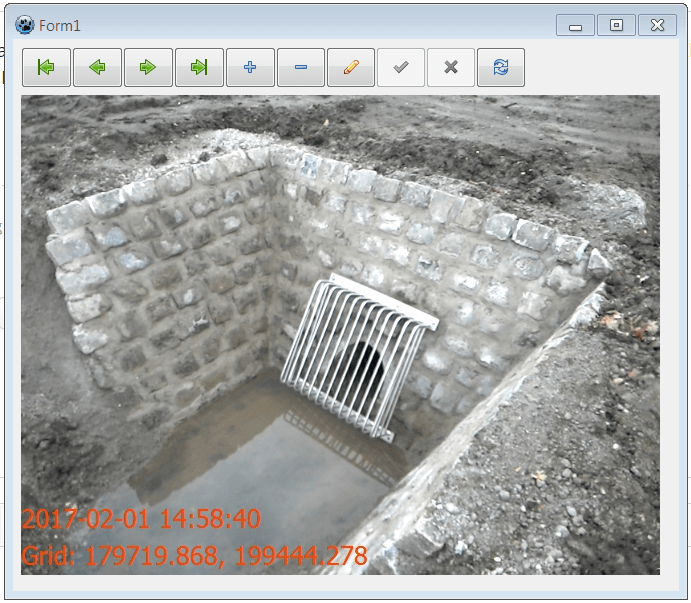
The pictures are in there, need only a way to save them back to disk.
Chr.
Posted : February 4, 2017 2:56 pm
Topic starter
Translate
▼
English
Spanish
French
German
Italian
Portuguese
Russian
Chinese
Japanese
Korean
Arabic
Hindi
Dutch
Polish
Turkish
Vietnamese
Thai
Swedish
Danish
Finnish
Norwegian
Czech
Hungarian
Romanian
Greek
Hebrew
Indonesian
Malay
Ukrainian
Bulgarian
Croatian
Slovak
Slovenian
Serbian
Lithuanian
Latvian
Estonian
Great stuff Christof.
I don't know anything about databases or programming but i can say that this one of the pictures taken.
If you're smart enough to extract them or provide me with a little software i can send a nice case of beer (or 2) your way.:-)
Posted : February 4, 2017 3:21 pm
Translate
▼
English
Spanish
French
German
Italian
Portuguese
Russian
Chinese
Japanese
Korean
Arabic
Hindi
Dutch
Polish
Turkish
Vietnamese
Thai
Swedish
Danish
Finnish
Norwegian
Czech
Hungarian
Romanian
Greek
Hebrew
Indonesian
Malay
Ukrainian
Bulgarian
Croatian
Slovak
Slovenian
Serbian
Lithuanian
Latvian
Estonian
Beuckie,
Routine to view images from the 16059.mjf file (zip above) and save to disk ... if the SQLite drivers will work.
Place all files in C:Temp
Run the exe file
Doubleclick the image to save them to disk
Christof.
Save your beer ... ik laat je weten wanneer ik eens in de buurt ben!;)
Posted : February 4, 2017 3:41 pm
Translate
▼
English
Spanish
French
German
Italian
Portuguese
Russian
Chinese
Japanese
Korean
Arabic
Hindi
Dutch
Polish
Turkish
Vietnamese
Thai
Swedish
Danish
Finnish
Norwegian
Czech
Hungarian
Romanian
Greek
Hebrew
Indonesian
Malay
Ukrainian
Bulgarian
Croatian
Slovak
Slovenian
Serbian
Lithuanian
Latvian
Estonian
I'm impressed! How did you determine the image file format? And is each image file simply the data between quotation marks?
Posted : February 4, 2017 4:41 pm

Translate
▼
English
Spanish
French
German
Italian
Portuguese
Russian
Chinese
Japanese
Korean
Arabic
Hindi
Dutch
Polish
Turkish
Vietnamese
Thai
Swedish
Danish
Finnish
Norwegian
Czech
Hungarian
Romanian
Greek
Hebrew
Indonesian
Malay
Ukrainian
Bulgarian
Croatian
Slovak
Slovenian
Serbian
Lithuanian
Latvian
Estonian
Interesting. The saved survey data for my current project is in MJF format.
I wonder if I could use a SQL routine to transform it to CSV or somesuch.
EDIT sorry it is in MJO format. Presumably the Office version (versus the Field version).
Posted : February 4, 2017 4:58 pm

Translate
▼
English
Spanish
French
German
Italian
Portuguese
Russian
Chinese
Japanese
Korean
Arabic
Hindi
Dutch
Polish
Turkish
Vietnamese
Thai
Swedish
Danish
Finnish
Norwegian
Czech
Hungarian
Romanian
Greek
Hebrew
Indonesian
Malay
Ukrainian
Bulgarian
Croatian
Slovak
Slovenian
Serbian
Lithuanian
Latvian
Estonian
Great, now I'm going to be gone down the SQLite rabbit hole for god knows how long....
🙂
Posted : February 4, 2017 9:16 pm
Translate
▼
English
Spanish
French
German
Italian
Portuguese
Russian
Chinese
Japanese
Korean
Arabic
Hindi
Dutch
Polish
Turkish
Vietnamese
Thai
Swedish
Danish
Finnish
Norwegian
Czech
Hungarian
Romanian
Greek
Hebrew
Indonesian
Malay
Ukrainian
Bulgarian
Croatian
Slovak
Slovenian
Serbian
Lithuanian
Latvian
Estonian
beuckie, post: 412391, member: 2245 wrote: Lee,
I have the same directories but the images directory is empty. It (the map itself) does show the date my last picture was taken. This is very strange. If i search for jpg or tiff on the tablet i have no results. It looks like a setting which i don't find.
Here are your photos with GeoTags along with a Google Earth KML
 Dropbox File (Private or Invalid)
Posted : February 5, 2017 4:28 am
Topic starter
Translate
▼
English
Spanish
French
German
Italian
Portuguese
Russian
Chinese
Japanese
Korean
Arabic
Hindi
Dutch
Polish
Turkish
Vietnamese
Thai
Swedish
Danish
Finnish
Norwegian
Czech
Hungarian
Romanian
Greek
Hebrew
Indonesian
Malay
Ukrainian
Bulgarian
Croatian
Slovak
Slovenian
Serbian
Lithuanian
Latvian
Estonian
Kudos for Christof and Lee.!
Posted : February 5, 2017 1:02 pm
Translate
▼
English
Spanish
French
German
Italian
Portuguese
Russian
Chinese
Japanese
Korean
Arabic
Hindi
Dutch
Polish
Turkish
Vietnamese
Thai
Swedish
Danish
Finnish
Norwegian
Czech
Hungarian
Romanian
Greek
Hebrew
Indonesian
Malay
Ukrainian
Bulgarian
Croatian
Slovak
Slovenian
Serbian
Lithuanian
Latvian
Estonian
Jim Frame, post: 412482, member: 10 wrote: I'm impressed! How did you determine the image file format? And is each image file simply the data between quotation marks?
Jim,
with the tools I used I did not need to, I only had to specify the file format for saving the image.
You did half the work, indicated the file as a SQLite database and give allready the right table to look for.
I guess you also used SQLiteManager?
https://sqlitestudio.pl/index.rvt
But there under the Data tab is no preview for Images.
So I used Lazarus, an Open Source Delphi clone - Delphi is like Visual Basic but with the Pascal language. That doesn't realy matter, most of these program languages have a lot of components (building blocks)
I used the database components to connect to the job file and made an active connection with the table with the images.
I added a navigator and an Image component. These are realy powerfull, no need to specify the type, the component is smart enough to figure that out and knows how to load, display and SafeToFile.
In fact, besides setting properties for the components, the only code I wrote are the lines in blue to extract the filename from the reccordnr.
[INDENT]procedure TForm1.DBImage1DblClick(Sender: TObject);
Var[/INDENT]
FileName: String;
begin
FileName := IntToStr(SQLQImageTable.RecNo) + '.jpg';
DBImage1.Picture.SaveToFile(FileName,'jpg');
end;
end.
If interested in Lazarus ... it's totally free
http://www.lazarus-ide.org/
and has a very active forum
http://forum.lazarus.freepascal.org/
[USER=11513]@Randy[/USER],
The SQLiteManager will lett you export most data to CSV format. (not the pictures of course ...)
greetz,
Christof.
Posted : February 5, 2017 2:47 pm
Page 1 / 2
Next