Reading RPLS is free for the whole profession. Members post, reply, and get the members-only rooms.


Notifications
Clear all
Software, CAD & Mapping
14
Posts
5
Users
0
Reactions
1,169
Views

Topic starter
Translate
▼
English
Spanish
French
German
Italian
Portuguese
Russian
Chinese
Japanese
Korean
Arabic
Hindi
Dutch
Polish
Turkish
Vietnamese
Thai
Swedish
Danish
Finnish
Norwegian
Czech
Hungarian
Romanian
Greek
Hebrew
Indonesian
Malay
Ukrainian
Bulgarian
Croatian
Slovak
Slovenian
Serbian
Lithuanian
Latvian
Estonian
I am again, going in circles, in my attempts.
I am willing to paypal you tonight, $75.00 to run the slope analysis routine on my points and break-lines, and produce the finished product for me.
I will pay an additional $75 if you can run through the process with me via facetime (if you have Carlson with the intelliCAD)
I can't imagine this would take more than 10-20 minutes, tops.
I must delineate (shade/hatch) my contour map for areas of slopes over 1:4 and 1:3 to meet the requirements of a permit application.
I am using Carlson Survey 14 (under active maintenance), and have the Slope Analysis in the menu, but
I keep going in circles, since I have not had satisfactory results with the routine.
I need to hatch areas that are sloping above tolerance only.
From my reading, it appears that creating a grid file and running the slope analysis on grid creates the best results, in the Carlson tutorial materials.
I have made the grid file, but failed at getting anything to happen with the Slope Analysis using that file.
Here's another site, similar to my current drawing.
Note the above map is very similar, though not the same as the current surface I am working with.
text me at the number provided on my business website, and I will email the dwg, crd, and txt of the points.
I have stripped my point file of all points not being used in the surface.
Thanks
Posted : October 16, 2016 7:50 pm
Topic starter
Translate
▼
English
Spanish
French
German
Italian
Portuguese
Russian
Chinese
Japanese
Korean
Arabic
Hindi
Dutch
Polish
Turkish
Vietnamese
Thai
Swedish
Danish
Finnish
Norwegian
Czech
Hungarian
Romanian
Greek
Hebrew
Indonesian
Malay
Ukrainian
Bulgarian
Croatian
Slovak
Slovenian
Serbian
Lithuanian
Latvian
Estonian
I have called about 5 surveyors in my area and the surrounding metro areas, and only 1 has actually accomplished this herculean feat.
Unfortunately his firm uses the $14K per seat AutoCAD Civil3DXgoogolplex9000.
So there's that.
Another small firm I contacted uses MircroSurvey for drafting and in the past has accomplished a slope map rendering very similar to what I need, however the map was unusable due to it's courseness.
I will call Carlson on Monday, and pay them, the money.
Posted : October 16, 2016 10:16 pm

Translate
▼
English
Spanish
French
German
Italian
Portuguese
Russian
Chinese
Japanese
Korean
Arabic
Hindi
Dutch
Polish
Turkish
Vietnamese
Thai
Swedish
Danish
Finnish
Norwegian
Czech
Hungarian
Romanian
Greek
Hebrew
Indonesian
Malay
Ukrainian
Bulgarian
Croatian
Slovak
Slovenian
Serbian
Lithuanian
Latvian
Estonian
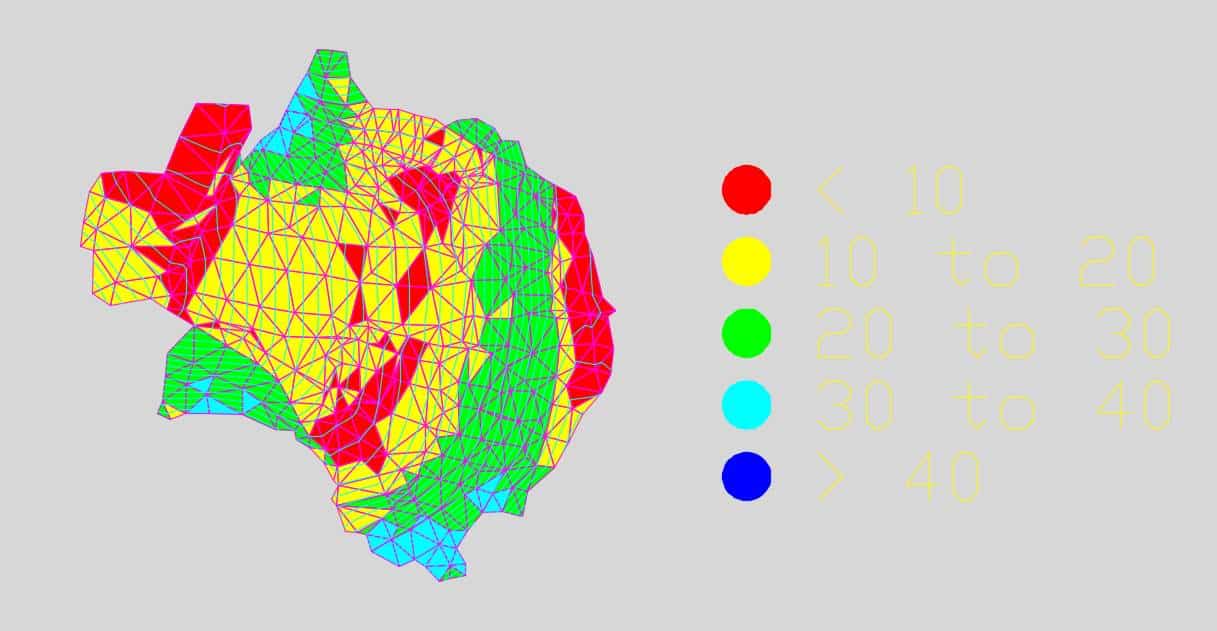
Looks like your version of software may not have the options necessary to generate the analysis you are looking for. These may be options that are included in the civil module.
This was created using the latest version of Carlson Civil/Survey on Autocad.
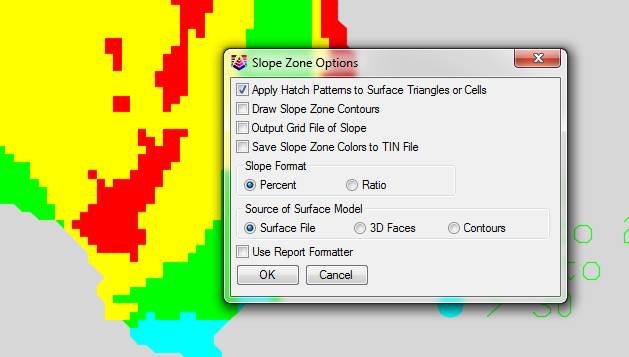
EDIT: Looking even closer, it looks like you do have the option to hatch grid cells (it's just at the command line instead of in the options window.). I have no doubt that the folks at Carlson will be willing to walk you through this task today (for free). Your problem may be with how the slopes are being entered/expected 2:1 vs 1:2. I would convert your slopes to percent and try and run the routine through that way.
Posted : October 17, 2016 10:12 am

Translate
▼
English
Spanish
French
German
Italian
Portuguese
Russian
Chinese
Japanese
Korean
Arabic
Hindi
Dutch
Polish
Turkish
Vietnamese
Thai
Swedish
Danish
Finnish
Norwegian
Czech
Hungarian
Romanian
Greek
Hebrew
Indonesian
Malay
Ukrainian
Bulgarian
Croatian
Slovak
Slovenian
Serbian
Lithuanian
Latvian
Estonian
I cold make an analogy to someone requesting a survey. You don't know how to do it or what's involved. Yet you know what it costs and how long it will take to do it.
Historic boundaries and conservation efforts.
Posted : October 17, 2016 11:17 am
Topic starter
Translate
▼
English
Spanish
French
German
Italian
Portuguese
Russian
Chinese
Japanese
Korean
Arabic
Hindi
Dutch
Polish
Turkish
Vietnamese
Thai
Swedish
Danish
Finnish
Norwegian
Czech
Hungarian
Romanian
Greek
Hebrew
Indonesian
Malay
Ukrainian
Bulgarian
Croatian
Slovak
Slovenian
Serbian
Lithuanian
Latvian
Estonian
Carlson is a fail.
Carlson tech support says it is a programming problem, and told me their programmer is booked through the end of this week.
Great!
Imaudigger's results are exactly what I need.
The offer is back on the table to anyone familiar with how to do this on their own CAD software.
A walk through is unnecessary now. I just need the hatching to overlay.
Name your price.
P.M. away if you are interested.
Posted : October 18, 2016 4:02 pm

Translate
▼
English
Spanish
French
German
Italian
Portuguese
Russian
Chinese
Japanese
Korean
Arabic
Hindi
Dutch
Polish
Turkish
Vietnamese
Thai
Swedish
Danish
Finnish
Norwegian
Czech
Hungarian
Romanian
Greek
Hebrew
Indonesian
Malay
Ukrainian
Bulgarian
Croatian
Slovak
Slovenian
Serbian
Lithuanian
Latvian
Estonian
I've run into that same challenge before, but my solution was to draw circles of certain diameter to fit between the contours. Took about 1/2 hour and 2 beers. 😀 Drawing and copying multiple circles was just an easier way of getting it done than using some specialized routine.
Posted : October 18, 2016 5:07 pm
Topic starter
Translate
▼
English
Spanish
French
German
Italian
Portuguese
Russian
Chinese
Japanese
Korean
Arabic
Hindi
Dutch
Polish
Turkish
Vietnamese
Thai
Swedish
Danish
Finnish
Norwegian
Czech
Hungarian
Romanian
Greek
Hebrew
Indonesian
Malay
Ukrainian
Bulgarian
Croatian
Slovak
Slovenian
Serbian
Lithuanian
Latvian
Estonian
Mark O, post: 395867, member: 11591 wrote: I've run into that same challenge before, but my solution was to draw circles of certain diameter to fit between the contours. Took about 1/2 hour and 2 beers. 😀 Drawing and copying multiple circles was just an easier way of getting it done than using some specialized routine.
So, for a 1:4 it would be a 4' radius or 2' radius and you make marks where the contours match up with or are wider than the line of the circle, and if the contours fell inside the circle the slope was steeper.
Same for 1:3, it would be a 3' radius or 1.5' radius running the same test?
What kind of beer?
Posted : October 18, 2016 5:21 pm

Translate
▼
English
Spanish
French
German
Italian
Portuguese
Russian
Chinese
Japanese
Korean
Arabic
Hindi
Dutch
Polish
Turkish
Vietnamese
Thai
Swedish
Danish
Finnish
Norwegian
Czech
Hungarian
Romanian
Greek
Hebrew
Indonesian
Malay
Ukrainian
Bulgarian
Croatian
Slovak
Slovenian
Serbian
Lithuanian
Latvian
Estonian
Broken Lath, post: 395859, member: 7397 wrote: Carlson is a fail.
Carlson tech support says it is a programming problem, and told me their programmer is booked through the end of this week.
Great!
Imaudigger's results are exactly what I need.
The offer is back on the table to anyone familiar with how to do this on their own CAD software.
A walk through is unnecessary now. I just need the hatching to overlay.Name your price.
P.M. away if you are interested.
If you'd care to send me your data and preferred settings, I'll take a look (no charge).
lnelsonATcarlsonswDOTcom
Posted : October 18, 2016 5:32 pm
Translate
▼
English
Spanish
French
German
Italian
Portuguese
Russian
Chinese
Japanese
Korean
Arabic
Hindi
Dutch
Polish
Turkish
Vietnamese
Thai
Swedish
Danish
Finnish
Norwegian
Czech
Hungarian
Romanian
Greek
Hebrew
Indonesian
Malay
Ukrainian
Bulgarian
Croatian
Slovak
Slovenian
Serbian
Lithuanian
Latvian
Estonian
Broken Lath, post: 395859, member: 7397 wrote: Carlson is a fail.
Using contours for modeling (or slope analysis) is the very last resort.
Mark O, post: 395867, member: 11591 wrote: I've run into that same challenge before, but my solution was to draw circles of certain diameter to fit between the contours. Took about 1/2 hour and 2 beers. 😀 Drawing and copying multiple circles was just an easier way of getting it done than using some specialized routine.
The alternative is to horiz. offset a contour and check to see if and where it overlaps the adjacent contour.
Several different ways to skin a cat. The Carlson routine works (evidence by my screen shot), it just takes some experience doing this type of work using Carlson.
Posted : October 18, 2016 6:08 pm
Topic starter
Translate
▼
English
Spanish
French
German
Italian
Portuguese
Russian
Chinese
Japanese
Korean
Arabic
Hindi
Dutch
Polish
Turkish
Vietnamese
Thai
Swedish
Danish
Finnish
Norwegian
Czech
Hungarian
Romanian
Greek
Hebrew
Indonesian
Malay
Ukrainian
Bulgarian
Croatian
Slovak
Slovenian
Serbian
Lithuanian
Latvian
Estonian
Done
Posted : October 18, 2016 6:14 pm
Translate
▼
English
Spanish
French
German
Italian
Portuguese
Russian
Chinese
Japanese
Korean
Arabic
Hindi
Dutch
Polish
Turkish
Vietnamese
Thai
Swedish
Danish
Finnish
Norwegian
Czech
Hungarian
Romanian
Greek
Hebrew
Indonesian
Malay
Ukrainian
Bulgarian
Croatian
Slovak
Slovenian
Serbian
Lithuanian
Latvian
Estonian
Ladd, this is the perfect situation for a screen sharing program. It would take about 10 minutes to run through creating a surface model from his data, then to the slope analysis routine. I think tech support should do this more often as it probably would resolve problems faster than simply talking on the phone or trading data.
I suspect the issue is with using contours rather than surface files for the input data. It SHOULD work, but it wouldn't surprise me if there was a glitch in that particular portion of the routine. It's not the way I would go about it.
Posted : October 18, 2016 6:20 pm
Translate
▼
English
Spanish
French
German
Italian
Portuguese
Russian
Chinese
Japanese
Korean
Arabic
Hindi
Dutch
Polish
Turkish
Vietnamese
Thai
Swedish
Danish
Finnish
Norwegian
Czech
Hungarian
Romanian
Greek
Hebrew
Indonesian
Malay
Ukrainian
Bulgarian
Croatian
Slovak
Slovenian
Serbian
Lithuanian
Latvian
Estonian
Ladd Nelson, post: 395872, member: 307 wrote: If you'd care to send me your data and preferred settings, I'll take a look (no charge).
lnelsonATcarlsonswDOTcom
My results have been sent.
Posted : October 18, 2016 8:43 pm
Translate
▼
English
Spanish
French
German
Italian
Portuguese
Russian
Chinese
Japanese
Korean
Arabic
Hindi
Dutch
Polish
Turkish
Vietnamese
Thai
Swedish
Danish
Finnish
Norwegian
Czech
Hungarian
Romanian
Greek
Hebrew
Indonesian
Malay
Ukrainian
Bulgarian
Croatian
Slovak
Slovenian
Serbian
Lithuanian
Latvian
Estonian
Broken Lath, post: 395871, member: 7397 wrote: So, for a 1:4 it would be a 4' radius or 2' radius and you make marks where the contours match up with or are wider than the line of the circle, and if the contours fell inside the circle the slope was steeper.
Same for 1:3, it would be a 3' radius or 1.5' radius running the same test?What kind of beer?
depends upon your contour interval. For 2 foot contour interval, I'd draw an 8' diameter circle. Wherever that circle crosses two contours means 4:1 slope. Same goes for 3:1 (6' diameter circle). Then you can create a polyline connecting the circles and hatch that area out. Not exactly scientific. but considering your contours are gross approximations, it's accurate enough.
I think it was Harpoon IPA, but it was about 20 years ago, lol.
Posted : October 18, 2016 8:44 pm
Topic starter
Translate
▼
English
Spanish
French
German
Italian
Portuguese
Russian
Chinese
Japanese
Korean
Arabic
Hindi
Dutch
Polish
Turkish
Vietnamese
Thai
Swedish
Danish
Finnish
Norwegian
Czech
Hungarian
Romanian
Greek
Hebrew
Indonesian
Malay
Ukrainian
Bulgarian
Croatian
Slovak
Slovenian
Serbian
Lithuanian
Latvian
Estonian
Broken Lath, post: 395859, member: 7397 wrote:
Carlson is a fail.Carlson tech support says it is a programming problem, and told me their programmer is booked through the end of this week.
Great!
Imaudigger's results are exactly what I need.
The offer is back on the table to anyone familiar with how to do this on their own CAD software.
A walk through is unnecessary now. I just need the hatching to overlay.Name your price.
P.M. away if you are interested.
Ladd is a win!
It appears my software is likely out of date, and I think MS updates may have damaged or disabled some of the routines.
I will update to Survey 2014 and see if that fixes the my problem, or come to find out that it is all me.
Thanks to all who spent time trying to help me with my quest.
Posted : October 19, 2016 5:28 am