Reading RPLS is free for the whole profession. Members post, reply, and get the members-only rooms.


Notifications
Clear all
Software, CAD & Mapping
8
Posts
3
Users
0
Reactions
1,029
Views

Topic starter
Translate
▼
English
Spanish
French
German
Italian
Portuguese
Russian
Chinese
Japanese
Korean
Arabic
Hindi
Dutch
Polish
Turkish
Vietnamese
Thai
Swedish
Danish
Finnish
Norwegian
Czech
Hungarian
Romanian
Greek
Hebrew
Indonesian
Malay
Ukrainian
Bulgarian
Croatian
Slovak
Slovenian
Serbian
Lithuanian
Latvian
Estonian
Trimble Access is telling me that there is a problem with the .NET Compact Framework installation and I need to re-install.
I removed .NET Compact Framework 3.5 from the TSC2. Then I tried to re-install (1) with NETCFSetupv35.msi when the TSC2 is connected by Windows Mobile Device center and (2) by copying NETCFv35.wm.armv4i.cab to the TSC2 and installing from there. Either way I get an unsuccessful installation error.
Any ideas/advice?
Posted : July 9, 2015 8:48 pm

Translate
▼
English
Spanish
French
German
Italian
Portuguese
Russian
Chinese
Japanese
Korean
Arabic
Hindi
Dutch
Polish
Turkish
Vietnamese
Thai
Swedish
Danish
Finnish
Norwegian
Czech
Hungarian
Romanian
Greek
Hebrew
Indonesian
Malay
Ukrainian
Bulgarian
Croatian
Slovak
Slovenian
Serbian
Lithuanian
Latvian
Estonian
Are these the files that did come with the originalTSC2 CDRom or are these standard WindowsCE files? You might need the original Trimble files (from your dealer).
I never had such an error on one of our TSC2's.
Posted : July 9, 2015 11:46 pm
Topic starter
Translate
▼
English
Spanish
French
German
Italian
Portuguese
Russian
Chinese
Japanese
Korean
Arabic
Hindi
Dutch
Polish
Turkish
Vietnamese
Thai
Swedish
Danish
Finnish
Norwegian
Czech
Hungarian
Romanian
Greek
Hebrew
Indonesian
Malay
Ukrainian
Bulgarian
Croatian
Slovak
Slovenian
Serbian
Lithuanian
Latvian
Estonian
The .NET install files are from Microsoft.
If I need Trimble's install files, I will need to get a CDRom with Access and Roading software. Is downloading these from Trimble a possibility?
I bought this used and would love to perform a ** clean install of Windows Mobile and Trimble software **. I am unsure how to find the necessary serial numbers and how to use them for the operating system and Trimble software reinstallation.
Any advice? Thanks for any help you can provide.
Posted : July 10, 2015 6:15 am
Translate
▼
English
Spanish
French
German
Italian
Portuguese
Russian
Chinese
Japanese
Korean
Arabic
Hindi
Dutch
Polish
Turkish
Vietnamese
Thai
Swedish
Danish
Finnish
Norwegian
Czech
Hungarian
Romanian
Greek
Hebrew
Indonesian
Malay
Ukrainian
Bulgarian
Croatian
Slovak
Slovenian
Serbian
Lithuanian
Latvian
Estonian
You won't find these files on the Trimble Access CDRom, with the TSC2 came a separate WindowsCE CDROM. I guess this was a custom build for Trimble.
I'll look this up.
Posted : July 10, 2015 6:41 am

Translate
▼
English
Spanish
French
German
Italian
Portuguese
Russian
Chinese
Japanese
Korean
Arabic
Hindi
Dutch
Polish
Turkish
Vietnamese
Thai
Swedish
Danish
Finnish
Norwegian
Czech
Hungarian
Romanian
Greek
Hebrew
Indonesian
Malay
Ukrainian
Bulgarian
Croatian
Slovak
Slovenian
Serbian
Lithuanian
Latvian
Estonian
You should get your Trimble dealer to reload the operating system; that's about the only way that's going to happen. Once the O/S has been reinstalled all you have to do to get Access and Roads is run it on Trimble Installation Manager.
Posted : July 10, 2015 7:32 am
Translate
▼
English
Spanish
French
German
Italian
Portuguese
Russian
Chinese
Japanese
Korean
Arabic
Hindi
Dutch
Polish
Turkish
Vietnamese
Thai
Swedish
Danish
Finnish
Norwegian
Czech
Hungarian
Romanian
Greek
Hebrew
Indonesian
Malay
Ukrainian
Bulgarian
Croatian
Slovak
Slovenian
Serbian
Lithuanian
Latvian
Estonian
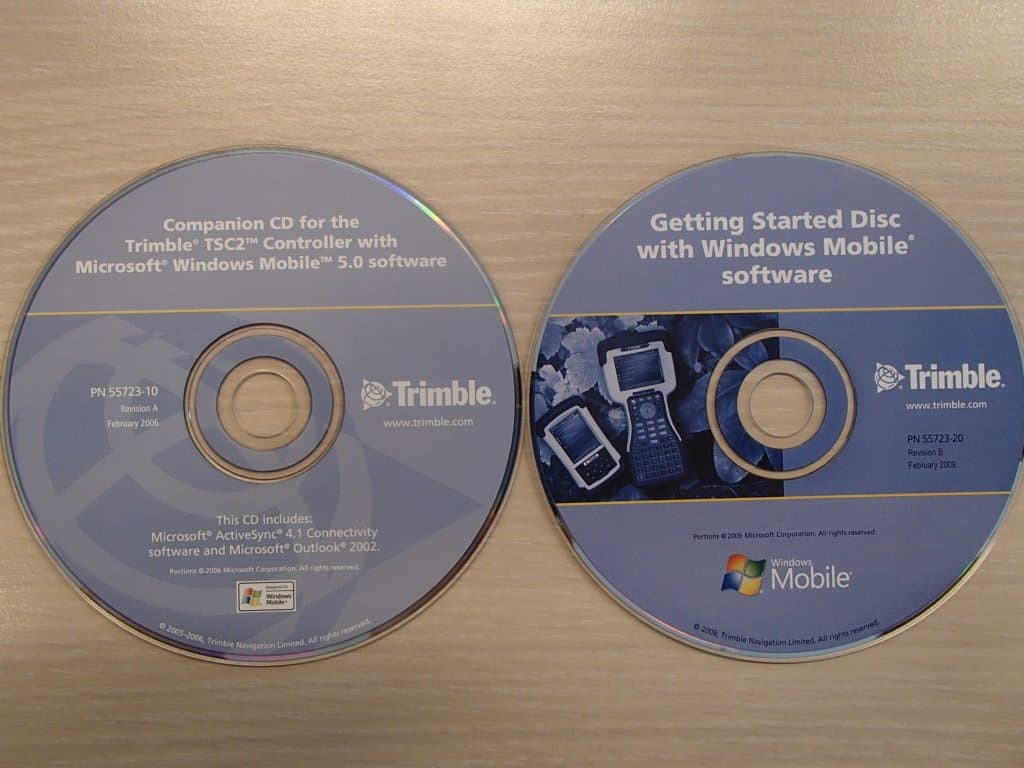
These are the two CDRoms I have,
Only Handbook software and ActiveSync and Mediacenter
These are no recovery disks for the OS.
I guess a Trimble dealer is your only option ...
Posted : July 10, 2015 8:05 am
Topic starter
Translate
▼
English
Spanish
French
German
Italian
Portuguese
Russian
Chinese
Japanese
Korean
Arabic
Hindi
Dutch
Polish
Turkish
Vietnamese
Thai
Swedish
Danish
Finnish
Norwegian
Czech
Hungarian
Romanian
Greek
Hebrew
Indonesian
Malay
Ukrainian
Bulgarian
Croatian
Slovak
Slovenian
Serbian
Lithuanian
Latvian
Estonian
Thanks all for trying to help. I think I have fixed my problem and want to post my conclusions for the next guy.
Here is what I **think** I have figured out....
1. The OS install that Trimble has online is meant to be installed with ActiveSync. ActiveSync is not compatible with Windows 7 - Windows Mobile Device Center (WMDC) is the only option available for Windows 7. Basically, I don't think I can reinstall the OS through my Windows 7 computers. The dealer can, but probably with a drive clone.
2. When WMDC is connected to the TSC2 properly and syncing with Windows features (ie. Outlook), my Trimble Installation Manager would not recognize the TSC2. Also, the .NET Compact Framework 3.5 from Microsoft would not install.
3. If WMDC is installed, recognizes the TSC2, but will **NOT** sync with Windows (gives error code), the Trimble Installation Manager works and the .NET Compact Framework 3.5 installer works. I don't know why this is the case.
3. So, to fix my problem when my .NET Compact Framework 3.5 installation after I replaced my screen and digitizer, I did the following:
a. uninstalled all programs
b. uninstalled WMDC and reinstalled. I would not set-up sync with WMDC
c. reinstalled .NET Compact Framework 3.5 from Microsoft
d. after this step c, WMDC recognizes TSC2 but is no longer able to sync with Windows/Outlook. Why? Curious, but I don't care.
d. deleted all uninstalled program directories on the TSC2 manually
e. hooked up to Trimble Installation Manager and let it reinstall Access and Roading Module
Posted : July 13, 2015 10:55 am
Translate
▼
English
Spanish
French
German
Italian
Portuguese
Russian
Chinese
Japanese
Korean
Arabic
Hindi
Dutch
Polish
Turkish
Vietnamese
Thai
Swedish
Danish
Finnish
Norwegian
Czech
Hungarian
Romanian
Greek
Hebrew
Indonesian
Malay
Ukrainian
Bulgarian
Croatian
Slovak
Slovenian
Serbian
Lithuanian
Latvian
Estonian
That's great!
& Thanks for keeping us posted.
Posted : July 13, 2015 11:52 pm