Reading RPLS is free for the whole profession. Members post, reply, and get the members-only rooms.


Notifications
Clear all

Topic starter
Translate
▼
English
Spanish
French
German
Italian
Portuguese
Russian
Chinese
Japanese
Korean
Arabic
Hindi
Dutch
Polish
Turkish
Vietnamese
Thai
Swedish
Danish
Finnish
Norwegian
Czech
Hungarian
Romanian
Greek
Hebrew
Indonesian
Malay
Ukrainian
Bulgarian
Croatian
Slovak
Slovenian
Serbian
Lithuanian
Latvian
Estonian
In Civil 3D what is the best setting (relative, absolute, fixed, ect.) and place to set the point size and point label size?
Posted : July 10, 2015 6:41 am

Translate
▼
English
Spanish
French
German
Italian
Portuguese
Russian
Chinese
Japanese
Korean
Arabic
Hindi
Dutch
Polish
Turkish
Vietnamese
Thai
Swedish
Danish
Finnish
Norwegian
Czech
Hungarian
Romanian
Greek
Hebrew
Indonesian
Malay
Ukrainian
Bulgarian
Croatian
Slovak
Slovenian
Serbian
Lithuanian
Latvian
Estonian
ekillo, post: 326655, member: 773 wrote: In Civil 3D what is the best setting (relative, absolute, fixed, ect.) and place to set the point size and point label size?
Absolute. Of course, in C3d, point appearance isn't a setting, its a style. A style with lots of settings. Which can be overridden with point group settings and styles.
Posted : July 10, 2015 8:00 am

Translate
▼
English
Spanish
French
German
Italian
Portuguese
Russian
Chinese
Japanese
Korean
Arabic
Hindi
Dutch
Polish
Turkish
Vietnamese
Thai
Swedish
Danish
Finnish
Norwegian
Czech
Hungarian
Romanian
Greek
Hebrew
Indonesian
Malay
Ukrainian
Bulgarian
Croatian
Slovak
Slovenian
Serbian
Lithuanian
Latvian
Estonian
While I'm no expert, I believe (at least in relative) those are also scaled by the drawing scale. In the Settings tab, right click the drawing name at the top and choose edit drawing settings.
Posted : July 10, 2015 8:38 am

Translate
▼
English
Spanish
French
German
Italian
Portuguese
Russian
Chinese
Japanese
Korean
Arabic
Hindi
Dutch
Polish
Turkish
Vietnamese
Thai
Swedish
Danish
Finnish
Norwegian
Czech
Hungarian
Romanian
Greek
Hebrew
Indonesian
Malay
Ukrainian
Bulgarian
Croatian
Slovak
Slovenian
Serbian
Lithuanian
Latvian
Estonian
I use "use drawing scale" so points are shown relative to the scale i'm working in. As far as size goes it depends on what I am using the points for.
Topo Point Labels and Point Styles (the node, "x") are made to come in quite small so in congested areas you can still read the data. Topo point nodes that are symbols, like a manhole, have been given a scale factor in their Point Style so they print at the correct size for the scale.
Point Labels that I calculate for printed staking diagrams come in at .06 x scale.
ekillo, post: 326655, member: 773 wrote: place to set the point size and point label size?
Point node is set in; Toolspace, Settings, Point, Point Styles
Point label is set in; Toolspace, Settings, Point, Label Styles
Posted : July 10, 2015 8:58 am

Translate
▼
English
Spanish
French
German
Italian
Portuguese
Russian
Chinese
Japanese
Korean
Arabic
Hindi
Dutch
Polish
Turkish
Vietnamese
Thai
Swedish
Danish
Finnish
Norwegian
Czech
Hungarian
Romanian
Greek
Hebrew
Indonesian
Malay
Ukrainian
Bulgarian
Croatian
Slovak
Slovenian
Serbian
Lithuanian
Latvian
Estonian
E,
In your Point Style Dialogue Box, hit the Help Button, which will take you to the information you need to make a choice.
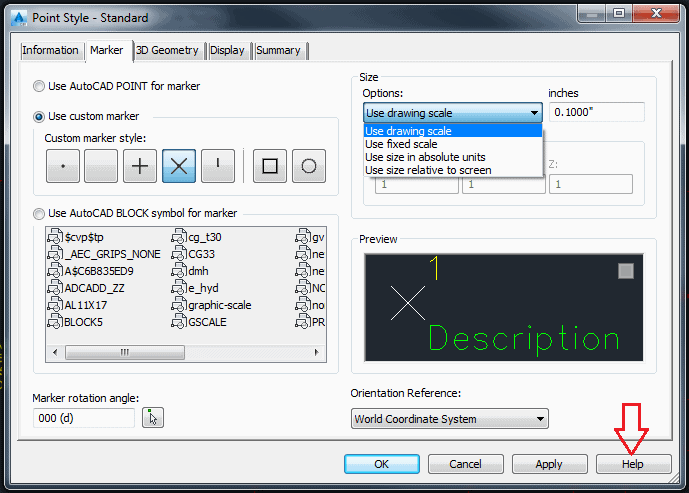
I would "Use Drawing Scale" for one good reason. Your Point Label is Annotative, so the Point Symbol and the Point Label will match eachother in size no matter the drawing scale.

Dave
Posted : July 10, 2015 9:31 am
Topic starter
Translate
▼
English
Spanish
French
German
Italian
Portuguese
Russian
Chinese
Japanese
Korean
Arabic
Hindi
Dutch
Polish
Turkish
Vietnamese
Thai
Swedish
Danish
Finnish
Norwegian
Czech
Hungarian
Romanian
Greek
Hebrew
Indonesian
Malay
Ukrainian
Bulgarian
Croatian
Slovak
Slovenian
Serbian
Lithuanian
Latvian
Estonian
Thanks.
I think I was setting them in different places and they were changing and I lost tract on how to put them back.
Ed
Posted : July 10, 2015 12:35 pm