Reading RPLS is free for the whole profession. Members post, reply, and get the members-only rooms.


Notifications
Clear all
Software, CAD & Mapping
15
Posts
5
Users
0
Reactions
1,911
Views

Topic starter
Translate
▼
English
Spanish
French
German
Italian
Portuguese
Russian
Chinese
Japanese
Korean
Arabic
Hindi
Dutch
Polish
Turkish
Vietnamese
Thai
Swedish
Danish
Finnish
Norwegian
Czech
Hungarian
Romanian
Greek
Hebrew
Indonesian
Malay
Ukrainian
Bulgarian
Croatian
Slovak
Slovenian
Serbian
Lithuanian
Latvian
Estonian
Is there a way to enter the data for a curve (Radius, arc, delta) and get it to draw the curve from 1 tangent only? All I see is 2 tangents options. How did we go from Softdesk that would allow you to do this, to a program that needs 10 times the info. to draw a dam curve?! Oh don't get me started w/Carlson again...
Any help (or Jack Daniels) would be greatly appreciated.
Posted : May 18, 2016 8:38 am

Translate
▼
English
Spanish
French
German
Italian
Portuguese
Russian
Chinese
Japanese
Korean
Arabic
Hindi
Dutch
Polish
Turkish
Vietnamese
Thai
Swedish
Danish
Finnish
Norwegian
Czech
Hungarian
Romanian
Greek
Hebrew
Indonesian
Malay
Ukrainian
Bulgarian
Croatian
Slovak
Slovenian
Serbian
Lithuanian
Latvian
Estonian
Draw pull down menu > Arc > many options available, including single tangent line
Posted : May 18, 2016 8:53 am
Topic starter
Translate
▼
English
Spanish
French
German
Italian
Portuguese
Russian
Chinese
Japanese
Korean
Arabic
Hindi
Dutch
Polish
Turkish
Vietnamese
Thai
Swedish
Danish
Finnish
Norwegian
Czech
Hungarian
Romanian
Greek
Hebrew
Indonesian
Malay
Ukrainian
Bulgarian
Croatian
Slovak
Slovenian
Serbian
Lithuanian
Latvian
Estonian
Peter Lothian - MA ME, post: 372732, member: 4512 wrote: Draw pull down menu > Arc > many options available, including single tangent line
Mine does not have this! Grrr....
Posted : May 18, 2016 9:14 am

Translate
▼
English
Spanish
French
German
Italian
Portuguese
Russian
Chinese
Japanese
Korean
Arabic
Hindi
Dutch
Polish
Turkish
Vietnamese
Thai
Swedish
Danish
Finnish
Norwegian
Czech
Hungarian
Romanian
Greek
Hebrew
Indonesian
Malay
Ukrainian
Bulgarian
Croatian
Slovak
Slovenian
Serbian
Lithuanian
Latvian
Estonian
All day long, 2dp, d>Enter Distance>A Angle>Enter>A Arc>L Radius Length>Right/Left>D Delta Angle, Voila!
Posted : May 18, 2016 9:19 am

Translate
▼
English
Spanish
French
German
Italian
Portuguese
Russian
Chinese
Japanese
Korean
Arabic
Hindi
Dutch
Polish
Turkish
Vietnamese
Thai
Swedish
Danish
Finnish
Norwegian
Czech
Hungarian
Romanian
Greek
Hebrew
Indonesian
Malay
Ukrainian
Bulgarian
Croatian
Slovak
Slovenian
Serbian
Lithuanian
Latvian
Estonian
hlbennettpls, post: 372737, member: 10049 wrote: Mine does not have this! Grrr....
2016 doesn't have the curve tools? That would surprise me. Maybe your menu bar is turned off?
Try re-loading your survey work space.
WORKSPACE -> SURVEY -->ENTER
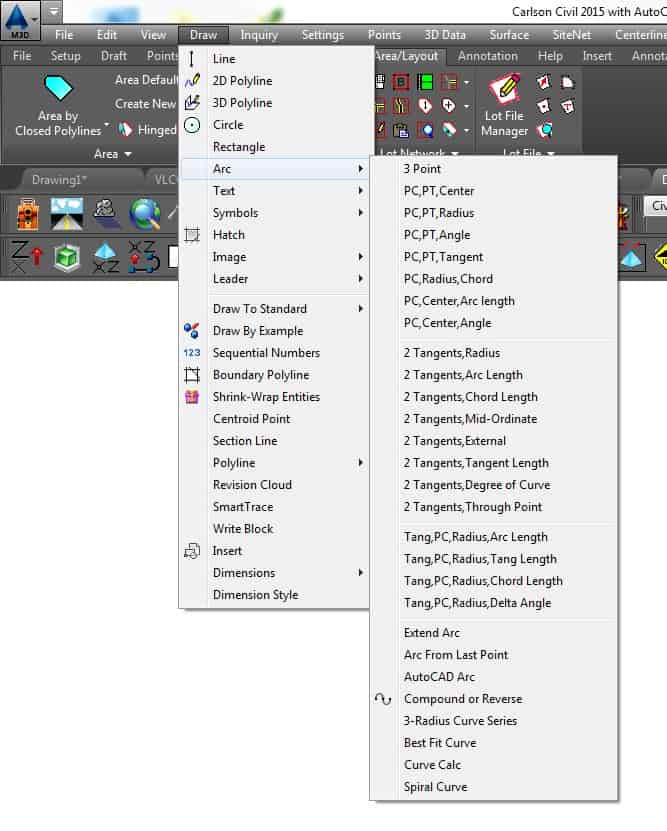
Posted : May 18, 2016 9:49 am
Translate
▼
English
Spanish
French
German
Italian
Portuguese
Russian
Chinese
Japanese
Korean
Arabic
Hindi
Dutch
Polish
Turkish
Vietnamese
Thai
Swedish
Danish
Finnish
Norwegian
Czech
Hungarian
Romanian
Greek
Hebrew
Indonesian
Malay
Ukrainian
Bulgarian
Croatian
Slovak
Slovenian
Serbian
Lithuanian
Latvian
Estonian
The 2D Polyline routine (2DP) has options to draw an arc off of a single tangent as well (using the info you have).
Posted : May 18, 2016 10:00 am
Topic starter
Translate
▼
English
Spanish
French
German
Italian
Portuguese
Russian
Chinese
Japanese
Korean
Arabic
Hindi
Dutch
Polish
Turkish
Vietnamese
Thai
Swedish
Danish
Finnish
Norwegian
Czech
Hungarian
Romanian
Greek
Hebrew
Indonesian
Malay
Ukrainian
Bulgarian
Croatian
Slovak
Slovenian
Serbian
Lithuanian
Latvian
Estonian
imaudigger, post: 372744, member: 7286 wrote: 2016 doesn't have the curve tools? That would surprise me. Maybe your menu bar is turned off?
Try re-loading your survey work space.
WORKSPACE -> SURVEY -->ENTER
That's the menu I have but I want to be able to draw a curve off one tangent by entering in any 2 elements of a curve. I don't see that listed. In SD8 it was curve off 1 tangent.
Posted : May 18, 2016 10:54 am
Translate
▼
English
Spanish
French
German
Italian
Portuguese
Russian
Chinese
Japanese
Korean
Arabic
Hindi
Dutch
Polish
Turkish
Vietnamese
Thai
Swedish
Danish
Finnish
Norwegian
Czech
Hungarian
Romanian
Greek
Hebrew
Indonesian
Malay
Ukrainian
Bulgarian
Croatian
Slovak
Slovenian
Serbian
Lithuanian
Latvian
Estonian
The routine I would choose would be...
Tang, PC, Radius, Delta Angle
Enter radius
Enter Delta Angle
Specify Point of Curvature
Pick point on back tangent.
However there appears to be a bug in my 2015 routine because I cannot get it to draw an arc to the left.
I normally use other methods, so I have never noticed this.
EDIT: Checking 2016 to see if the bug exists there as well.
Posted : May 18, 2016 11:07 am
Topic starter
Translate
▼
English
Spanish
French
German
Italian
Portuguese
Russian
Chinese
Japanese
Korean
Arabic
Hindi
Dutch
Polish
Turkish
Vietnamese
Thai
Swedish
Danish
Finnish
Norwegian
Czech
Hungarian
Romanian
Greek
Hebrew
Indonesian
Malay
Ukrainian
Bulgarian
Croatian
Slovak
Slovenian
Serbian
Lithuanian
Latvian
Estonian
How does it do if you enter a negative radius?
Posted : May 18, 2016 11:15 am
Topic starter
Translate
▼
English
Spanish
French
German
Italian
Portuguese
Russian
Chinese
Japanese
Korean
Arabic
Hindi
Dutch
Polish
Turkish
Vietnamese
Thai
Swedish
Danish
Finnish
Norwegian
Czech
Hungarian
Romanian
Greek
Hebrew
Indonesian
Malay
Ukrainian
Bulgarian
Croatian
Slovak
Slovenian
Serbian
Lithuanian
Latvian
Estonian
That is exactly what I was looking for. Not worded how I'd expect to find it, but nonetheless it's what I need. Thank you. Also, if you want a curve to the left enter the radius as a negative value.
Posted : May 18, 2016 11:16 am
Translate
▼
English
Spanish
French
German
Italian
Portuguese
Russian
Chinese
Japanese
Korean
Arabic
Hindi
Dutch
Polish
Turkish
Vietnamese
Thai
Swedish
Danish
Finnish
Norwegian
Czech
Hungarian
Romanian
Greek
Hebrew
Indonesian
Malay
Ukrainian
Bulgarian
Croatian
Slovak
Slovenian
Serbian
Lithuanian
Latvian
Estonian
Never though about entering the radius as a negative value!
I am used to entering the delta angle as a negative value for curves concave to the left.
If anybody from Carlson is monitoring this thread....the help files could be improved just a little bit...
Posted : May 18, 2016 11:33 am
Translate
▼
English
Spanish
French
German
Italian
Portuguese
Russian
Chinese
Japanese
Korean
Arabic
Hindi
Dutch
Polish
Turkish
Vietnamese
Thai
Swedish
Danish
Finnish
Norwegian
Czech
Hungarian
Romanian
Greek
Hebrew
Indonesian
Malay
Ukrainian
Bulgarian
Croatian
Slovak
Slovenian
Serbian
Lithuanian
Latvian
Estonian
Check out the 2DP routine as well. It has a lot of options. There are a few more prompts, but you can continue entering your forward tangent without going to a different routine.
Posted : May 18, 2016 11:39 am

Translate
▼
English
Spanish
French
German
Italian
Portuguese
Russian
Chinese
Japanese
Korean
Arabic
Hindi
Dutch
Polish
Turkish
Vietnamese
Thai
Swedish
Danish
Finnish
Norwegian
Czech
Hungarian
Romanian
Greek
Hebrew
Indonesian
Malay
Ukrainian
Bulgarian
Croatian
Slovak
Slovenian
Serbian
Lithuanian
Latvian
Estonian
Wow,
Play with the program a bit before airing dirty laundry.
Posted : May 18, 2016 12:43 pm
Topic starter
Translate
▼
English
Spanish
French
German
Italian
Portuguese
Russian
Chinese
Japanese
Korean
Arabic
Hindi
Dutch
Polish
Turkish
Vietnamese
Thai
Swedish
Danish
Finnish
Norwegian
Czech
Hungarian
Romanian
Greek
Hebrew
Indonesian
Malay
Ukrainian
Bulgarian
Croatian
Slovak
Slovenian
Serbian
Lithuanian
Latvian
Estonian
erwsdot, post: 372775, member: 6038 wrote: Wow,
Play with the program a bit before airing dirty laundry.
Know my story w/Carlson before passing judgement...
Posted : May 18, 2016 12:55 pm
Topic starter
Translate
▼
English
Spanish
French
German
Italian
Portuguese
Russian
Chinese
Japanese
Korean
Arabic
Hindi
Dutch
Polish
Turkish
Vietnamese
Thai
Swedish
Danish
Finnish
Norwegian
Czech
Hungarian
Romanian
Greek
Hebrew
Indonesian
Malay
Ukrainian
Bulgarian
Croatian
Slovak
Slovenian
Serbian
Lithuanian
Latvian
Estonian
imaudigger, post: 372767, member: 7286 wrote: Never though about entering the radius as a negative value!
I am used to entering the delta angle as a negative value for curves concave to the left.If anybody from Carlson is monitoring this thread....the help files could be improved just a little bit...
I agree with this 100% as I looked for this very item.
Posted : May 18, 2016 12:55 pm