Reading RPLS is free for the whole profession. Members post, reply, and get the members-only rooms.

Notifications
Clear all

Topic starter
Translate
▼
English
Spanish
French
German
Italian
Portuguese
Russian
Chinese
Japanese
Korean
Arabic
Hindi
Dutch
Polish
Turkish
Vietnamese
Thai
Swedish
Danish
Finnish
Norwegian
Czech
Hungarian
Romanian
Greek
Hebrew
Indonesian
Malay
Ukrainian
Bulgarian
Croatian
Slovak
Slovenian
Serbian
Lithuanian
Latvian
Estonian
Can anyone comment on the range of the bluetooth for the FZ - M1? Has it got a long range option or do you need an external bluetooth for adequate comms back to the robot?
Posted : February 15, 2016 10:20 pm

Translate
▼
English
Spanish
French
German
Italian
Portuguese
Russian
Chinese
Japanese
Korean
Arabic
Hindi
Dutch
Polish
Turkish
Vietnamese
Thai
Swedish
Danish
Finnish
Norwegian
Czech
Hungarian
Romanian
Greek
Hebrew
Indonesian
Malay
Ukrainian
Bulgarian
Croatian
Slovak
Slovenian
Serbian
Lithuanian
Latvian
Estonian
I'd be skeptical of any BT device that doesn't have an external antenna when it comes to running a robot. It seems that most hardware developers consider BT to be a short-range technology, and if their device can connect to something 100 feet away they're happy. In my experience, you need a 5dBi antenna (about 7" long) to effectively run a robot in normal surveying circumstances. (By "normal" I mean like what I was doing today: running control and topo with my robot at distances up to 1200 feet.)
Posted : February 15, 2016 11:57 pm

Translate
▼
English
Spanish
French
German
Italian
Portuguese
Russian
Chinese
Japanese
Korean
Arabic
Hindi
Dutch
Polish
Turkish
Vietnamese
Thai
Swedish
Danish
Finnish
Norwegian
Czech
Hungarian
Romanian
Greek
Hebrew
Indonesian
Malay
Ukrainian
Bulgarian
Croatian
Slovak
Slovenian
Serbian
Lithuanian
Latvian
Estonian
Yes, the Panasonic ToughPad's do have class 1 bluetooth (long range). There is a problem with the OEM Windows 8.x bluetooth drivers on the FZ-M1 and FZ-G1. But if you remove the OEM driver, and use the default bluetooth it works fine or load the older 2013 driver it works fine. No problems with OEM drivers on Windows 7 and 10.
With the FZ-M1, I can get a solid 900ft from a Topcon GPT-3003 robot, and over 1600ft from a Topcon PS-103 robot. Carlson's robot is struggling with long range bluetooth distance when connecting with the FZ-M1 in OEM, so they sell the external usb bluetooth adapter (PARANI-UD100-3) and works fine. As you can see, the range is also limited by your instruments bluetooth hardware.
The key to using these PC's and getting good bluetooth connection, is remember they are PC's. You must shut down the device down completely at least once a day. These are not cell phones, though sleep mode is an OK option, you must clear the bluetooth stack and ram to ensure solid performance.
Posted : February 16, 2016 5:20 am
Topic starter
Translate
▼
English
Spanish
French
German
Italian
Portuguese
Russian
Chinese
Japanese
Korean
Arabic
Hindi
Dutch
Polish
Turkish
Vietnamese
Thai
Swedish
Danish
Finnish
Norwegian
Czech
Hungarian
Romanian
Greek
Hebrew
Indonesian
Malay
Ukrainian
Bulgarian
Croatian
Slovak
Slovenian
Serbian
Lithuanian
Latvian
Estonian
Thanks Lee/Jim,
I've decided to go for the FZ-M1 and now have one on order, and will try to pair it with my TPS1100 via a long range Parani SD1000. I will try your suggestion Lee and remove the OEM bluetooth driver, failing that I also have a UD100 so I will test that as well.
Posted : February 19, 2016 10:28 pm
Topic starter
Translate
▼
English
Spanish
French
German
Italian
Portuguese
Russian
Chinese
Japanese
Korean
Arabic
Hindi
Dutch
Polish
Turkish
Vietnamese
Thai
Swedish
Danish
Finnish
Norwegian
Czech
Hungarian
Romanian
Greek
Hebrew
Indonesian
Malay
Ukrainian
Bulgarian
Croatian
Slovak
Slovenian
Serbian
Lithuanian
Latvian
Estonian
leegreen, post: 358034, member: 2332 wrote: Yes, the Panasonic ToughPad's do have class 1 bluetooth (long range). There is a problem with the OEM Windows 8.x bluetooth drivers on the FZ-M1 and FZ-G1. But if you remove the OEM driver, and use the default bluetooth it works fine or load the older 2013 driver it works fine. No problems with OEM drivers on Windows 7 and 10.
With the FZ-M1, I can get a solid 900ft from a Topcon GPT-3003 robot, and over 1600ft from a Topcon PS-103 robot. Carlson's robot is struggling with long range bluetooth distance when connecting with the FZ-M1 in OEM, so they sell the external usb bluetooth adapter (PARANI-UD100-3) and works fine. As you can see, the range is also limited by your instruments bluetooth hardware.
The key to using these PC's and getting good bluetooth connection, is remember they are PC's. You must shut down the device down completely at least once a day. These are not cell phones, though sleep mode is an OK option, you must clear the bluetooth stack and ram to ensure solid performance.
Hi Lee,
I have removed the OEM bluetooth driver and used the default bluetooth - but i'm still only getting about 150m from the Toughpad back to the Parani SD1000. Do I need to install another bluetooth driver?
Posted : March 26, 2016 11:38 pm

Translate
▼
English
Spanish
French
German
Italian
Portuguese
Russian
Chinese
Japanese
Korean
Arabic
Hindi
Dutch
Polish
Turkish
Vietnamese
Thai
Swedish
Danish
Finnish
Norwegian
Czech
Hungarian
Romanian
Greek
Hebrew
Indonesian
Malay
Ukrainian
Bulgarian
Croatian
Slovak
Slovenian
Serbian
Lithuanian
Latvian
Estonian
I was wondering if SD1000 can be used a repeater ??
Posted : March 27, 2016 2:45 am
Translate
▼
English
Spanish
French
German
Italian
Portuguese
Russian
Chinese
Japanese
Korean
Arabic
Hindi
Dutch
Polish
Turkish
Vietnamese
Thai
Swedish
Danish
Finnish
Norwegian
Czech
Hungarian
Romanian
Greek
Hebrew
Indonesian
Malay
Ukrainian
Bulgarian
Croatian
Slovak
Slovenian
Serbian
Lithuanian
Latvian
Estonian
JH Surveying, post: 364321, member: 11044 wrote: Hi Lee,
I have removed the OEM bluetooth driver and used the default bluetooth - but i'm still only getting about 150m from the Toughpad back to the Parani SD1000. Do I need to install another bluetooth driver?
You need to also uninstall Intel Bluetooth software.
if you have the FZ-M1 then yes you need older driver 2013. I can send you a link when I get to my PC. Are you using the 5" antenna with the SD1000? The reasonI ask, your distance is greater than most get with OEM driver.
Posted : March 27, 2016 4:28 am
Topic starter
Translate
▼
English
Spanish
French
German
Italian
Portuguese
Russian
Chinese
Japanese
Korean
Arabic
Hindi
Dutch
Polish
Turkish
Vietnamese
Thai
Swedish
Danish
Finnish
Norwegian
Czech
Hungarian
Romanian
Greek
Hebrew
Indonesian
Malay
Ukrainian
Bulgarian
Croatian
Slovak
Slovenian
Serbian
Lithuanian
Latvian
Estonian
Thanks Lee. Antenna is a 5bdi, overall length closer to 8".
Posted : March 27, 2016 6:27 am

Translate
▼
English
Spanish
French
German
Italian
Portuguese
Russian
Chinese
Japanese
Korean
Arabic
Hindi
Dutch
Polish
Turkish
Vietnamese
Thai
Swedish
Danish
Finnish
Norwegian
Czech
Hungarian
Romanian
Greek
Hebrew
Indonesian
Malay
Ukrainian
Bulgarian
Croatian
Slovak
Slovenian
Serbian
Lithuanian
Latvian
Estonian
[USER=2332]@leegreen[/USER] Nice website! Interesting services and links.
Posted : March 27, 2016 6:31 am
Translate
▼
English
Spanish
French
German
Italian
Portuguese
Russian
Chinese
Japanese
Korean
Arabic
Hindi
Dutch
Polish
Turkish
Vietnamese
Thai
Swedish
Danish
Finnish
Norwegian
Czech
Hungarian
Romanian
Greek
Hebrew
Indonesian
Malay
Ukrainian
Bulgarian
Croatian
Slovak
Slovenian
Serbian
Lithuanian
Latvian
Estonian
JH Surveying, post: 364329, member: 11044 wrote: Thanks Lee. Antenna is a 5bdi, overall length closer to 8".
JH,
Try this link to https://drive.google.com/open?id=0B6dKgW5AoWsdUlZmNXFQWEFSWXM&apos ;">download bluetooth driver.
Posted : March 27, 2016 10:08 am
Translate
▼
English
Spanish
French
German
Italian
Portuguese
Russian
Chinese
Japanese
Korean
Arabic
Hindi
Dutch
Polish
Turkish
Vietnamese
Thai
Swedish
Danish
Finnish
Norwegian
Czech
Hungarian
Romanian
Greek
Hebrew
Indonesian
Malay
Ukrainian
Bulgarian
Croatian
Slovak
Slovenian
Serbian
Lithuanian
Latvian
Estonian
FL/GA PLS., post: 364331, member: 379 wrote: [USER=2332]@leegreen[/USER] Nice website! Interesting services and links.
Thank you.
I just got back from Orlando, Florida with some surveyors I met on this board. Heading to Atlanta, GA next week. Then to Stennis, MS for work at the space center. Seems all my work these days, is out of state. Not bad to be in warmer climate this time of year.
Posted : March 27, 2016 10:12 am
Topic starter
Translate
▼
English
Spanish
French
German
Italian
Portuguese
Russian
Chinese
Japanese
Korean
Arabic
Hindi
Dutch
Polish
Turkish
Vietnamese
Thai
Swedish
Danish
Finnish
Norwegian
Czech
Hungarian
Romanian
Greek
Hebrew
Indonesian
Malay
Ukrainian
Bulgarian
Croatian
Slovak
Slovenian
Serbian
Lithuanian
Latvian
Estonian
Hi Lee,
Thanks for the link to the bluetooth driver, however I'm having some issues. I tried the following:
- Deleted the existing driver - by un-installing in Device Manager and then deleting under Programs and Features
- Extracted the file you provided to the toughpad - it prompts to create a file called util2
- Opened the util2 file and tried to run Autorun - it started to install then gave an error message saying it required my computer to be running 32 bit Vista SP2 or Windows 7 or above, and then the install was cancelled.
- I then navigated to util2/drivers/bluet/Win8/Win64/Install/Intel Bluetooth - whilst this driver appeared to install properly it did not run - when I navigated to Intel Wireless Bluetooth (R) 4.0 the following message was found under properties - "Windows has stopped the device because it has reported problems (Code 43)
- Next I searched for the same driver on the panasonic web page and downloaded the following (BluetoothSoftwareDriver_v3.1-pv3-wwbtw0430_3.1.1307g_M1C_W764_ss15498.exe) - I believe this is the same link you provided. This gave the same result as above.
- I searched for another driver on the panasonic web page and downloaded the following (BluetoothSoftwareDriver_v3.1-pv6-wwbtw0459_3.1.1307g_M1C_W8164_ss15567.exe) - this one worked, however bluetooth range appears to be only 150m.
Any assistance would be greatly appreciated!
Posted : March 28, 2016 2:45 am
Translate
▼
English
Spanish
French
German
Italian
Portuguese
Russian
Chinese
Japanese
Korean
Arabic
Hindi
Dutch
Polish
Turkish
Vietnamese
Thai
Swedish
Danish
Finnish
Norwegian
Czech
Hungarian
Romanian
Greek
Hebrew
Indonesian
Malay
Ukrainian
Bulgarian
Croatian
Slovak
Slovenian
Serbian
Lithuanian
Latvian
Estonian
Choose the proper operating system for your Toughpad. Tell me the specs.Looks like 64bit Windows 8? It is tricky to uninstall the Intel Driver.
Call me. See phone number on my website.
We have also seen success in upgrading to Windows 10. I hate Windows 8, but I do have dozens of clients using Win8 with ToughPad and the driver I sent you. They use it with Topcon instruments.It is odd that you get 150m. With the wrong driver we get only 10m.
Posted : March 28, 2016 4:30 am

Translate
▼
English
Spanish
French
German
Italian
Portuguese
Russian
Chinese
Japanese
Korean
Arabic
Hindi
Dutch
Polish
Turkish
Vietnamese
Thai
Swedish
Danish
Finnish
Norwegian
Czech
Hungarian
Romanian
Greek
Hebrew
Indonesian
Malay
Ukrainian
Bulgarian
Croatian
Slovak
Slovenian
Serbian
Lithuanian
Latvian
Estonian
Is there a pole mount for these?
Posted : April 28, 2016 6:18 am
Translate
▼
English
Spanish
French
German
Italian
Portuguese
Russian
Chinese
Japanese
Korean
Arabic
Hindi
Dutch
Polish
Turkish
Vietnamese
Thai
Swedish
Danish
Finnish
Norwegian
Czech
Hungarian
Romanian
Greek
Hebrew
Indonesian
Malay
Ukrainian
Bulgarian
Croatian
Slovak
Slovenian
Serbian
Lithuanian
Latvian
Estonian
For 7" panasonic tablet and standard pogo this one should fit http://www.rammount.com/part/RAM-B-400-C-UN8U . Looks like arm is too long. For my 9" tablet I use shorter Double Socket Arm, and bigger x-grip.
Posted : April 28, 2016 7:33 am
Translate
▼
English
Spanish
French
German
Italian
Portuguese
Russian
Chinese
Japanese
Korean
Arabic
Hindi
Dutch
Polish
Turkish
Vietnamese
Thai
Swedish
Danish
Finnish
Norwegian
Czech
Hungarian
Romanian
Greek
Hebrew
Indonesian
Malay
Ukrainian
Bulgarian
Croatian
Slovak
Slovenian
Serbian
Lithuanian
Latvian
Estonian
In the pictures bellow
1. the claw is RAM Small Tough-Claw㢠with 1" Diameter Rubber Ball
2. the arm is RAM Double Socket Arm for 1" Balls (Overall Length: 3.69")
3. the x-grip X-Gripå¨ 9"-10" Tablet Mounts
9"-10" tablet mount for the toughbook would be too big but the RAM Double Socket Arm should be ok. one part of a claw has smaller radius than pogo, so there is a little gap betwen them, the other part of the claw has radius that perfectly fits pogo
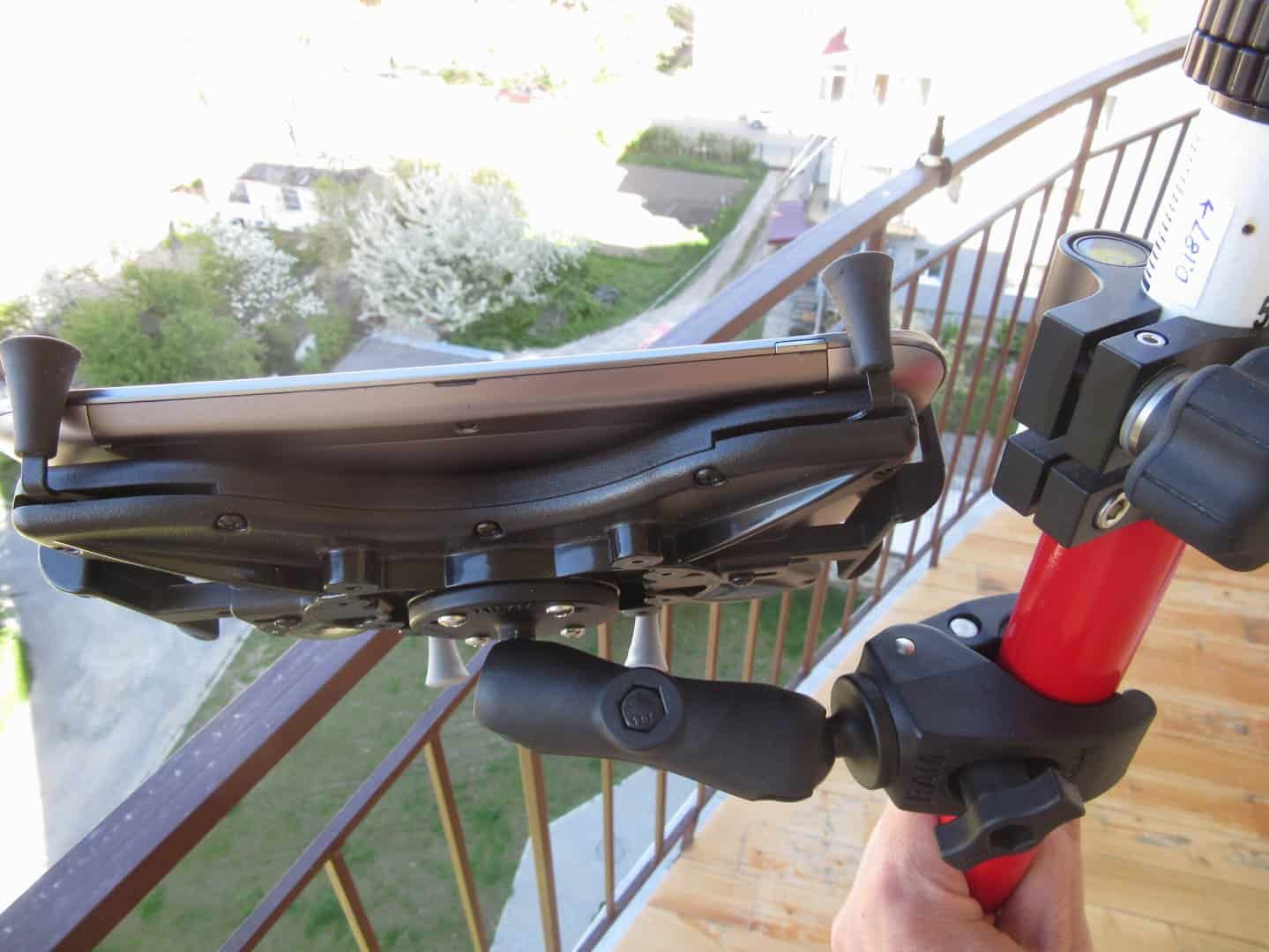
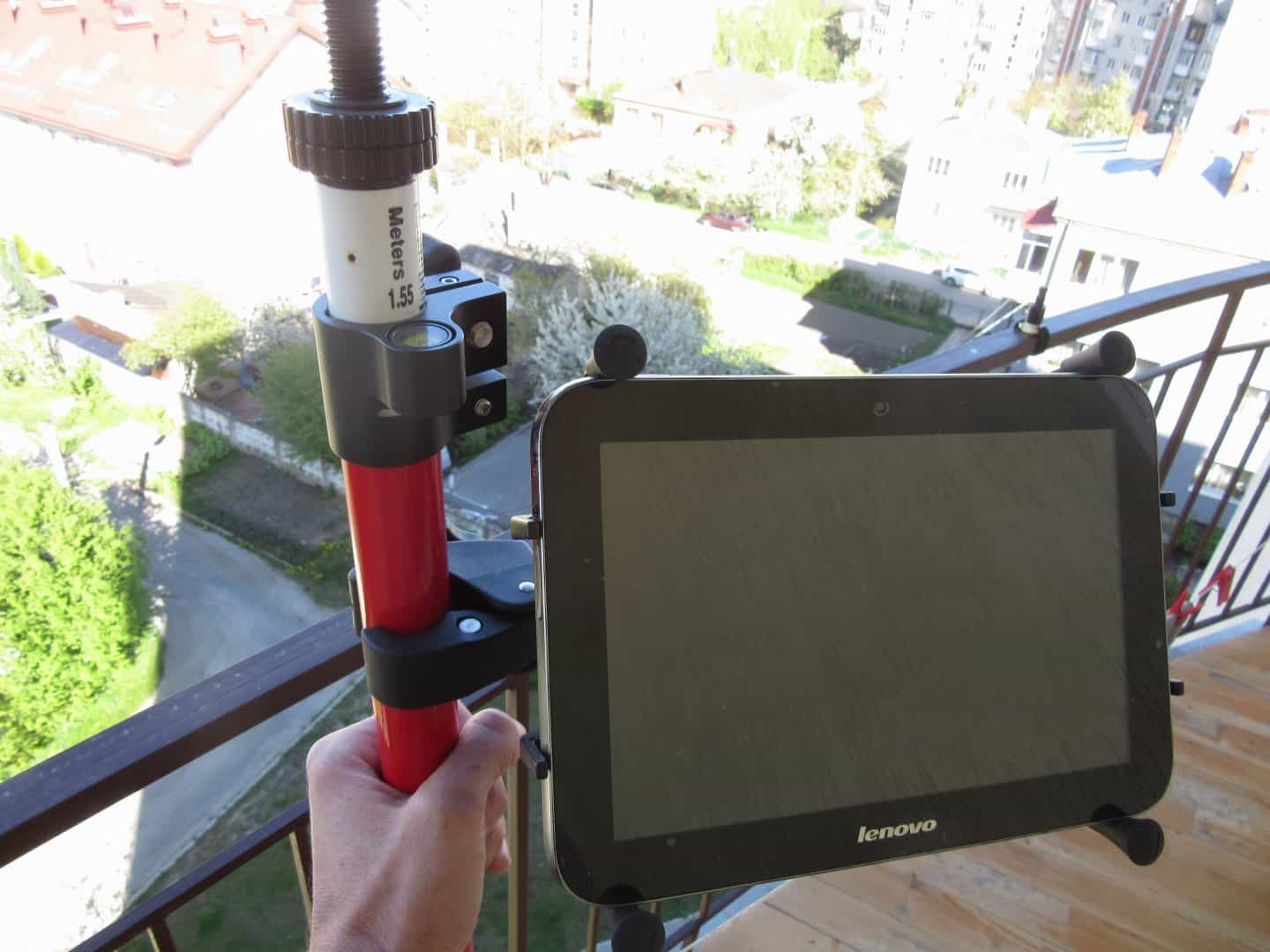
.
Posted : April 28, 2016 8:23 am
Translate
▼
English
Spanish
French
German
Italian
Portuguese
Russian
Chinese
Japanese
Korean
Arabic
Hindi
Dutch
Polish
Turkish
Vietnamese
Thai
Swedish
Danish
Finnish
Norwegian
Czech
Hungarian
Romanian
Greek
Hebrew
Indonesian
Malay
Ukrainian
Bulgarian
Croatian
Slovak
Slovenian
Serbian
Lithuanian
Latvian
Estonian
I used that pole mount for a while. But it was not secure. I tripped one day and the touphpad feel out of that mount onto concrete. So I designed my own 3d printed case with ball mount for the Panasonic FZ-M1.
Here is a link to print your own. I don't have a 3d printer.
http://www.shapeways.com/shops/leegreen
Posted : April 28, 2016 8:42 am

Translate
▼
English
Spanish
French
German
Italian
Portuguese
Russian
Chinese
Japanese
Korean
Arabic
Hindi
Dutch
Polish
Turkish
Vietnamese
Thai
Swedish
Danish
Finnish
Norwegian
Czech
Hungarian
Romanian
Greek
Hebrew
Indonesian
Malay
Ukrainian
Bulgarian
Croatian
Slovak
Slovenian
Serbian
Lithuanian
Latvian
Estonian
I purchased two of the mounts that Lee made and they work great, especially if you go with the extended battery. Most of the Panasonic units come with the bridge battery which stick out a bit and prevents the x-grip and ram mount type mounts from securing it safely.
Posted : April 29, 2016 6:26 pm
Translate
▼
English
Spanish
French
German
Italian
Portuguese
Russian
Chinese
Japanese
Korean
Arabic
Hindi
Dutch
Polish
Turkish
Vietnamese
Thai
Swedish
Danish
Finnish
Norwegian
Czech
Hungarian
Romanian
Greek
Hebrew
Indonesian
Malay
Ukrainian
Bulgarian
Croatian
Slovak
Slovenian
Serbian
Lithuanian
Latvian
Estonian
Finally got one of these. It's working great with ts12 and radio handle got out about 900' which is almost double what I got with my algiz 7

Sent from my Pixel XL using Tapatalk
Posted : December 14, 2016 10:02 am
Translate
▼
English
Spanish
French
German
Italian
Portuguese
Russian
Chinese
Japanese
Korean
Arabic
Hindi
Dutch
Polish
Turkish
Vietnamese
Thai
Swedish
Danish
Finnish
Norwegian
Czech
Hungarian
Romanian
Greek
Hebrew
Indonesian
Malay
Ukrainian
Bulgarian
Croatian
Slovak
Slovenian
Serbian
Lithuanian
Latvian
Estonian
Ease,
Be very careful with that universal tablet holder & ram mount. When my tablet feel out of that onto concrete, it cost me $500 to repair the screen. That is what prompted me to create my own mount with protective case.
Posted : December 14, 2016 10:22 am
Page 1 / 2
Next