Reading RPLS is free for the whole profession. Members post, reply, and get the members-only rooms.

Notifications
Clear all

Topic starter
Translate
▼
English
Spanish
French
German
Italian
Portuguese
Russian
Chinese
Japanese
Korean
Arabic
Hindi
Dutch
Polish
Turkish
Vietnamese
Thai
Swedish
Danish
Finnish
Norwegian
Czech
Hungarian
Romanian
Greek
Hebrew
Indonesian
Malay
Ukrainian
Bulgarian
Croatian
Slovak
Slovenian
Serbian
Lithuanian
Latvian
Estonian
Is there anyone on here that knows how to make your own RTK INTERNET SERVER. In other words I would like to leave my Base station at the office and have it broadcast the corrections via internet. I would like to then use carlson SURVCE to download those corrections using a hotspot. I have a pair of TOPCON HIPER LITE PLUS's with GLONASS. I tried using PC-CDU to do it but every time i tell it to connnect it appears to be working then after 14 seconds it disconnects my receiver from the computer?
Posted : January 15, 2016 8:13 am

Translate
▼
English
Spanish
French
German
Italian
Portuguese
Russian
Chinese
Japanese
Korean
Arabic
Hindi
Dutch
Polish
Turkish
Vietnamese
Thai
Swedish
Danish
Finnish
Norwegian
Czech
Hungarian
Romanian
Greek
Hebrew
Indonesian
Malay
Ukrainian
Bulgarian
Croatian
Slovak
Slovenian
Serbian
Lithuanian
Latvian
Estonian
Do you have oaf to extend the range on your Hiper Lite +
If not you'll get only 2.5 miles from your base.
There are several free apps to setup a base via TCP IP.
Posted : January 15, 2016 12:04 pm
Topic starter
Translate
▼
English
Spanish
French
German
Italian
Portuguese
Russian
Chinese
Japanese
Korean
Arabic
Hindi
Dutch
Polish
Turkish
Vietnamese
Thai
Swedish
Danish
Finnish
Norwegian
Czech
Hungarian
Romanian
Greek
Hebrew
Indonesian
Malay
Ukrainian
Bulgarian
Croatian
Slovak
Slovenian
Serbian
Lithuanian
Latvian
Estonian
leegreen, post: 353401, member: 2332 wrote: Do you have oaf to extend the range on your Hiper Lite +
If not you'll get only 2.5 miles from your base.
There are several free apps to setup a base via TCP IP.
Can u name one that would work? A quick Google search and I'm overwelmed with spam.
Posted : January 15, 2016 12:22 pm
Translate
▼
English
Spanish
French
German
Italian
Portuguese
Russian
Chinese
Japanese
Korean
Arabic
Hindi
Dutch
Polish
Turkish
Vietnamese
Thai
Swedish
Danish
Finnish
Norwegian
Czech
Hungarian
Romanian
Greek
Hebrew
Indonesian
Malay
Ukrainian
Bulgarian
Croatian
Slovak
Slovenian
Serbian
Lithuanian
Latvian
Estonian
Try to Search this site for NTRIP caster.
I have not used. It sounds like what you are looking for.
Posted : January 15, 2016 12:56 pm

Translate
▼
English
Spanish
French
German
Italian
Portuguese
Russian
Chinese
Japanese
Korean
Arabic
Hindi
Dutch
Polish
Turkish
Vietnamese
Thai
Swedish
Danish
Finnish
Norwegian
Czech
Hungarian
Romanian
Greek
Hebrew
Indonesian
Malay
Ukrainian
Bulgarian
Croatian
Slovak
Slovenian
Serbian
Lithuanian
Latvian
Estonian
Ntrip is the probably the way to go. I have researched it but not actually set one up.
Here are some links I have bookmarked. Some of these may have to do with OPUS and PBO casters (those may be an option for you too).
http://www.trimble.com/EC_ReceiverHelp/V4.19/en/ReceiverSetup_CommonWaysToSetupBaseStation.htm
https://surveyorconnect.com/index.php?mode=thread&id=176510#p291445
http://gpsworld.com/centimeter-level-rtk-accuracy-more-and-more-available-for-less-and-less/
http://igs.bkg.bund.de/index/index
http://gpsworld.com/sources-of-public-real-time-high-precision-corrections/
Google is your friend. I have always found that googling very specifically works best.
Don't search "setup base at home", Search more like "setup topcon hiper base with nework correction" or along those lines. Good Luck.
Posted : January 15, 2016 1:43 pm

Translate
▼
English
Spanish
French
German
Italian
Portuguese
Russian
Chinese
Japanese
Korean
Arabic
Hindi
Dutch
Polish
Turkish
Vietnamese
Thai
Swedish
Danish
Finnish
Norwegian
Czech
Hungarian
Romanian
Greek
Hebrew
Indonesian
Malay
Ukrainian
Bulgarian
Croatian
Slovak
Slovenian
Serbian
Lithuanian
Latvian
Estonian
lefebure.com NTRIP caster - http://bit.ly/1npPGRR
I have heard that it may struggle with broadcasting corrections to more than 1 or 2 clients.
We have NTRIP caster built into the newer Trimble receivers so use that.
Posted : January 16, 2016 11:04 am
Topic starter
Translate
▼
English
Spanish
French
German
Italian
Portuguese
Russian
Chinese
Japanese
Korean
Arabic
Hindi
Dutch
Polish
Turkish
Vietnamese
Thai
Swedish
Danish
Finnish
Norwegian
Czech
Hungarian
Romanian
Greek
Hebrew
Indonesian
Malay
Ukrainian
Bulgarian
Croatian
Slovak
Slovenian
Serbian
Lithuanian
Latvian
Estonian
I just spent about 5 hours trying to get TCP-Com to work. It is receiving data from my base station and uploading it to my port. But my data collector SURVCE wont connect to it? I wish there was a step by step guide to this. I had to login into my wireless router and create the port. My DC just keeps saying it cant connect to that ipaddress or port? My DC is connected to the wifi.
Any ideas?
Posted : January 16, 2016 12:56 pm

Translate
▼
English
Spanish
French
German
Italian
Portuguese
Russian
Chinese
Japanese
Korean
Arabic
Hindi
Dutch
Polish
Turkish
Vietnamese
Thai
Swedish
Danish
Finnish
Norwegian
Czech
Hungarian
Romanian
Greek
Hebrew
Indonesian
Malay
Ukrainian
Bulgarian
Croatian
Slovak
Slovenian
Serbian
Lithuanian
Latvian
Estonian
from you data collector are you connecting to external or internal IP address of lefebure caster, hard to say what else is the problem , may be firewall, may be try to disable it.
Posted : January 17, 2016 4:58 am
Translate
▼
English
Spanish
French
German
Italian
Portuguese
Russian
Chinese
Japanese
Korean
Arabic
Hindi
Dutch
Polish
Turkish
Vietnamese
Thai
Swedish
Danish
Finnish
Norwegian
Czech
Hungarian
Romanian
Greek
Hebrew
Indonesian
Malay
Ukrainian
Bulgarian
Croatian
Slovak
Slovenian
Serbian
Lithuanian
Latvian
Estonian
topconman, post: 353510, member: 9389 wrote: I just spent about 5 hours trying to get TCP-Com to work. It is receiving data from my base station and uploading it to my port. But my data collector SURVCE wont connect to it? I wish there was a step by step guide to this. I had to login into my wireless router and create the port. My DC just keeps saying it cant connect to that ipaddress or port? My DC is connected to the wifi.
Any ideas?
I think what you are doing is transmitting the (NMEA?) corrections directly to the TCP/IP port. Are you telling SurvCE that it is looking for NTRIP as this is not the same as NTRIP or RTCM. RTCM is a message type and NTRIP is the protocol for transmitting it over TCP/IP (internet).
SurvCE will need to be setup a bit differently but it is not a softgware I am familiar with. You could see if there is a setting for "correction type".
You may want to give Lefebure a go.
Posted : January 17, 2016 6:53 am
Translate
▼
English
Spanish
French
German
Italian
Portuguese
Russian
Chinese
Japanese
Korean
Arabic
Hindi
Dutch
Polish
Turkish
Vietnamese
Thai
Swedish
Danish
Finnish
Norwegian
Czech
Hungarian
Romanian
Greek
Hebrew
Indonesian
Malay
Ukrainian
Bulgarian
Croatian
Slovak
Slovenian
Serbian
Lithuanian
Latvian
Estonian
vendor specific Raw and/or RTCM messages can be sent via NTRIP caster.
Posted : January 17, 2016 7:09 am
Translate
▼
English
Spanish
French
German
Italian
Portuguese
Russian
Chinese
Japanese
Korean
Arabic
Hindi
Dutch
Polish
Turkish
Vietnamese
Thai
Swedish
Danish
Finnish
Norwegian
Czech
Hungarian
Romanian
Greek
Hebrew
Indonesian
Malay
Ukrainian
Bulgarian
Croatian
Slovak
Slovenian
Serbian
Lithuanian
Latvian
Estonian
Yuriy Lutsyshyn, post: 353575, member: 2507 wrote: vendor specific Raw and/or RTCM messages can be sent via NTRIP caster.
Yes I don't think TCP-Com is sending the messages using NTRIP protocol though. It's just a straight serial to TCP/IP conversion.
Posted : January 17, 2016 7:37 am
Translate
▼
English
Spanish
French
German
Italian
Portuguese
Russian
Chinese
Japanese
Korean
Arabic
Hindi
Dutch
Polish
Turkish
Vietnamese
Thai
Swedish
Danish
Finnish
Norwegian
Czech
Hungarian
Romanian
Greek
Hebrew
Indonesian
Malay
Ukrainian
Bulgarian
Croatian
Slovak
Slovenian
Serbian
Lithuanian
Latvian
Estonian
oh I see you guys are probably talking about http://pcmicro.com/TCP-COM/ , I meant lefebure caster , oops 🙂
Posted : January 17, 2016 8:39 am
Translate
▼
English
Spanish
French
German
Italian
Portuguese
Russian
Chinese
Japanese
Korean
Arabic
Hindi
Dutch
Polish
Turkish
Vietnamese
Thai
Swedish
Danish
Finnish
Norwegian
Czech
Hungarian
Romanian
Greek
Hebrew
Indonesian
Malay
Ukrainian
Bulgarian
Croatian
Slovak
Slovenian
Serbian
Lithuanian
Latvian
Estonian
topconman, post: 353510, member: 9389 wrote: I just spent about 5 hours trying to get TCP-Com to work. It is receiving data from my base station and uploading it to my port. But my data collector SURVCE wont connect to it? I wish there was a step by step guide to this. I had to login into my wireless router and create the port. My DC just keeps saying it cant connect to that ipaddress or port? My DC is connected to the wifi.
Any ideas?
I think SurvCE ntrip client expects (binary) raw or RTCM messages to be wrapped in NTRIP prptocol, (to be able to send them to Rover RX for RTK processing there)
Posted : January 18, 2016 7:01 am
Topic starter
Translate
▼
English
Spanish
French
German
Italian
Portuguese
Russian
Chinese
Japanese
Korean
Arabic
Hindi
Dutch
Polish
Turkish
Vietnamese
Thai
Swedish
Danish
Finnish
Norwegian
Czech
Hungarian
Romanian
Greek
Hebrew
Indonesian
Malay
Ukrainian
Bulgarian
Croatian
Slovak
Slovenian
Serbian
Lithuanian
Latvian
Estonian
I just wanted to thank everyone for all of your input. I have learnt an amazing amount of information the past couple of days regarding setting up your own network. Unfortunately I never could get it to work. I was getting the data from the Base to my pc. And it was being sent from there to an external ip address and port number that I set up on my router. But my data collector just keeps telling me to check the ip address or port number. Unless someone can get me a step by step I am at a loss. I would be willing to pay a small fee via paypal if someone could walk me thru it successfully. I just dont know who to talk to. Its not like I can just run down to walmart and get fixed up. lol. My dealer wants to sell me new equipment instead of helping me with my request. Yes I am sure if I dropped another $30,000 it would be a lot easier to setup an NTRIP but I don't really have another $30000 to drop. Alot of states offer NTRIP for fee. But here it is $3500 a year. Most of my jobs are within a few miles of my office so NTRIP would be awesome. Dang I wish I could get it to work. It would be cool.
Posted : January 18, 2016 8:11 am
Translate
▼
English
Spanish
French
German
Italian
Portuguese
Russian
Chinese
Japanese
Korean
Arabic
Hindi
Dutch
Polish
Turkish
Vietnamese
Thai
Swedish
Danish
Finnish
Norwegian
Czech
Hungarian
Romanian
Greek
Hebrew
Indonesian
Malay
Ukrainian
Bulgarian
Croatian
Slovak
Slovenian
Serbian
Lithuanian
Latvian
Estonian
topconman, post: 353673, member: 9389 wrote: I just wanted to thank everyone for all of your input. I have learnt an amazing amount of information the past couple of days regarding setting up your own network. Unfortunately I never could get it to work. I was getting the data from the Base to my pc. And it was being sent from there to an external ip address and port number that I set up on my router. But my data collector just keeps telling me to check the ip address or port number. Unless someone can get me a step by step I am at a loss. I would be willing to pay a small fee via paypal if someone could walk me thru it successfully. I just dont know who to talk to. Its not like I can just run down to walmart and get fixed up. lol. My dealer wants to sell me new equipment instead of helping me with my request. Yes I am sure if I dropped another $30,000 it would be a lot easier to setup an NTRIP but I don't really have another $30000 to drop. Alot of states offer NTRIP for fee. But here it is $3500 a year. Most of my jobs are within a few miles of my office so NTRIP would be awesome. Dang I wish I could get it to work. It would be cool.
did you try lefebure?
Posted : January 18, 2016 1:37 pm

Translate
▼
English
Spanish
French
German
Italian
Portuguese
Russian
Chinese
Japanese
Korean
Arabic
Hindi
Dutch
Polish
Turkish
Vietnamese
Thai
Swedish
Danish
Finnish
Norwegian
Czech
Hungarian
Romanian
Greek
Hebrew
Indonesian
Malay
Ukrainian
Bulgarian
Croatian
Slovak
Slovenian
Serbian
Lithuanian
Latvian
Estonian
If your data collector was connected to the same router, then you need to use the local area network address (such as 192.168.0.1) instead of the internet address.
With a device connected to the internet on the same router as your base, type "what's my IP". The return will be your IP address. When the DC is connected to the internet using a different internet connection from your base, you need to use this IP address.
Posted : January 18, 2016 1:48 pm
Translate
▼
English
Spanish
French
German
Italian
Portuguese
Russian
Chinese
Japanese
Korean
Arabic
Hindi
Dutch
Polish
Turkish
Vietnamese
Thai
Swedish
Danish
Finnish
Norwegian
Czech
Hungarian
Romanian
Greek
Hebrew
Indonesian
Malay
Ukrainian
Bulgarian
Croatian
Slovak
Slovenian
Serbian
Lithuanian
Latvian
Estonian
Shawn Billings, post: 353735, member: 6521 wrote: If your data collector was connected to the same router, then you need to use the local area network address (such as 192.168.0.1) instead of the internet address.
With a device connected to the internet on the same router as your base, type "what's my IP". The return will be your IP address. When the DC is connected to the internet using a different internet connection from your base, you need to use this IP address.
on the computer type cmd in the search box and start command window.
then ipconfig will give you it's local IP address
Posted : January 18, 2016 1:57 pm

Translate
▼
English
Spanish
French
German
Italian
Portuguese
Russian
Chinese
Japanese
Korean
Arabic
Hindi
Dutch
Polish
Turkish
Vietnamese
Thai
Swedish
Danish
Finnish
Norwegian
Czech
Hungarian
Romanian
Greek
Hebrew
Indonesian
Malay
Ukrainian
Bulgarian
Croatian
Slovak
Slovenian
Serbian
Lithuanian
Latvian
Estonian
You will need to forward the ports you are using through your router to the local IP address of the device hosting the corrections. Your router setup can typically be accessed at http://192.168.1.1/ . Here is an example of my router where I forward ports 8002 through 8014 to IP address 192.168.1.20, which is the local IP address of a Javad Triumph-2 connected to the router through WiFi and transmitting corrections through TCP:
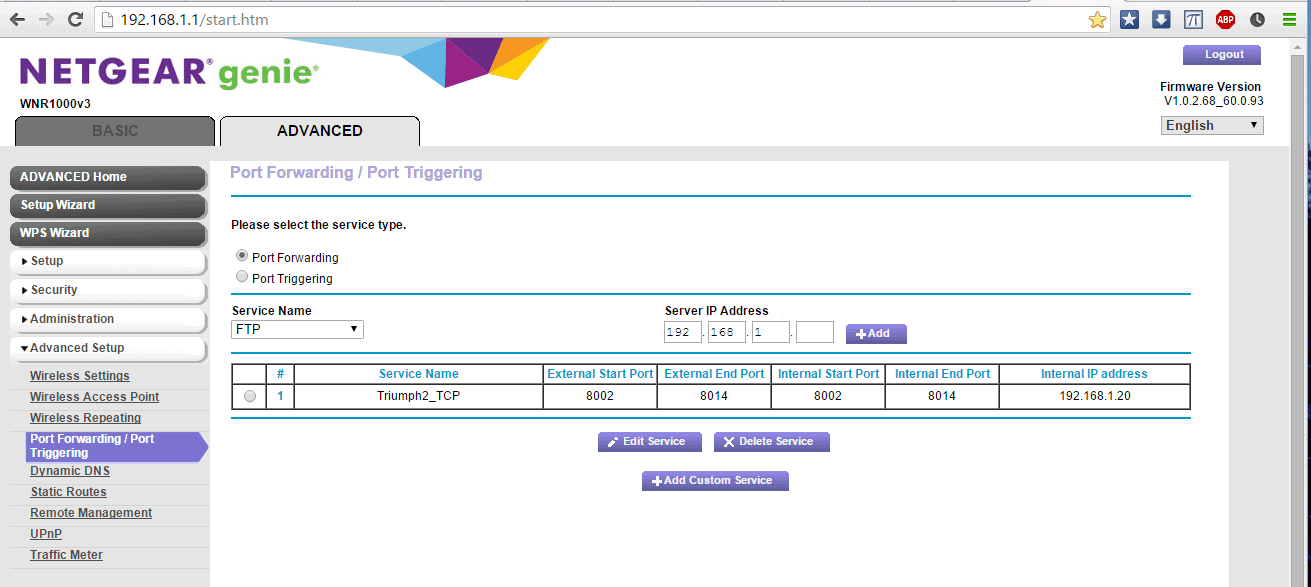
Once this is done you will be able to connect to the connection stream using your public IP address. Use http://whatismyipaddress.com/ to determine your public IP address.
Posted : January 18, 2016 2:32 pm
Translate
▼
English
Spanish
French
German
Italian
Portuguese
Russian
Chinese
Japanese
Korean
Arabic
Hindi
Dutch
Polish
Turkish
Vietnamese
Thai
Swedish
Danish
Finnish
Norwegian
Czech
Hungarian
Romanian
Greek
Hebrew
Indonesian
Malay
Ukrainian
Bulgarian
Croatian
Slovak
Slovenian
Serbian
Lithuanian
Latvian
Estonian
I just wrote a quick guide how to setup lefebure caster: https://dl.dropboxusercontent.com/u/98820835/lefebure%20ntrip%20caster%20setup.pdf
I also tested the caster again and it works like a charm ! 🙂
Posted : January 18, 2016 5:35 pm
Translate
▼
English
Spanish
French
German
Italian
Portuguese
Russian
Chinese
Japanese
Korean
Arabic
Hindi
Dutch
Polish
Turkish
Vietnamese
Thai
Swedish
Danish
Finnish
Norwegian
Czech
Hungarian
Romanian
Greek
Hebrew
Indonesian
Malay
Ukrainian
Bulgarian
Croatian
Slovak
Slovenian
Serbian
Lithuanian
Latvian
Estonian
i made a mistake, on page 2 it should be "not the local IP of your WiFi router" i just updated the dropbox link with the correction 😉
Posted : January 19, 2016 2:03 am
Page 1 / 2
Next