Reading RPLS is free for the whole profession. Members post, reply, and get the members-only rooms.

Notifications
Clear all

Topic starter
Translate
▼
English
Spanish
French
German
Italian
Portuguese
Russian
Chinese
Japanese
Korean
Arabic
Hindi
Dutch
Polish
Turkish
Vietnamese
Thai
Swedish
Danish
Finnish
Norwegian
Czech
Hungarian
Romanian
Greek
Hebrew
Indonesian
Malay
Ukrainian
Bulgarian
Croatian
Slovak
Slovenian
Serbian
Lithuanian
Latvian
Estonian
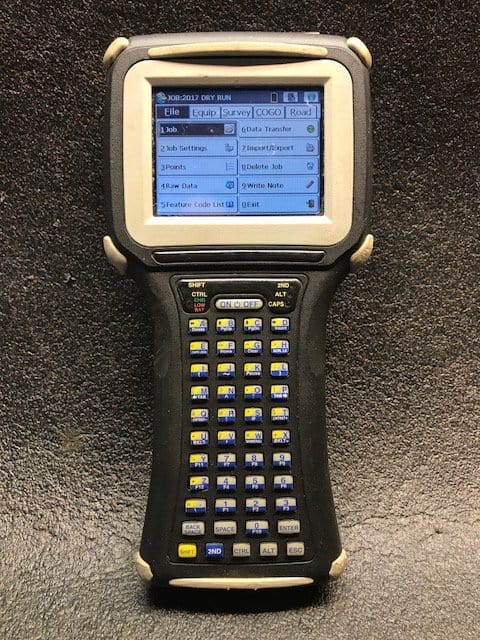
I have a fairly early Jett DC I bought from someone here (can't remember who) for a great price (less than $100). It's worked great until last fall when it started developing "stuck key" syndrome...characters would be repeated, without touching the touch screen, at times it would click away like a machine gun for a few seconds. I think it's starting to get worse, and I can't put rhyme or reason to what might be causing it. It's never been rained on; never dropped.
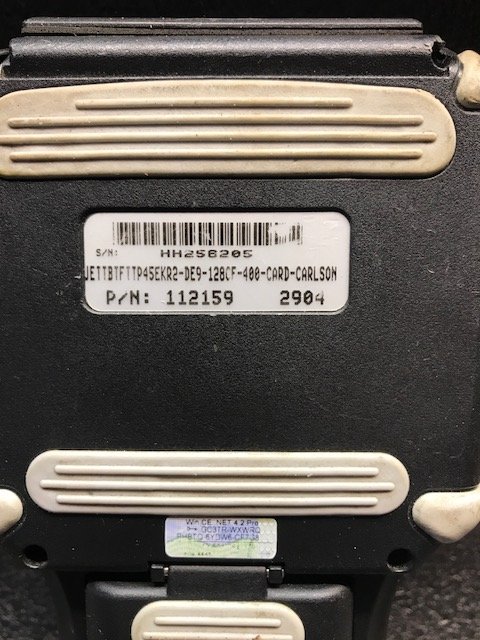
Before I start the hunt for a slightly newer unit (possibly with a slightly newer version of SurvCE on it), I thought I'd ask: Can the touch screens be replaced on these? I thought Nate did it but can't find that thread. Thanks in advance for any ideas.
Posted : April 24, 2017 6:44 pm

Translate
▼
English
Spanish
French
German
Italian
Portuguese
Russian
Chinese
Japanese
Korean
Arabic
Hindi
Dutch
Polish
Turkish
Vietnamese
Thai
Swedish
Danish
Finnish
Norwegian
Czech
Hungarian
Romanian
Greek
Hebrew
Indonesian
Malay
Ukrainian
Bulgarian
Croatian
Slovak
Slovenian
Serbian
Lithuanian
Latvian
Estonian
I recently have been opening up phones and replacing worn our parts in them for my grandkids to have something that will connect to my wifi when they are here and I use them as a bluetooth music player.
Had to get one of those micro toolkits that run $10 all over EBay and there are many how to videos on YouTube that will walk you thru the process plus the text instructions from many online sites with pictures and video.
So, my answer is that it is possible if you have a steady hand and patience.
Posted : April 24, 2017 8:21 pm

Translate
▼
English
Spanish
French
German
Italian
Portuguese
Russian
Chinese
Japanese
Korean
Arabic
Hindi
Dutch
Polish
Turkish
Vietnamese
Thai
Swedish
Danish
Finnish
Norwegian
Czech
Hungarian
Romanian
Greek
Hebrew
Indonesian
Malay
Ukrainian
Bulgarian
Croatian
Slovak
Slovenian
Serbian
Lithuanian
Latvian
Estonian
Have you reset to factory?
Not suggesting it's the issue, but I'd go that way before gutting it and giving it a new screen.
Does it have a screen protector? They say you should replace every so often, not sure time frame, 6 months?
Posted : April 24, 2017 9:26 pm

Translate
▼
English
Spanish
French
German
Italian
Portuguese
Russian
Chinese
Japanese
Korean
Arabic
Hindi
Dutch
Polish
Turkish
Vietnamese
Thai
Swedish
Danish
Finnish
Norwegian
Czech
Hungarian
Romanian
Greek
Hebrew
Indonesian
Malay
Ukrainian
Bulgarian
Croatian
Slovak
Slovenian
Serbian
Lithuanian
Latvian
Estonian
If you can find a new "box", it is very possible that you may be able to transfer the license of SurvCE to the new hardware.
Posted : April 24, 2017 9:31 pm

Translate
▼
English
Spanish
French
German
Italian
Portuguese
Russian
Chinese
Japanese
Korean
Arabic
Hindi
Dutch
Polish
Turkish
Vietnamese
Thai
Swedish
Danish
Finnish
Norwegian
Czech
Hungarian
Romanian
Greek
Hebrew
Indonesian
Malay
Ukrainian
Bulgarian
Croatian
Slovak
Slovenian
Serbian
Lithuanian
Latvian
Estonian
Replacing it is probably pretty doable if you're okay with the idea that you *might* kill it in the process, but finding a replacement screen at a reasonable cost might not be so easy. I'd probably open it and see if I could ID the manufacturer and model number, and then see if they're available on eBay. If you buy one from a dealer you're likely to pay more than 10 times the direct-from-China cost.
Posted : April 24, 2017 10:12 pm
Topic starter
Translate
▼
English
Spanish
French
German
Italian
Portuguese
Russian
Chinese
Japanese
Korean
Arabic
Hindi
Dutch
Polish
Turkish
Vietnamese
Thai
Swedish
Danish
Finnish
Norwegian
Czech
Hungarian
Romanian
Greek
Hebrew
Indonesian
Malay
Ukrainian
Bulgarian
Croatian
Slovak
Slovenian
Serbian
Lithuanian
Latvian
Estonian
Richard, post: 425258, member: 833 wrote: Have you reset to factory?
Not suggesting it's the issue, but I'd go that way before gutting it and giving it a new screen.
Does it have a screen protector? They say you should replace every so often, not sure time frame, 6 months?
Hadn't thought of that. But...if resetting to Factory wipes either WinCE or SurvCE, I can't do it, as I have no software on other media to restore it to. I have opened it, and there is another smart media card inside it, that may have the software on it. I'll read about what a factory reset does.
Posted : April 25, 2017 3:49 am
Topic starter
Translate
▼
English
Spanish
French
German
Italian
Portuguese
Russian
Chinese
Japanese
Korean
Arabic
Hindi
Dutch
Polish
Turkish
Vietnamese
Thai
Swedish
Danish
Finnish
Norwegian
Czech
Hungarian
Romanian
Greek
Hebrew
Indonesian
Malay
Ukrainian
Bulgarian
Croatian
Slovak
Slovenian
Serbian
Lithuanian
Latvian
Estonian
Jimmy Cleveland, post: 425259, member: 91 wrote: If you can find a new "box", it is very possible that you may be able to transfer the license of SurvCE to the new hardware.
Unlikely I can do that. It's running a very old version (2.05 I think) of SurvCE. I remember calling Carlson about buying an upgrade with the license and they said it was too old. Not sure I asked them specifically about transferring that license.
Posted : April 25, 2017 3:51 am
Topic starter
Translate
▼
English
Spanish
French
German
Italian
Portuguese
Russian
Chinese
Japanese
Korean
Arabic
Hindi
Dutch
Polish
Turkish
Vietnamese
Thai
Swedish
Danish
Finnish
Norwegian
Czech
Hungarian
Romanian
Greek
Hebrew
Indonesian
Malay
Ukrainian
Bulgarian
Croatian
Slovak
Slovenian
Serbian
Lithuanian
Latvian
Estonian
Jim Frame, post: 425262, member: 10 wrote: I'd probably open it and see if I could ID the manufacturer and model number, and then see if they're available on eBay. If you buy one from a dealer you're likely to pay more than 10 times the direct-from-China cost.
Thank you Jim. I'll open it and see if there's a part number and see if it's socketed or connectorized. I know someone with a full on desoldering station in case it's not.
Just wish I'd gotten on this last November, when weather shut me down.
Posted : April 25, 2017 3:55 am
Translate
▼
English
Spanish
French
German
Italian
Portuguese
Russian
Chinese
Japanese
Korean
Arabic
Hindi
Dutch
Polish
Turkish
Vietnamese
Thai
Swedish
Danish
Finnish
Norwegian
Czech
Hungarian
Romanian
Greek
Hebrew
Indonesian
Malay
Ukrainian
Bulgarian
Croatian
Slovak
Slovenian
Serbian
Lithuanian
Latvian
Estonian
I've successfully reset my Jet back to factory and reinstalled same programs.
It needs cooperation from supplier.
If you can get the serial number from your device I imagine you should be able to reset to factory and reinstall.
I realise software bit long in the tooth, but trust Carlson would honor a reinstall.
Factory reset wipes the lot and leaves you with a new install of windows mobile or whatever they run on.
Obviously no guarantee that's your problem.
I've seen some reasonably priced devices on ebay running later versions of SurveCe.
But that's still money to fork out.
You should be able to download from Carlson and install from your PC. It's pretty straightforward.
Posted : April 25, 2017 4:07 am

Translate
▼
English
Spanish
French
German
Italian
Portuguese
Russian
Chinese
Japanese
Korean
Arabic
Hindi
Dutch
Polish
Turkish
Vietnamese
Thai
Swedish
Danish
Finnish
Norwegian
Czech
Hungarian
Romanian
Greek
Hebrew
Indonesian
Malay
Ukrainian
Bulgarian
Croatian
Slovak
Slovenian
Serbian
Lithuanian
Latvian
Estonian
I have performed this surgery before with great success.
I picked up another Jett collector on eBay for $50 and took it apart before I dove into the Explorer.
You'll need some clear silicone to seal it back up, and you'll need a heat gun (used carefully) to help pry it apart.
I ran into one "hitch" is that the replacement screen from the slightly different model had a slightly different mounting than the Carlson. I was easily able to make it work.
When you crack it open, everything is just screws and ribbon cables; truly plug and play as Jett makes handheld collectors for many professions. The aforementioned donor I bought on eBay had been used for parking enforcement.
Good luck, and "your mileage may vary" 😎
Posted : April 25, 2017 9:28 am
Topic starter
Translate
▼
English
Spanish
French
German
Italian
Portuguese
Russian
Chinese
Japanese
Korean
Arabic
Hindi
Dutch
Polish
Turkish
Vietnamese
Thai
Swedish
Danish
Finnish
Norwegian
Czech
Hungarian
Romanian
Greek
Hebrew
Indonesian
Malay
Ukrainian
Bulgarian
Croatian
Slovak
Slovenian
Serbian
Lithuanian
Latvian
Estonian
Thanks very much. That's very helpful. I'm now wondering if a flaky ribbon cable connection might be the problem. I might open it up and take a look.
Posted : April 25, 2017 4:40 pm
Translate
▼
English
Spanish
French
German
Italian
Portuguese
Russian
Chinese
Japanese
Korean
Arabic
Hindi
Dutch
Polish
Turkish
Vietnamese
Thai
Swedish
Danish
Finnish
Norwegian
Czech
Hungarian
Romanian
Greek
Hebrew
Indonesian
Malay
Ukrainian
Bulgarian
Croatian
Slovak
Slovenian
Serbian
Lithuanian
Latvian
Estonian
I found a couple of pictures for you. I apologize for lack of size or detail as it was from quite some time ago. From what I remember now, once you crack it open, the screen only needs the ribbon disconnected (first picture), as it just sits inside the case basically. Some silicone may hold it in place but I can't remember for sure. Anyhow:
Donor unit opened up:
Screen successfully transplanted and powered on. You can see some adhesive around the margin on the old screen it seems, so I probably had to heat that up a little to separate it from the shell. And, those little plastic bits at the bottom...I think those are the small pieces I trimmed inside the Carlson Explorer to fit the new screen. Really though, plug and play:
Also, if you have a screen protector, try taking that off first to see if that helps your problem at all.
Posted : April 25, 2017 4:42 pm
Topic starter
Translate
▼
English
Spanish
French
German
Italian
Portuguese
Russian
Chinese
Japanese
Korean
Arabic
Hindi
Dutch
Polish
Turkish
Vietnamese
Thai
Swedish
Danish
Finnish
Norwegian
Czech
Hungarian
Romanian
Greek
Hebrew
Indonesian
Malay
Ukrainian
Bulgarian
Croatian
Slovak
Slovenian
Serbian
Lithuanian
Latvian
Estonian
I opened my unit. Looks super simple; all ribbon cable and ZIF sockets. Totally modular design. Found a couple of screens on ebay for $100 (but "make offer"). I think now I just wait it out and see if it gets any worse.
Posted : April 25, 2017 5:39 pm