Reading RPLS is free for the whole profession. Members post, reply, and get the members-only rooms.


Notifications
Clear all

Topic starter
Translate
▼
English
Spanish
French
German
Italian
Portuguese
Russian
Chinese
Japanese
Korean
Arabic
Hindi
Dutch
Polish
Turkish
Vietnamese
Thai
Swedish
Danish
Finnish
Norwegian
Czech
Hungarian
Romanian
Greek
Hebrew
Indonesian
Malay
Ukrainian
Bulgarian
Croatian
Slovak
Slovenian
Serbian
Lithuanian
Latvian
Estonian
I've been using SurvCE for about 4 years now and have never been able to figure out the zoom-to-point feature of the map screen. I'm hoping that someone smarter than me can point me in the right direction. Here's what the manual has to say about it:
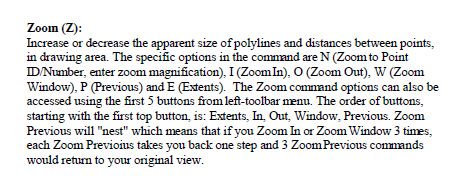
And here's what my map screen looks like:
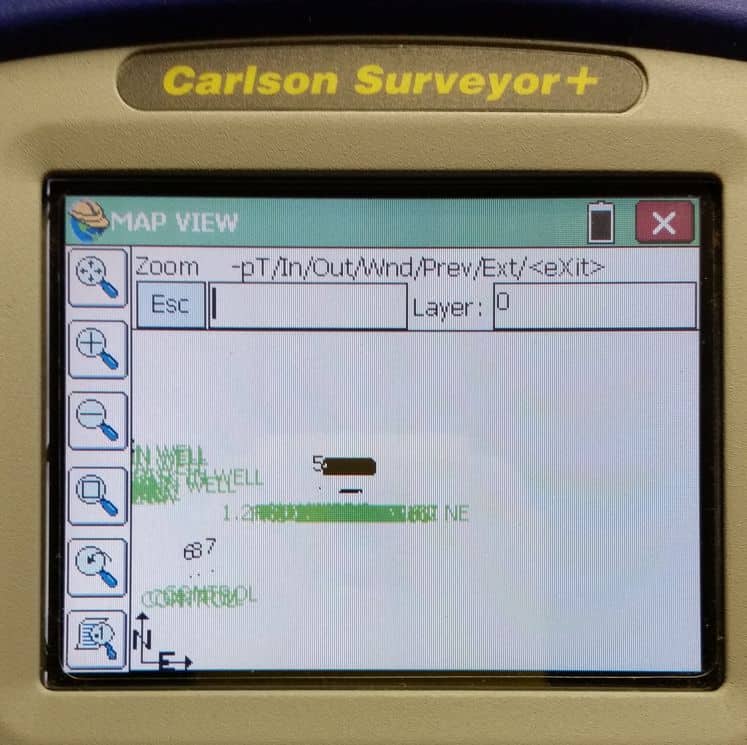
The command options on the screenshot don't seem to match the manual description. I've tried entering numerous combinations of a minus sign, p, T and point number, without any success. Hints, anyone?
Thanks!
Posted : February 19, 2016 8:24 am

Translate
▼
English
Spanish
French
German
Italian
Portuguese
Russian
Chinese
Japanese
Korean
Arabic
Hindi
Dutch
Polish
Turkish
Vietnamese
Thai
Swedish
Danish
Finnish
Norwegian
Czech
Hungarian
Romanian
Greek
Hebrew
Indonesian
Malay
Ukrainian
Bulgarian
Croatian
Slovak
Slovenian
Serbian
Lithuanian
Latvian
Estonian
Enter T, then green check, it should then prompt for point id, enter and enter magnification, then green check.
Posted : February 19, 2016 8:33 am
Translate
▼
English
Spanish
French
German
Italian
Portuguese
Russian
Chinese
Japanese
Korean
Arabic
Hindi
Dutch
Polish
Turkish
Vietnamese
Thai
Swedish
Danish
Finnish
Norwegian
Czech
Hungarian
Romanian
Greek
Hebrew
Indonesian
Malay
Ukrainian
Bulgarian
Croatian
Slovak
Slovenian
Serbian
Lithuanian
Latvian
Estonian
I use the find point option too (view, find point), which will find it and zoom in to it.
Posted : February 19, 2016 8:35 am
Topic starter
Translate
▼
English
Spanish
French
German
Italian
Portuguese
Russian
Chinese
Japanese
Korean
Arabic
Hindi
Dutch
Polish
Turkish
Vietnamese
Thai
Swedish
Danish
Finnish
Norwegian
Czech
Hungarian
Romanian
Greek
Hebrew
Indonesian
Malay
Ukrainian
Bulgarian
Croatian
Slovak
Slovenian
Serbian
Lithuanian
Latvian
Estonian
Adam, post: 358631, member: 8900 wrote: Enter T, then green check, it should then prompt for point id, enter and enter magnification, then green check.
Bingo! The "T" thing doesn't make much sense to me, but at least I now know how to do it.
Thanks!
P.S. Is there a Pan option besides using a stylus? I've found the touchscreen pan on the Allegro CX and Surveyor+ to be nearly useless, as the screen either jumps back to where it was or brings up a point list. I don't understand why I can't pan with the joystick...
Posted : February 19, 2016 8:42 am

Translate
▼
English
Spanish
French
German
Italian
Portuguese
Russian
Chinese
Japanese
Korean
Arabic
Hindi
Dutch
Polish
Turkish
Vietnamese
Thai
Swedish
Danish
Finnish
Norwegian
Czech
Hungarian
Romanian
Greek
Hebrew
Indonesian
Malay
Ukrainian
Bulgarian
Croatian
Slovak
Slovenian
Serbian
Lithuanian
Latvian
Estonian
FYI you can tell it's 'T' because that is the letter capitalized in the list of command choices. You will see similar functionality when drawing/editing polylines on the screen. I can't tell from the screen shot if you use field to finish or have linework on your collector, but it can be quite helpful. For example, I will draw the boundary line on the collector screen and then topo the lot. I can check the screen to make sure I filled in the whole boundary. (Good for wooded topo or irregular shaped lot type of stuff).
Posted : February 19, 2016 8:47 am
Translate
▼
English
Spanish
French
German
Italian
Portuguese
Russian
Chinese
Japanese
Korean
Arabic
Hindi
Dutch
Polish
Turkish
Vietnamese
Thai
Swedish
Danish
Finnish
Norwegian
Czech
Hungarian
Romanian
Greek
Hebrew
Indonesian
Malay
Ukrainian
Bulgarian
Croatian
Slovak
Slovenian
Serbian
Lithuanian
Latvian
Estonian
Jim Frame, post: 358634, member: 10 wrote: Bingo! The "T" thing doesn't make much sense to me, but at least I now know how to do it.
Thanks!
P.S. Is there a Pan option besides using a stylus? I've found the touchscreen pan on the Allegro CX and Surveyor+ to be nearly useless, as the screen either jumps back to where it was or brings up a point list. I don't understand why I can't pan with the joystick...
Jim, I think the reason the pan option is jumping back is because the setting auto zoom may be selected. If so then the screen will always jump back to your cursor position. Tap the little magnifying glass looking at the sheet of paper. uncheck auto zoom. I find panning really functional in survce.
Posted : February 19, 2016 8:58 am
Topic starter
Translate
▼
English
Spanish
French
German
Italian
Portuguese
Russian
Chinese
Japanese
Korean
Arabic
Hindi
Dutch
Polish
Turkish
Vietnamese
Thai
Swedish
Danish
Finnish
Norwegian
Czech
Hungarian
Romanian
Greek
Hebrew
Indonesian
Malay
Ukrainian
Bulgarian
Croatian
Slovak
Slovenian
Serbian
Lithuanian
Latvian
Estonian
Dan Patterson, post: 358635, member: 1179 wrote: I can't tell from the screen shot if you use field to finish or have linework on your collector
I use F2F in the office, but haven't ever tried it on the DC. (I use a custom-built F2F in the office, so the coding probably isn't compatible with SurvCE.) I find the DC map screen too small and the navigation too persnickety to use it except when I have to, and that's usually when I need to zoom to a point to figure out where I am or what I've already shot.
Posted : February 19, 2016 8:59 am
Topic starter
Translate
▼
English
Spanish
French
German
Italian
Portuguese
Russian
Chinese
Japanese
Korean
Arabic
Hindi
Dutch
Polish
Turkish
Vietnamese
Thai
Swedish
Danish
Finnish
Norwegian
Czech
Hungarian
Romanian
Greek
Hebrew
Indonesian
Malay
Ukrainian
Bulgarian
Croatian
Slovak
Slovenian
Serbian
Lithuanian
Latvian
Estonian
Adam, post: 358637, member: 8900 wrote: Jim, I think the reason the pan option is jumping back is because the setting auto zoom may be selected.
I unchecked Intelligent Zoom and that helped some. It's still jumpy, but better. Thanks for that tip!
Posted : February 19, 2016 9:02 am
Translate
▼
English
Spanish
French
German
Italian
Portuguese
Russian
Chinese
Japanese
Korean
Arabic
Hindi
Dutch
Polish
Turkish
Vietnamese
Thai
Swedish
Danish
Finnish
Norwegian
Czech
Hungarian
Romanian
Greek
Hebrew
Indonesian
Malay
Ukrainian
Bulgarian
Croatian
Slovak
Slovenian
Serbian
Lithuanian
Latvian
Estonian
Do you use Carlson in the office? I am curious about the custom built F2F. The Carlson f2f is customizable so you probably could use your existing F2F with some tweeking.
Posted : February 19, 2016 9:02 am
Translate
▼
English
Spanish
French
German
Italian
Portuguese
Russian
Chinese
Japanese
Korean
Arabic
Hindi
Dutch
Polish
Turkish
Vietnamese
Thai
Swedish
Danish
Finnish
Norwegian
Czech
Hungarian
Romanian
Greek
Hebrew
Indonesian
Malay
Ukrainian
Bulgarian
Croatian
Slovak
Slovenian
Serbian
Lithuanian
Latvian
Estonian
Jim Frame, post: 358640, member: 10 wrote: I unchecked Intelligent Zoom and that helped some. It's still jumpy, but better. Thanks for that tip!
There is another setting, but you may have to link to your robot or gps to see it. I dont see it in the map screen but in the Survey Store points map, tap the little magnifying glass looking at paper. It says Autozoom, which is different from intelligent zoom. I leave Intelligent zoom checked.
Posted : February 19, 2016 9:04 am
Topic starter
Translate
▼
English
Spanish
French
German
Italian
Portuguese
Russian
Chinese
Japanese
Korean
Arabic
Hindi
Dutch
Polish
Turkish
Vietnamese
Thai
Swedish
Danish
Finnish
Norwegian
Czech
Hungarian
Romanian
Greek
Hebrew
Indonesian
Malay
Ukrainian
Bulgarian
Croatian
Slovak
Slovenian
Serbian
Lithuanian
Latvian
Estonian
Adam, post: 358641, member: 8900 wrote: Do you use Carlson in the office?
I don't, I run BricsCAD with my own software. It's possible that I could tweak SurvCE to read my F2F coding, but I'm not sure it's worth the trouble -- I very rarely do any construction staking, and on most topo jobs I never need to look at the map screen. But I wanted to learn how to use the map screen command line to zoom to a point, because I hate using a stylus!
Posted : February 19, 2016 9:23 am