Reading RPLS is free for the whole profession. Members post, reply, and get the members-only rooms.

Notifications
Clear all

Topic starter
Translate
▼
English
Spanish
French
German
Italian
Portuguese
Russian
Chinese
Japanese
Korean
Arabic
Hindi
Dutch
Polish
Turkish
Vietnamese
Thai
Swedish
Danish
Finnish
Norwegian
Czech
Hungarian
Romanian
Greek
Hebrew
Indonesian
Malay
Ukrainian
Bulgarian
Croatian
Slovak
Slovenian
Serbian
Lithuanian
Latvian
Estonian
I have been using a new TSC3.
When using RTK and TSC2, I often calibrated to known coordinates, and my calibration screen would tell me how far "off" my rtk observations were between two points - meaning I would hold one coordinate, and the second point would be close but not perfect.
Using what I thought were the same properties and set up on my TSC3, I can't seem to work the same way: instead, I get both calibration points as "exact same". This seems forced, and is not how I want to work.
Thanks in advance for any and all advice on how to calibrate with TSC3.
Posted : April 25, 2016 8:47 pm

Translate
▼
English
Spanish
French
German
Italian
Portuguese
Russian
Chinese
Japanese
Korean
Arabic
Hindi
Dutch
Polish
Turkish
Vietnamese
Thai
Swedish
Danish
Finnish
Norwegian
Czech
Hungarian
Romanian
Greek
Hebrew
Indonesian
Malay
Ukrainian
Bulgarian
Croatian
Slovak
Slovenian
Serbian
Lithuanian
Latvian
Estonian
Just a thought.... is it adjusting the scale factor to "fit" the two points??
Posted : April 26, 2016 10:23 am

Translate
▼
English
Spanish
French
German
Italian
Portuguese
Russian
Chinese
Japanese
Korean
Arabic
Hindi
Dutch
Polish
Turkish
Vietnamese
Thai
Swedish
Danish
Finnish
Norwegian
Czech
Hungarian
Romanian
Greek
Hebrew
Indonesian
Malay
Ukrainian
Bulgarian
Croatian
Slovak
Slovenian
Serbian
Lithuanian
Latvian
Estonian
There's a check box in the Survey Style that says Set Scale To 1; my guess is it's checked on one and not the other. If it's unchecked it scales the GPS to fit the ground coordinates; this is the default.
I'd suggest that you download the General Survey Help file; TIM will link you to it (the info circle next to GS), so will this link:
http://www.trimble.com/Survey/Trimble-Access-IS.aspx
Go to Downloads and then Help Files and Release Notes.
Posted : April 26, 2016 2:08 pm

Translate
▼
English
Spanish
French
German
Italian
Portuguese
Russian
Chinese
Japanese
Korean
Arabic
Hindi
Dutch
Polish
Turkish
Vietnamese
Thai
Swedish
Danish
Finnish
Norwegian
Czech
Hungarian
Romanian
Greek
Hebrew
Indonesian
Malay
Ukrainian
Bulgarian
Croatian
Slovak
Slovenian
Serbian
Lithuanian
Latvian
Estonian
Any 2 points will make a line, therefore you won't show any residuals for either H or V. Add a 3rd point you will see H residuals but not V, why? Because any 3 points will make a plane. Add a 4th point and you will see V residuals as well. Been the same in TSC2 TSC3 all along.
Posted : April 26, 2016 3:37 pm
Topic starter
Translate
▼
English
Spanish
French
German
Italian
Portuguese
Russian
Chinese
Japanese
Korean
Arabic
Hindi
Dutch
Polish
Turkish
Vietnamese
Thai
Swedish
Danish
Finnish
Norwegian
Czech
Hungarian
Romanian
Greek
Hebrew
Indonesian
Malay
Ukrainian
Bulgarian
Croatian
Slovak
Slovenian
Serbian
Lithuanian
Latvian
Estonian
what makes me nervous is getting "zero residuals" with two points, when I know there is a small residual. On my own previously adjusted sites, I don't see why I need to go to three or four points, which I did not have to do with the TSC2. Therefore, I'm following L Dee's suggestion - that sounds like where I need to go.
Posted : April 26, 2016 8:32 pm
Translate
▼
English
Spanish
French
German
Italian
Portuguese
Russian
Chinese
Japanese
Korean
Arabic
Hindi
Dutch
Polish
Turkish
Vietnamese
Thai
Swedish
Danish
Finnish
Norwegian
Czech
Hungarian
Romanian
Greek
Hebrew
Indonesian
Malay
Ukrainian
Bulgarian
Croatian
Slovak
Slovenian
Serbian
Lithuanian
Latvian
Estonian
There won't be a residual with 2 points. Not if youre calibrating. You are forcing the project to scale to those points. If you have 3 you can't have the exact scale between all 3, therefore you get a residual. If you are thinking you want a scale factor or 1.00000000 yes you will have a residual, but calibrating will ignore the scale factor setting of 1.0000. Dont have RTN yet in my area, so I've calibrated literally 100s of jobs....
Posted : April 26, 2016 9:08 pm
Topic starter
Translate
▼
English
Spanish
French
German
Italian
Portuguese
Russian
Chinese
Japanese
Korean
Arabic
Hindi
Dutch
Polish
Turkish
Vietnamese
Thai
Swedish
Danish
Finnish
Norwegian
Czech
Hungarian
Romanian
Greek
Hebrew
Indonesian
Malay
Ukrainian
Bulgarian
Croatian
Slovak
Slovenian
Serbian
Lithuanian
Latvian
Estonian
I'm missing a togle. with my TSC2, on a daily basis, I would calibrate onto a known site. After two points, there would be a residual. my two known points were not exact distance as measured with RTK. I calibrate onto the first point, shoot the second point, and the actual difference between known points and measured RTK would show up as a residual. .01, or point 02., never 0.0000. I tried the above suggestion but the same thing is happening. If the TSC3 will not show residuals as the TSC2 did, I just need to know.
Posted : April 26, 2016 9:29 pm
Topic starter
Translate
▼
English
Spanish
French
German
Italian
Portuguese
Russian
Chinese
Japanese
Korean
Arabic
Hindi
Dutch
Polish
Turkish
Vietnamese
Thai
Swedish
Danish
Finnish
Norwegian
Czech
Hungarian
Romanian
Greek
Hebrew
Indonesian
Malay
Ukrainian
Bulgarian
Croatian
Slovak
Slovenian
Serbian
Lithuanian
Latvian
Estonian
i just checked my TSC2, and there are several 2-point calibrations that show a residual for the second point. all the set up is identical to my TSC3 settings. so, I'm stumped.
Posted : April 26, 2016 9:43 pm

Translate
▼
English
Spanish
French
German
Italian
Portuguese
Russian
Chinese
Japanese
Korean
Arabic
Hindi
Dutch
Polish
Turkish
Vietnamese
Thai
Swedish
Danish
Finnish
Norwegian
Czech
Hungarian
Romanian
Greek
Hebrew
Indonesian
Malay
Ukrainian
Bulgarian
Croatian
Slovak
Slovenian
Serbian
Lithuanian
Latvian
Estonian
A two point calibration should show residuals. I would imagine it would also reproject your file each time it is calibrated
Posted : April 28, 2016 7:27 am
Translate
▼
English
Spanish
French
German
Italian
Portuguese
Russian
Chinese
Japanese
Korean
Arabic
Hindi
Dutch
Polish
Turkish
Vietnamese
Thai
Swedish
Danish
Finnish
Norwegian
Czech
Hungarian
Romanian
Greek
Hebrew
Indonesian
Malay
Ukrainian
Bulgarian
Croatian
Slovak
Slovenian
Serbian
Lithuanian
Latvian
Estonian
I don't know about older versions of SC, but I don't remember either SC or Access ever showing residuals for a two point calibration. To prove this, I just grabbed a tablet running Access 2016.00 (current release) and keyed in Global coordinates 30 00 00N 90 00 00W and 30 00 10N and 90 00 00W. I then keyed in grid coordinates 5000,10000 and 5100,10000 and calibrated to those pairs. See below.
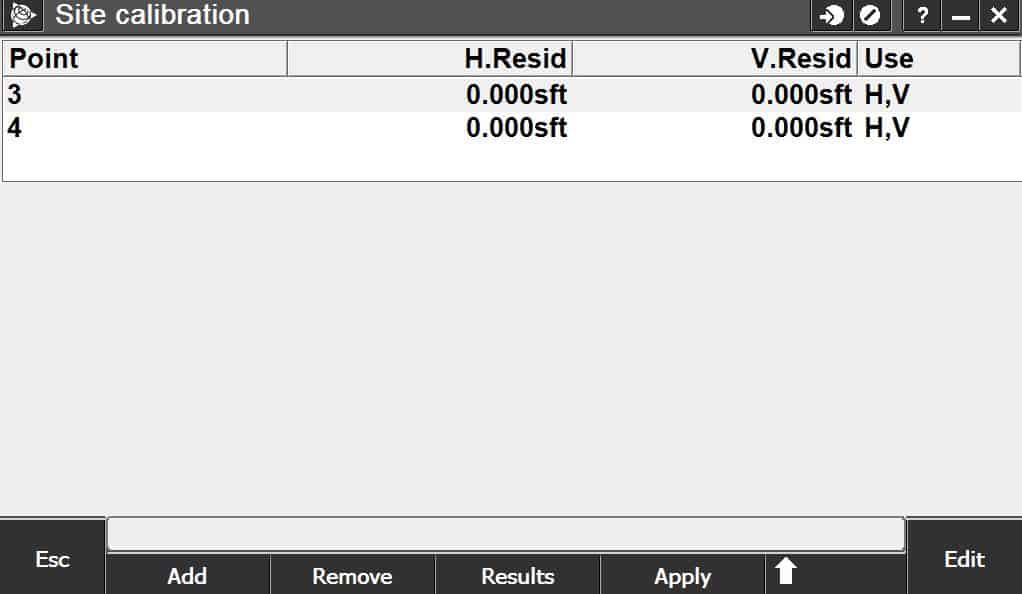
Posted : April 28, 2016 8:05 am
Translate
▼
English
Spanish
French
German
Italian
Portuguese
Russian
Chinese
Japanese
Korean
Arabic
Hindi
Dutch
Polish
Turkish
Vietnamese
Thai
Swedish
Danish
Finnish
Norwegian
Czech
Hungarian
Romanian
Greek
Hebrew
Indonesian
Malay
Ukrainian
Bulgarian
Croatian
Slovak
Slovenian
Serbian
Lithuanian
Latvian
Estonian
Lee D, post: 369813, member: 7971 wrote: I don't know about older versions of SC, but I don't remember either SC or Access ever showing residuals for a two point calibration. To prove this, I just grabbed a tablet running Access 2016.00 (current release) and keyed in Global coordinates 30 00 00N 90 00 00W and 30 00 10N and 90 00 00W. I then keyed in grid coordinates 5000,10000 and 5100,10000 and calibrated to those pairs. See below.
What's the scale factor on your example project??
Posted : April 28, 2016 8:24 am
Translate
▼
English
Spanish
French
German
Italian
Portuguese
Russian
Chinese
Japanese
Korean
Arabic
Hindi
Dutch
Polish
Turkish
Vietnamese
Thai
Swedish
Danish
Finnish
Norwegian
Czech
Hungarian
Romanian
Greek
Hebrew
Indonesian
Malay
Ukrainian
Bulgarian
Croatian
Slovak
Slovenian
Serbian
Lithuanian
Latvian
Estonian
Scale factor is 0.09898582.
Posted : April 28, 2016 9:05 am

Translate
▼
English
Spanish
French
German
Italian
Portuguese
Russian
Chinese
Japanese
Korean
Arabic
Hindi
Dutch
Polish
Turkish
Vietnamese
Thai
Swedish
Danish
Finnish
Norwegian
Czech
Hungarian
Romanian
Greek
Hebrew
Indonesian
Malay
Ukrainian
Bulgarian
Croatian
Slovak
Slovenian
Serbian
Lithuanian
Latvian
Estonian
I don't see how a residual could be calculated with 2 points unless you already had a scale factor applied. Even then your residual would just show the distance error.
Posted : April 28, 2016 9:08 am
Translate
▼
English
Spanish
French
German
Italian
Portuguese
Russian
Chinese
Japanese
Korean
Arabic
Hindi
Dutch
Polish
Turkish
Vietnamese
Thai
Swedish
Danish
Finnish
Norwegian
Czech
Hungarian
Romanian
Greek
Hebrew
Indonesian
Malay
Ukrainian
Bulgarian
Croatian
Slovak
Slovenian
Serbian
Lithuanian
Latvian
Estonian
I always have the scale factor set to 1 just for that reason. If you allow that to float, you will never get residuals on a (two point) line.... but more importantly, it will apply that scale factor to Everything else you measure. That is where you can get really screwed up.
Posted : April 28, 2016 9:10 am
Translate
▼
English
Spanish
French
German
Italian
Portuguese
Russian
Chinese
Japanese
Korean
Arabic
Hindi
Dutch
Polish
Turkish
Vietnamese
Thai
Swedish
Danish
Finnish
Norwegian
Czech
Hungarian
Romanian
Greek
Hebrew
Indonesian
Malay
Ukrainian
Bulgarian
Croatian
Slovak
Slovenian
Serbian
Lithuanian
Latvian
Estonian
Lee D, post: 369824, member: 7971 wrote: Scale factor is 0.09898582.
Now if you force the s/f to stay at 1, you would get residuals and you would know right away that something was wrong.
Posted : April 28, 2016 9:12 am
Translate
▼
English
Spanish
French
German
Italian
Portuguese
Russian
Chinese
Japanese
Korean
Arabic
Hindi
Dutch
Polish
Turkish
Vietnamese
Thai
Swedish
Danish
Finnish
Norwegian
Czech
Hungarian
Romanian
Greek
Hebrew
Indonesian
Malay
Ukrainian
Bulgarian
Croatian
Slovak
Slovenian
Serbian
Lithuanian
Latvian
Estonian
I tried it both ways - with and without Set Scale to 1 checked. Per Trimble's literature, the Set Scale to One holds the GPS distances over the calibration point distances and should be used in a case where you believe the GPS to be more precise than the points you're calibrating to. But you still don't get residuals with only two points.
Posted : April 28, 2016 9:13 am
Translate
▼
English
Spanish
French
German
Italian
Portuguese
Russian
Chinese
Japanese
Korean
Arabic
Hindi
Dutch
Polish
Turkish
Vietnamese
Thai
Swedish
Danish
Finnish
Norwegian
Czech
Hungarian
Romanian
Greek
Hebrew
Indonesian
Malay
Ukrainian
Bulgarian
Croatian
Slovak
Slovenian
Serbian
Lithuanian
Latvian
Estonian
In any case this is interesting as a purely academic exercise but with all due respect I would never calibrate to two points in the real world.
Posted : April 28, 2016 9:17 am
Translate
▼
English
Spanish
French
German
Italian
Portuguese
Russian
Chinese
Japanese
Korean
Arabic
Hindi
Dutch
Polish
Turkish
Vietnamese
Thai
Swedish
Danish
Finnish
Norwegian
Czech
Hungarian
Romanian
Greek
Hebrew
Indonesian
Malay
Ukrainian
Bulgarian
Croatian
Slovak
Slovenian
Serbian
Lithuanian
Latvian
Estonian
Lee D, post: 369831, member: 7971 wrote: In any case this is interesting as a purely academic exercise but with all due respect I would never calibrate to two points in the real world.
yes, agreed on that for sure!
Posted : April 28, 2016 2:20 pm

Translate
▼
English
Spanish
French
German
Italian
Portuguese
Russian
Chinese
Japanese
Korean
Arabic
Hindi
Dutch
Polish
Turkish
Vietnamese
Thai
Swedish
Danish
Finnish
Norwegian
Czech
Hungarian
Romanian
Greek
Hebrew
Indonesian
Malay
Ukrainian
Bulgarian
Croatian
Slovak
Slovenian
Serbian
Lithuanian
Latvian
Estonian
Is it possible to set the scale factor to the proper geodetic combined factor instead of 1?
Posted : April 29, 2016 5:18 am
Translate
▼
English
Spanish
French
German
Italian
Portuguese
Russian
Chinese
Japanese
Korean
Arabic
Hindi
Dutch
Polish
Turkish
Vietnamese
Thai
Swedish
Danish
Finnish
Norwegian
Czech
Hungarian
Romanian
Greek
Hebrew
Indonesian
Malay
Ukrainian
Bulgarian
Croatian
Slovak
Slovenian
Serbian
Lithuanian
Latvian
Estonian
A calibration would set its own scale. A calibration should always be done using static data, then once done to acceptable limits never, never redone to a file.
Posted : April 29, 2016 5:46 am
Page 1 / 2
Next