Reading RPLS is free for the whole profession. Members post, reply, and get the members-only rooms.


Notifications
Clear all

Topic starter
Translate
▼
English
Spanish
French
German
Italian
Portuguese
Russian
Chinese
Japanese
Korean
Arabic
Hindi
Dutch
Polish
Turkish
Vietnamese
Thai
Swedish
Danish
Finnish
Norwegian
Czech
Hungarian
Romanian
Greek
Hebrew
Indonesian
Malay
Ukrainian
Bulgarian
Croatian
Slovak
Slovenian
Serbian
Lithuanian
Latvian
Estonian
I'm just finishing application for RTK measurements directly from Android device (Bluetooth connection with RTK) and last days i've achieved another goal: the possibility to create GNSS raports from survey made on my RTK Android software.
This software has support for some of local coordinate systems, local geoids files and bring some calculations (COGO) like linear intersections, orthogonal offsets, intersections by 4-pt and many others. Of course one can also do the stakeout session. You can simply connect the Disto rangefinders (like A6, D8 or D3aBT) or Bosch (GLM100C) and do the linear intersection fast.
Some of the screens from previous (extended) version can be seen on local surveyors forum (only PL language): Android software for RTK
Current screens with RTK measurement:
(icon meaning, horizontal: GPS Measure, GPS Stakeout,File, Options, Hardware, Fullscreen)
(icon meaning, vertical: Undo, Redo, Search, Calculations, Draw, Edit)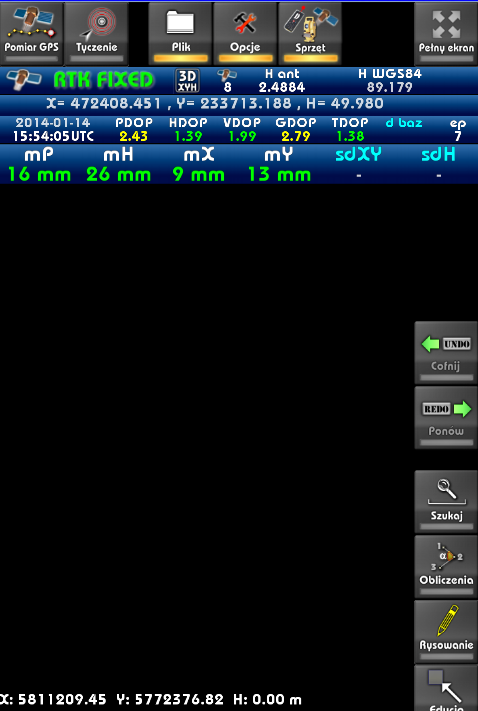
So I concern is it worth to create local (english) version of this app and target it to your local markets?
kind regards
Posted : June 9, 2014 8:06 am
Translate
▼
English
Spanish
French
German
Italian
Portuguese
Russian
Chinese
Japanese
Korean
Arabic
Hindi
Dutch
Polish
Turkish
Vietnamese
Thai
Swedish
Danish
Finnish
Norwegian
Czech
Hungarian
Romanian
Greek
Hebrew
Indonesian
Malay
Ukrainian
Bulgarian
Croatian
Slovak
Slovenian
Serbian
Lithuanian
Latvian
Estonian
How does it work? Does it connect to a GPS rover by bluetooth?
Which models?
Looks impressive anyway.
Posted : June 9, 2014 9:14 am
Topic starter
Translate
▼
English
Spanish
French
German
Italian
Portuguese
Russian
Chinese
Japanese
Korean
Arabic
Hindi
Dutch
Polish
Turkish
Vietnamese
Thai
Swedish
Danish
Finnish
Norwegian
Czech
Hungarian
Romanian
Greek
Hebrew
Indonesian
Malay
Ukrainian
Bulgarian
Croatian
Slovak
Slovenian
Serbian
Lithuanian
Latvian
Estonian
Thanks for reply.
First, you configure the GPS module. Application supports position from two gps at once + distance meter. You can configure these GPS in settings, so you can setup for example RTK rover on bluetooth and Android GPS for navigation.
Source for GPS can be:
- bluetooth (external receiver)
- log file (if you have binary file from antenna)
- android (built-in gps)
When you finish configure, you press Connect icon, and GPS starts - initialize receiver, setup antenna, commands and get raw data.
Raw data are decoded to RTK data like:
- GPS position in local coordinates XYH
- GPS position in WGS84
- solution precision parameters (DOP, HSIG/VSIG (mP,mH on screen))
- base information (ID, base vectors, length of base vector)
- reduced height (according to selected geoid model)
Application can be setup easily, so log file can be recorded autmatically (to one could replay them when needed).
Position is displayed on the map, so you can enter the GPS Measure and:
- center map position according to the gps
- select measurement method (point averaged, point continous, point single)
- run/reset the survey (when you want to get averaged measure from some epochs or add current measure [single point measurement]
- run the stakeout - you select point you want to stake and application show distance and vector to the desired point
Data from GPS are recorded in file *.RTKP which includes data like can be seen in other log files like RW5, JXL..etc (and used for make GPS report from survey).
Having measured some points, one can edit it properties (key=value), symbol id, point name or use it with COGO modules to make some calculations like offsets, intersections. You can also change color of lines, widths..etc
In the first version we've implement 18 different calculations types but for test surveyors it was too much (too complicated) 🙂 So limited it into the 8 most commonly used. First version Cad-Room was supposed to mix the survey module and architectural (plan) module - it has name CadRoom. However our testers said that app should be small/easy to use to divided project, and current version RTK PowerGPS is focused on the geodetic/survey functions.
Version which is currently under development, will have some functions like:
- loading control points from txt files
- loading vector map overlay from DXF, DGN (v7), OSM (OpenStreetMap), GML/XML
- loading raster WMS/TMS services like OpenStreetMap, WMS (Geoportals)..etc
- filter for precision (min hsig/vsig, epochs count...etc)
In the near future:
- download map overlay from OpenStreetMap server
- loading TIFF files
Back to the hardware:
Till this time we've implemented support for NMEA (but RTK in nmea isn't very rich), Kolida K-9T based on Trimble BD970 architecture (with initialization and receiving binary data from receiver, works great). So other devices based on BD970 rather should work, because most of initialization procedures are from Trimble protocol.
Also have some procedures for reading from Novatel OEMV devices (tested on data from Spectra Precision Epoch35). I'm open to any other devices, but for small developer studio, don't have sufficient funds to do it all at one moment - we've based on the hardware of surveyors that have access to given receivers. We've rather seek for investor for that project right now, to add new hardware models.
I think we can add support for any hardware, when we get some specs and hardware do tests. Producers of the measurement equipment usually have some own solutions so don't want to share their specs to the unknown/small developers, so sometime there is hard, but not impossible.
kind regards
Posted : June 9, 2014 9:51 am
Translate
▼
English
Spanish
French
German
Italian
Portuguese
Russian
Chinese
Japanese
Korean
Arabic
Hindi
Dutch
Polish
Turkish
Vietnamese
Thai
Swedish
Danish
Finnish
Norwegian
Czech
Hungarian
Romanian
Greek
Hebrew
Indonesian
Malay
Ukrainian
Bulgarian
Croatian
Slovak
Slovenian
Serbian
Lithuanian
Latvian
Estonian
Android GPS
So you still need 2 GPS receivers - base station and rover, but you can use the android device instead of a logger?
Posted : June 9, 2014 10:03 am
Topic starter
Translate
▼
English
Spanish
French
German
Italian
Portuguese
Russian
Chinese
Japanese
Korean
Arabic
Hindi
Dutch
Polish
Turkish
Vietnamese
Thai
Swedish
Danish
Finnish
Norwegian
Czech
Hungarian
Romanian
Greek
Hebrew
Indonesian
Malay
Ukrainian
Bulgarian
Croatian
Slovak
Slovenian
Serbian
Lithuanian
Latvian
Estonian
Android GPS
To measure you need only one GPS:
- RTK - if you want to do the RTK survey
- Android or external/car Bluetooth GPS - if you want to do the amateur measurement
We didn't have opportunity to test connection like Base+Rover - only testing in Rover mode with RTN option (virtual base stations through NTRIP services), because this option is commonly used by our clients.
Posted : June 9, 2014 10:07 am
Topic starter
Translate
▼
English
Spanish
French
German
Italian
Portuguese
Russian
Chinese
Japanese
Korean
Arabic
Hindi
Dutch
Polish
Turkish
Vietnamese
Thai
Swedish
Danish
Finnish
Norwegian
Czech
Hungarian
Romanian
Greek
Hebrew
Indonesian
Malay
Ukrainian
Bulgarian
Croatian
Slovak
Slovenian
Serbian
Lithuanian
Latvian
Estonian
Android GPS
Dialog for setup NTRIP options is ready, currently we working on setup remote hardware (Kolida) with NTRIP data - Kolida have protocol that contains 3 different datatypes (nmea, trimble and kolida's), so NTRIP most concern this third protocol.
Second option for NTRIP will be passing the receiving NTRIP data from server and passing it through the choosen Bluetooth port of the GPS receiver (GPS port or second port for corrections). Procedures for receiving NTRIP from internet connection are finished, the last option is integration and connect it to the settings of the Android app.
There is parallel development of Windows (XP/7/8) version of this app, so it will be version that should work on the Surface tablets that support Win7/Win8 desktop apps.
P.S. In 2010 we've developed some RS232-Bluetooth-USB adapter, so teoretically users that have old devices with RS232 connection can have some ready solution for work with Bluetooth phones and tablets.
Posted : June 9, 2014 10:15 am
Translate
▼
English
Spanish
French
German
Italian
Portuguese
Russian
Chinese
Japanese
Korean
Arabic
Hindi
Dutch
Polish
Turkish
Vietnamese
Thai
Swedish
Danish
Finnish
Norwegian
Czech
Hungarian
Romanian
Greek
Hebrew
Indonesian
Malay
Ukrainian
Bulgarian
Croatian
Slovak
Slovenian
Serbian
Lithuanian
Latvian
Estonian
Android GPS
It could make a cheap(er) data collector. Is Kolida your local NTRIP service?
Which devices have you been testing with then? Trimble?
Posted : June 9, 2014 10:19 am
Topic starter
Translate
▼
English
Spanish
French
German
Italian
Portuguese
Russian
Chinese
Japanese
Korean
Arabic
Hindi
Dutch
Polish
Turkish
Vietnamese
Thai
Swedish
Danish
Finnish
Norwegian
Czech
Hungarian
Romanian
Greek
Hebrew
Indonesian
Malay
Ukrainian
Bulgarian
Croatian
Slovak
Slovenian
Serbian
Lithuanian
Latvian
Estonian
Android GPS
When you look on the price of Android devices (especially there are some new rugged Android tablets) it should be good solution to the surveyors.
Our local NTRIP service for tests with Kolida and Epoch was ASGEupos (ASGEupos homepage), national NTRIP service for PL (it works only when you send GPGGA position to the provider). However NTRIP is standard so it should work with other services based on NTRIP protocol.
I know, that Kolida models are equipped with GSM module, so NTRIP module can be configured remotely and one don't have to pass corrections to the receiver - only supposed to configure it.
We tested on a few models of Kolida's K-9T (based on the Trimble BD970 chipset) with comparison to the SurvCE software, and Epoch 35 based on the other software.
We consider which models we should test with first order (after we finish with NTRIP for Kolida). Some surveyors tells me that it should be CHC but there was models based both on the Trimble and Novatel chipset.
Posted : June 9, 2014 10:30 am
Translate
▼
English
Spanish
French
German
Italian
Portuguese
Russian
Chinese
Japanese
Korean
Arabic
Hindi
Dutch
Polish
Turkish
Vietnamese
Thai
Swedish
Danish
Finnish
Norwegian
Czech
Hungarian
Romanian
Greek
Hebrew
Indonesian
Malay
Ukrainian
Bulgarian
Croatian
Slovak
Slovenian
Serbian
Lithuanian
Latvian
Estonian
Android GPS
Ah - Kolida is a GPS receiver manufacturer.
Could be an overall cheap solution then.
The cost of the RTN licence is still high in the UK though.
Posted : June 9, 2014 11:30 am
Topic starter
Translate
▼
English
Spanish
French
German
Italian
Portuguese
Russian
Chinese
Japanese
Korean
Arabic
Hindi
Dutch
Polish
Turkish
Vietnamese
Thai
Swedish
Danish
Finnish
Norwegian
Czech
Hungarian
Romanian
Greek
Hebrew
Indonesian
Malay
Ukrainian
Bulgarian
Croatian
Slovak
Slovenian
Serbian
Lithuanian
Latvian
Estonian
Android GPS
In fact, current version of app is in polish language, only part of icons are translated to english. But translation is only part of the localization.
The best localization have to be done for given country, because every of it uses it's own coordinate systems, have it own requirements..etc
First when we want to have localized version we have to know info like:
- geoids file (for example in text file - for all grid) - to do the height corrections - convert from WGS84 to normal heights
- coordinate systems (typical measurements are done in local [XYH] systems not WGS84; even receiver works on ECEF/WGS84 cartesian values). In according to universal XYZ reference systems, we've implemented Web-Mercator [projection used by Google] and UTM for a few zones, last time added ECEF/WGS84 cartesian. But don't know which CS are used in your area
- precision requirements (in Poland we have some requirements, for example when you use RTK you have to check control points - you have to check: HSIG(mXY)<=12cm VSIG(mH)<=9cm, and nearest control point have to be near that 5km from the every measured point)
- local WMS/TMS services (in Poland we have Geoportal - web service that provides ortho, topo and raster maps in WMS format, which are commonly used by surveyors). But it is a local (country) service. Every country has it's own service like this. But there are global services (like TMS - OpenStreetMap which have offers good quality of the map data)
Here's the adapter RS232-USB-Bluetooth hardware page, if somebody is interested:
Ultra Adapter
I've use the adapter often for simulation (for example for simulation of Kolida or other devices when i've some log/antenna data) - it works with PC, Android, Windows Mobile.
kind regards
Posted : June 9, 2014 2:57 pm
Topic starter
Translate
▼
English
Spanish
French
German
Italian
Portuguese
Russian
Chinese
Japanese
Korean
Arabic
Hindi
Dutch
Polish
Turkish
Vietnamese
Thai
Swedish
Danish
Finnish
Norwegian
Czech
Hungarian
Romanian
Greek
Hebrew
Indonesian
Malay
Ukrainian
Bulgarian
Croatian
Slovak
Slovenian
Serbian
Lithuanian
Latvian
Estonian
Android GPS
Kolida and CHC manufacturers that create cheaper version of the receivers. Most of surveyors from our market says there are "chinese". For example: Kolida made K-9T model, CHC made X900, X900+.
Most of that models are based on the Trimble or Novatel chipsets, so guarantee good quality of the RTK solution. There are some surveyors which claims that devices offers better fix than other products made by companies like Trimble, Leica..etc (in the same worst condition Leica still didn't get the fix, but Kolida do). The question that can't be avoided is question of service and guarantee, but I hear that our local provider offers good support of Kolida devices, so I think it could be very good alternative instead of expensive brand survey.
I hear that there are some voices to create open RTN services (like we have OpenStreetMap project for maps), but I see that it is still far away from normal use. In our country ASGEupos is rather for free, but they plan to introduce some payments per year from last few years. Till that, surveyors rather don't have to think about other systems. When you have virtual stations from RTN and only rover+controller (hardware+software) it is still cheaper/economic than buying all: base, rover and controller.
In that situation Android controller is definitely very good option. When controller crashes or battery charges off, you can use your phone to continue and finish measurement. But from author perspective it will be good to focus on providing software that could offer not only temporary help but mostly good alternative/replacement.
Usually big companies that delivers products are focused on their local markets, so don't reacts fast on user's needs, especially when users comes from other countries/small markets.
For example: can you use Bosch GLM100C distance meter with SurvCe? It still isn't supported. When you want to use it with SurvCe you have to invest with special disto emulator (that makes SurvCe recognize Bosch as Disto) so have another cost and tool. I've written that kind of emulator when one of our clients reported problem (using Bosch & SurvCe) question and says that producer of SurvCe ignored his question. If you want get more info I can translate some article that I made recent time for one of the technical blog that concern rangefinder survey.
So when you have to spent some $1500 over controler, but you can buy more economic and better supported modern android equipment - which version you choose?
Posted : June 9, 2014 7:03 pm

Translate
▼
English
Spanish
French
German
Italian
Portuguese
Russian
Chinese
Japanese
Korean
Arabic
Hindi
Dutch
Polish
Turkish
Vietnamese
Thai
Swedish
Danish
Finnish
Norwegian
Czech
Hungarian
Romanian
Greek
Hebrew
Indonesian
Malay
Ukrainian
Bulgarian
Croatian
Slovak
Slovenian
Serbian
Lithuanian
Latvian
Estonian
Looks good.
I see you have a total station in the Equipment icon.
Is that side also an option?
One issue in our bright sun (Australia) is the screen.
I've yet to see any device, Android or Apple, that is anywhere as good as current data recorders.
Do such devices exist?
Keep up the good work.
Posted : June 21, 2014 9:27 pm

Translate
▼
English
Spanish
French
German
Italian
Portuguese
Russian
Chinese
Japanese
Korean
Arabic
Hindi
Dutch
Polish
Turkish
Vietnamese
Thai
Swedish
Danish
Finnish
Norwegian
Czech
Hungarian
Romanian
Greek
Hebrew
Indonesian
Malay
Ukrainian
Bulgarian
Croatian
Slovak
Slovenian
Serbian
Lithuanian
Latvian
Estonian
Android GPS
Skyraster, I'm so glad to see what you have been doing, and I'm hoping you keep going. Did you see the work that JAVAD has done with the Triumph 2 and Android?
Posted : July 13, 2014 1:06 pm
Topic starter
Translate
▼
English
Spanish
French
German
Italian
Portuguese
Russian
Chinese
Japanese
Korean
Arabic
Hindi
Dutch
Polish
Turkish
Vietnamese
Thai
Swedish
Danish
Finnish
Norwegian
Czech
Hungarian
Romanian
Greek
Hebrew
Indonesian
Malay
Ukrainian
Bulgarian
Croatian
Slovak
Slovenian
Serbian
Lithuanian
Latvian
Estonian
> Looks good.
> I see you have a total station in the Equipment icon.
> Is that side also an option?
In near future we add support for some total station equipment. At this time we have Distance Meter, dual GPS and NTRIP hardware icon access. In the near future it will appear Total Station, Accelerometer and Magnetic field sensor.
> One issue in our bright sun (Australia) is the screen.
> I've yet to see any device, Android or Apple, that is anywhere as good as current data recorders.
> Do such devices exist?
Yes, modern mobile devices like phones and tablets often have glass screen which isn't always as good as typical matte screen of data recorders. Why Android devices have glass screen? Here's some tips: http://connect.dpreview.com/forums/thread/3349424
In fact there are hardware suppliers (mostly from China), that can built some custom hardware, so in theory, it should be possible to order device with matte screen. But for that reason you have to use rather stylus for work with that equipment. For Android screen stylus have to be dedicated and it isn't cheap as typical stylus items($50). Android system is designed to use it with fingers . When you have stylus you rather don't use two-finger gestures.
I think there are other solutions:
- anti-glare coating (something like this http://www.amazon.com/Belkin-Anti-Glare-Protector-Overlay-Samsung/dp/B004BDOREC)
- anti-sun covers (  )
)
For the bright sun i've added some color layouts - with possibility to switch background colors fast (between four main schemes). When app will be ready and bring some feedback from more users maybe we can elaborate some better/smart solution.
> Keep up the good work.
Thanks - we are near to publish first public releases with some modules - there will be version for warp points localization, version for GIS data acqusition (when one want to set some dictionaries) and finally version for RTK measurement). You can email me (office@skyraster.com) and I will email you when it's done.
kind regards
Posted : July 13, 2014 3:35 pm
Translate
▼
English
Spanish
French
German
Italian
Portuguese
Russian
Chinese
Japanese
Korean
Arabic
Hindi
Dutch
Polish
Turkish
Vietnamese
Thai
Swedish
Danish
Finnish
Norwegian
Czech
Hungarian
Romanian
Greek
Hebrew
Indonesian
Malay
Ukrainian
Bulgarian
Croatian
Slovak
Slovenian
Serbian
Lithuanian
Latvian
Estonian
I look forward with interest in Android for TS.
> In fact there are hardware suppliers (mostly from China), that can built some custom hardware, so in theory, it should be possible to order device with matte screen. But for that reason you have to use rather stylus for work with that equipment. For Android screen stylus have to be dedicated and it isn't cheap as typical stylus items($50). Android system is designed to use it with fingers . When you have stylus you rather don't use two-finger gestures.
>
I have a Samsung Note 10.1 and Samsung S3, both with stylus.
They really make Android sing in my opinion and I wouldn't buy another Android without a dedicated stylus. These aren't just a piece of tube with a rubbery end, but interact with the operating system/ application.
One can still pinch and zoom etc with fingers.
Great bits of gear. Plug over!
I've looked at another developer that has a Total Station version in English and whilst good, it lacks polish just now.
To be fair he is still developing so I'm not condemning it.
I guess English versions will be essential for us so language oriented.
But definitely worth pursuing.
Keep posting to this forum please.
Posted : August 1, 2014 10:17 pm
Topic starter
Translate
▼
English
Spanish
French
German
Italian
Portuguese
Russian
Chinese
Japanese
Korean
Arabic
Hindi
Dutch
Polish
Turkish
Vietnamese
Thai
Swedish
Danish
Finnish
Norwegian
Czech
Hungarian
Romanian
Greek
Hebrew
Indonesian
Malay
Ukrainian
Bulgarian
Croatian
Slovak
Slovenian
Serbian
Lithuanian
Latvian
Estonian
> Keep posting to this forum please.
A few days later we've finally posted official version of RTK PowerGPS (still Polish-oriented version) but with a new improvements and support for new devices (like Trimble SPS882 or South S82.2014). It takes too much time than expected but i think it was worth it.
In this video i've shown how to:
- measure control point (at start and end of the surveying session) - RTK measure with stakeout-like panel
- make simple point measure
- how to measure distances between points
- how to export data to shape file and dxf (with upload data to our new webservice rtk24 - net storage)
- how to generate RTK report directly from Android
So at this moment we can focus on localization and translation purposes.
kind regards
Mark
Posted : April 7, 2015 9:49 pm