Reading RPLS is free for the whole profession. Members post, reply, and get the members-only rooms.

Notifications
Clear all
Strictly Surveying
18
Posts
7
Users
0
Reactions
423
Views

Topic starter
Translate
▼
English
Spanish
French
German
Italian
Portuguese
Russian
Chinese
Japanese
Korean
Arabic
Hindi
Dutch
Polish
Turkish
Vietnamese
Thai
Swedish
Danish
Finnish
Norwegian
Czech
Hungarian
Romanian
Greek
Hebrew
Indonesian
Malay
Ukrainian
Bulgarian
Croatian
Slovak
Slovenian
Serbian
Lithuanian
Latvian
Estonian
Is there a way in TopSurv to do a point to line inverse and have a new point stored at the resulting intersection? I've been through both the user and reference manuals and can't find it. It will do point to line inverses and give you the resulting info but no stored point on the original line.
Posted : March 30, 2011 5:25 pm

Translate
▼
English
Spanish
French
German
Italian
Portuguese
Russian
Chinese
Japanese
Korean
Arabic
Hindi
Dutch
Polish
Turkish
Vietnamese
Thai
Swedish
Danish
Finnish
Norwegian
Czech
Hungarian
Romanian
Greek
Hebrew
Indonesian
Malay
Ukrainian
Bulgarian
Croatian
Slovak
Slovenian
Serbian
Lithuanian
Latvian
Estonian
it is just a bearing bearing intersection.
Posted : March 30, 2011 6:18 pm
Topic starter
Translate
▼
English
Spanish
French
German
Italian
Portuguese
Russian
Chinese
Japanese
Korean
Arabic
Hindi
Dutch
Polish
Turkish
Vietnamese
Thai
Swedish
Danish
Finnish
Norwegian
Czech
Hungarian
Romanian
Greek
Hebrew
Indonesian
Malay
Ukrainian
Bulgarian
Croatian
Slovak
Slovenian
Serbian
Lithuanian
Latvian
Estonian
A bearing bearing intersection will not do what I'm looking for. Say I have a line that starts at point #1 and ends at point #2 and a point #3 that is off to one side. I want the DC to tell me the perpendicular distance from #3 to the line created by #1 & #2 and also store a point where that perpendicular distance intersects the line. TopSurv's Point-to-Line inverse will do all of the above except store the point at the intersection. Using bearing bearing on TopSurv would require me to calc the bearing perpendicular to the line created by #1 & #2.
Posted : March 30, 2011 6:50 pm
Translate
▼
English
Spanish
French
German
Italian
Portuguese
Russian
Chinese
Japanese
Korean
Arabic
Hindi
Dutch
Polish
Turkish
Vietnamese
Thai
Swedish
Danish
Finnish
Norwegian
Czech
Hungarian
Romanian
Greek
Hebrew
Indonesian
Malay
Ukrainian
Bulgarian
Croatian
Slovak
Slovenian
Serbian
Lithuanian
Latvian
Estonian
Couple ways to skin the cat. What is the final objective once you get the point and I will see which way is easiest.
What you are asking for should have a check box to store the result but doesn't.
Also I am using topserv 7, have you moved up to 8 yet?
Posted : March 30, 2011 7:06 pm
Topic starter
Translate
▼
English
Spanish
French
German
Italian
Portuguese
Russian
Chinese
Japanese
Korean
Arabic
Hindi
Dutch
Polish
Turkish
Vietnamese
Thai
Swedish
Danish
Finnish
Norwegian
Czech
Hungarian
Romanian
Greek
Hebrew
Indonesian
Malay
Ukrainian
Bulgarian
Croatian
Slovak
Slovenian
Serbian
Lithuanian
Latvian
Estonian
I'm running version 7.51 but I've checked version 8 on the PC and it works the same way. I thought that checking the "store PTL point" box at the bottom of the point-to-line inverse screen would do the trick but it only stores the inverse info in an additional tab under the edit points screen ie. #3 would have a tab that shows the inverse info. I want it to store the inverse pt as #4.
The job I needed this function for involved locating the centerline of a busy road and a fence running parallel to the road. Local zoning regulations prohibit fences more than 3.5' higher than the crown of the road. I wanted to locate the road centerline, then take shots along the top of the fence. I had hoped to use the road centerline shots for my line and the fence shots as the points being inversed to create points along the centerline that were perpendicular to the fence shots. I hoped that it would work similar to the stake to line function where it will interpolate the elevations between the line points which would have given me an easy way to determine centerline elevation at points perpendicular to my fence shots. Then a simple point-to-point inverse of the new centerline point and the corresponding fence shot would've given me the elevation difference.
I ended up locating the centerline at 15' intervals, taking shots on the fence at each support post, and doing most of the necessary math on a sheet of graph paper on the hood of the truck.
Posted : March 30, 2011 9:25 pm
Translate
▼
English
Spanish
French
German
Italian
Portuguese
Russian
Chinese
Japanese
Korean
Arabic
Hindi
Dutch
Polish
Turkish
Vietnamese
Thai
Swedish
Danish
Finnish
Norwegian
Czech
Hungarian
Romanian
Greek
Hebrew
Indonesian
Malay
Ukrainian
Bulgarian
Croatian
Slovak
Slovenian
Serbian
Lithuanian
Latvian
Estonian
You could have just used stake line after shooting the centerline.
Set the Ht Comp to interpolate and then go to each post and it would have given you a distance along the center line and cut to centerline grade while allowing you to store the point. Then you also could have printed a cut sheet report back at the office.
Posted : March 30, 2011 9:49 pm

Translate
▼
English
Spanish
French
German
Italian
Portuguese
Russian
Chinese
Japanese
Korean
Arabic
Hindi
Dutch
Polish
Turkish
Vietnamese
Thai
Swedish
Danish
Finnish
Norwegian
Czech
Hungarian
Romanian
Greek
Hebrew
Indonesian
Malay
Ukrainian
Bulgarian
Croatian
Slovak
Slovenian
Serbian
Lithuanian
Latvian
Estonian
Topsurv has some strange behaviors such as telling a GR3 receiver that it is a Hiper and the GR3 believes it too!
And don't get me started on the goofy calibration thing that tells you to go 6,000,000 feet to the rebar you have it set up over.
Posted : March 30, 2011 9:59 pm
Topic starter
Translate
▼
English
Spanish
French
German
Italian
Portuguese
Russian
Chinese
Japanese
Korean
Arabic
Hindi
Dutch
Polish
Turkish
Vietnamese
Thai
Swedish
Danish
Finnish
Norwegian
Czech
Hungarian
Romanian
Greek
Hebrew
Indonesian
Malay
Ukrainian
Bulgarian
Croatian
Slovak
Slovenian
Serbian
Lithuanian
Latvian
Estonian
Thanks, I wandered about that after the fact but it didn't occur to me at the time. One of the dangers of "upgrading" is no longer being able to do things you used to take for granted. For a couple of weeks after switching from TDS on a Huskey FS2 to TopSurv on an FC2500; I felt like a green instrument man.:-(
Posted : March 30, 2011 9:59 pm
Translate
▼
English
Spanish
French
German
Italian
Portuguese
Russian
Chinese
Japanese
Korean
Arabic
Hindi
Dutch
Polish
Turkish
Vietnamese
Thai
Swedish
Danish
Finnish
Norwegian
Czech
Hungarian
Romanian
Greek
Hebrew
Indonesian
Malay
Ukrainian
Bulgarian
Croatian
Slovak
Slovenian
Serbian
Lithuanian
Latvian
Estonian
I felt the same when I switched a couple years back when the 2500 first came out.
Posted : March 30, 2011 10:06 pm
Topic starter
Translate
▼
English
Spanish
French
German
Italian
Portuguese
Russian
Chinese
Japanese
Korean
Arabic
Hindi
Dutch
Polish
Turkish
Vietnamese
Thai
Swedish
Danish
Finnish
Norwegian
Czech
Hungarian
Romanian
Greek
Hebrew
Indonesian
Malay
Ukrainian
Bulgarian
Croatian
Slovak
Slovenian
Serbian
Lithuanian
Latvian
Estonian
There are still a bunch of little things in TopSurv that still irritate me after 8 months. TopSurv works great when I'm just collection data. However, when I need to manipulate the data or do calculations I find the interface and tool-set lacking for the way I prefer to do things.
I would have stayed with TDS but with Trimble owning them, I was hearing bad things about support and compatibility. Now I'm giving Carlson SurvCE a look.
Posted : March 30, 2011 11:06 pm

Translate
▼
English
Spanish
French
German
Italian
Portuguese
Russian
Chinese
Japanese
Korean
Arabic
Hindi
Dutch
Polish
Turkish
Vietnamese
Thai
Swedish
Danish
Finnish
Norwegian
Czech
Hungarian
Romanian
Greek
Hebrew
Indonesian
Malay
Ukrainian
Bulgarian
Croatian
Slovak
Slovenian
Serbian
Lithuanian
Latvian
Estonian
you can do it but it will take multiple steps
inv>point to line
enter the info
it will give you a dist both along the line and the perp dist
go to cogo and trav along the line the dist shown.
I have always wished you could stake the midpoint of a line
would be a great tool for recon.
instead of inverse the distance calc the dist at half go to cogo to store the point and then go back to stake out to lay out the point
Posted : March 31, 2011 6:07 am
Translate
▼
English
Spanish
French
German
Italian
Portuguese
Russian
Chinese
Japanese
Korean
Arabic
Hindi
Dutch
Polish
Turkish
Vietnamese
Thai
Swedish
Danish
Finnish
Norwegian
Czech
Hungarian
Romanian
Greek
Hebrew
Indonesian
Malay
Ukrainian
Bulgarian
Croatian
Slovak
Slovenian
Serbian
Lithuanian
Latvian
Estonian
To stake the mid point of a line go to, stake-offset-line, there in the number of segments but 2 and it will stake the beginning, mid and end of the line.
Also in stake-offset-curve, 4 segments will give you the 1/4 delta locations.
Posted : March 31, 2011 7:29 am
Topic starter
Translate
▼
English
Spanish
French
German
Italian
Portuguese
Russian
Chinese
Japanese
Korean
Arabic
Hindi
Dutch
Polish
Turkish
Vietnamese
Thai
Swedish
Danish
Finnish
Norwegian
Czech
Hungarian
Romanian
Greek
Hebrew
Indonesian
Malay
Ukrainian
Bulgarian
Croatian
Slovak
Slovenian
Serbian
Lithuanian
Latvian
Estonian
Thanks, workarounds and alternate ways of skinning cats seems to be what I do best these days.;-) I was just hoping that I had missed something and there was a simple way to get it to store the point. I learned years ago that if you can accomplish a task with 1 step instead of 10 steps you've eliminated 9 chances to screw it up.
Posted : March 31, 2011 7:32 am

Translate
▼
English
Spanish
French
German
Italian
Portuguese
Russian
Chinese
Japanese
Korean
Arabic
Hindi
Dutch
Polish
Turkish
Vietnamese
Thai
Swedish
Danish
Finnish
Norwegian
Czech
Hungarian
Romanian
Greek
Hebrew
Indonesian
Malay
Ukrainian
Bulgarian
Croatian
Slovak
Slovenian
Serbian
Lithuanian
Latvian
Estonian
Sounds like you need to make a road alignment of the cl road shots and then stake the road alignment . shoot the fence as you go . Should give you a perpindicular station and offset and the cut and fill to the cl . If I am not missing something?
Posted : March 31, 2011 9:15 am

Translate
▼
English
Spanish
French
German
Italian
Portuguese
Russian
Chinese
Japanese
Korean
Arabic
Hindi
Dutch
Polish
Turkish
Vietnamese
Thai
Swedish
Danish
Finnish
Norwegian
Czech
Hungarian
Romanian
Greek
Hebrew
Indonesian
Malay
Ukrainian
Bulgarian
Croatian
Slovak
Slovenian
Serbian
Lithuanian
Latvian
Estonian
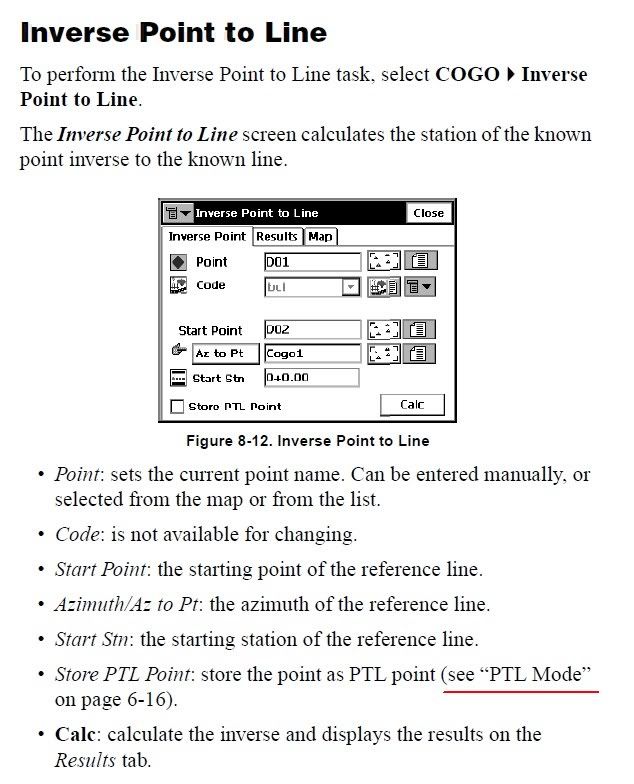
> .... TopSurv's Point-to-Line inverse will do all of the above except store the point at the intersection.
I just browsed the PDF manual and noticed that there is a check box on the Point-to-Line inverse screen that says "Store PTL Point"...is it checked?
Posted : March 31, 2011 10:21 am

Translate
▼
English
Spanish
French
German
Italian
Portuguese
Russian
Chinese
Japanese
Korean
Arabic
Hindi
Dutch
Polish
Turkish
Vietnamese
Thai
Swedish
Danish
Finnish
Norwegian
Czech
Hungarian
Romanian
Greek
Hebrew
Indonesian
Malay
Ukrainian
Bulgarian
Croatian
Slovak
Slovenian
Serbian
Lithuanian
Latvian
Estonian
Well, I think I managed to duplicate your problem with no solution, sorry.
Step One: send out the seven year old to do some surveying so you can spend some time at beerleg.com:

Then (not sure how to get these images rotated 90° sorry again):
I had to click behind the running hourglass to try to store point number 130, but it turns out all that did was duplicate point number 1...


Posted : March 31, 2011 12:36 pm
Topic starter
Translate
▼
English
Spanish
French
German
Italian
Portuguese
Russian
Chinese
Japanese
Korean
Arabic
Hindi
Dutch
Polish
Turkish
Vietnamese
Thai
Swedish
Danish
Finnish
Norwegian
Czech
Hungarian
Romanian
Greek
Hebrew
Indonesian
Malay
Ukrainian
Bulgarian
Croatian
Slovak
Slovenian
Serbian
Lithuanian
Latvian
Estonian
"Store PTL Point" almost does what I want. It stores the inverse info on a new tab called "PTL" for the point being inversed. Then you have to go to "edit points" to see the new tab and the info, but it still won't store a new point. Probably just something I'll put on my wishlist to Topcon.
Posted : March 31, 2011 4:38 pm
Translate
▼
English
Spanish
French
German
Italian
Portuguese
Russian
Chinese
Japanese
Korean
Arabic
Hindi
Dutch
Polish
Turkish
Vietnamese
Thai
Swedish
Danish
Finnish
Norwegian
Czech
Hungarian
Romanian
Greek
Hebrew
Indonesian
Malay
Ukrainian
Bulgarian
Croatian
Slovak
Slovenian
Serbian
Lithuanian
Latvian
Estonian
TopSurv Question - Stephen
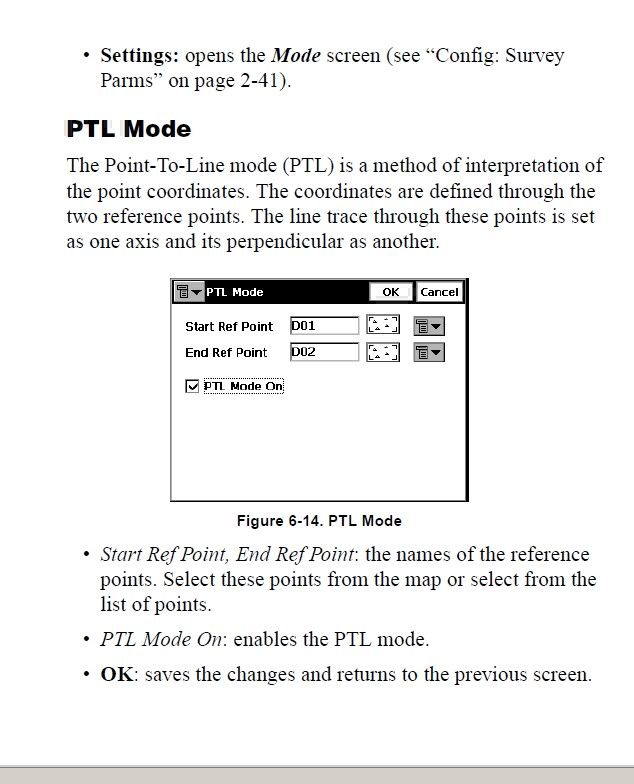
This may or may not help, but there are two different menus that deal with PTL. Here are a couple of snapshots for you..
Inverse Point to Line
PTL Mode
http://e-topo.web.auth.gr/TOMEIS_INDEX/TOMEASA/Pikridas/give/topcon/topsurv_refmanual.pdf
Posted : March 31, 2011 5:18 pm