Reading RPLS is free for the whole profession. Members post, reply, and get the members-only rooms.

Notifications
Clear all

Topic starter
Translate
▼
English
Spanish
French
German
Italian
Portuguese
Russian
Chinese
Japanese
Korean
Arabic
Hindi
Dutch
Polish
Turkish
Vietnamese
Thai
Swedish
Danish
Finnish
Norwegian
Czech
Hungarian
Romanian
Greek
Hebrew
Indonesian
Malay
Ukrainian
Bulgarian
Croatian
Slovak
Slovenian
Serbian
Lithuanian
Latvian
Estonian
I am using a TDS Nomad 800 with TDS Pro Max for my Focus 10 (same as Trimble 5603) robot and my Topcon Hiper+ RTK system. It works great, I like the speed, but I need a back up collector. I like the Nomad and can get one with Carlson SurvCE 3.0 fairly reasonable. Has anyone used SurvCE 3.0 with either my robot or RTK setup? How is the communication? My current set-up is very stable, unlike a Recon I used to had that had to be rebooted a couple times a day. How stable is SurvCE on the Nomad? I appreciate your insights.
Gary
Posted : August 2, 2013 12:38 pm

Translate
▼
English
Spanish
French
German
Italian
Portuguese
Russian
Chinese
Japanese
Korean
Arabic
Hindi
Dutch
Polish
Turkish
Vietnamese
Thai
Swedish
Danish
Finnish
Norwegian
Czech
Hungarian
Romanian
Greek
Hebrew
Indonesian
Malay
Ukrainian
Bulgarian
Croatian
Slovak
Slovenian
Serbian
Lithuanian
Latvian
Estonian
> I am using a TDS Nomad 800 with TDS Pro Max for my Focus 10 (same as Trimble 5603) robot and my Topcon Hiper+ RTK system. It works great, I like the speed, but I need a back up collector. I like the Nomad and can get one with Carlson SurvCE 3.0 fairly reasonable. Has anyone used SurvCE 3.0 with either my robot or RTK setup? How is the communication? My current set-up is very stable, unlike a Recon I used to had that had to be rebooted a couple times a day. How stable is SurvCE on the Nomad? I appreciate your insights.
>
> Gary
Gary,
I am still at 2.62 on SurvCE on my Nomad 800, but can say I am very pleased with the DC and would anticipate 3.0X being even better (am upgrading soon). I run a HIPER LITE + VRS Rover, 802AR Robot and CTS-3005 Total Station without issues.
FWIW,
Matt
Posted : August 2, 2013 1:00 pm
Topic starter
Translate
▼
English
Spanish
French
German
Italian
Portuguese
Russian
Chinese
Japanese
Korean
Arabic
Hindi
Dutch
Polish
Turkish
Vietnamese
Thai
Swedish
Danish
Finnish
Norwegian
Czech
Hungarian
Romanian
Greek
Hebrew
Indonesian
Malay
Ukrainian
Bulgarian
Croatian
Slovak
Slovenian
Serbian
Lithuanian
Latvian
Estonian
SurvCE - Focus 10- 5603
Thanks for the reply on the RTK. Anyone tried Carlson with a 5603 or Focus 10? I was wondering how it ran the robot compared to TDS Survey Pro. I am looking at used unit across country for a spare and can't test it before I buy it.
Posted : August 3, 2013 7:50 am

Translate
▼
English
Spanish
French
German
Italian
Portuguese
Russian
Chinese
Japanese
Korean
Arabic
Hindi
Dutch
Polish
Turkish
Vietnamese
Thai
Swedish
Danish
Finnish
Norwegian
Czech
Hungarian
Romanian
Greek
Hebrew
Indonesian
Malay
Ukrainian
Bulgarian
Croatian
Slovak
Slovenian
Serbian
Lithuanian
Latvian
Estonian
SurvCE - Focus 10- 5603
SurvCE works fine with the 5603. You will lose the option to see you level bubble robotically. You can only check level from the instrument faceplate. It will however, not take a shot if the instrument if the instrument is too far out of level. Other than that, it's about the same as TDS.
Posted : August 3, 2013 1:28 pm
Topic starter
Translate
▼
English
Spanish
French
German
Italian
Portuguese
Russian
Chinese
Japanese
Korean
Arabic
Hindi
Dutch
Polish
Turkish
Vietnamese
Thai
Swedish
Danish
Finnish
Norwegian
Czech
Hungarian
Romanian
Greek
Hebrew
Indonesian
Malay
Ukrainian
Bulgarian
Croatian
Slovak
Slovenian
Serbian
Lithuanian
Latvian
Estonian
SurvCE - Focus 10- 5603
Thanks. I went ahead and purchased it.
Posted : August 3, 2013 1:49 pm

Translate
▼
English
Spanish
French
German
Italian
Portuguese
Russian
Chinese
Japanese
Korean
Arabic
Hindi
Dutch
Polish
Turkish
Vietnamese
Thai
Swedish
Danish
Finnish
Norwegian
Czech
Hungarian
Romanian
Greek
Hebrew
Indonesian
Malay
Ukrainian
Bulgarian
Croatian
Slovak
Slovenian
Serbian
Lithuanian
Latvian
Estonian
Looking for driver help here. I just picked up a 5603 and a Nomad, when I connect the two via USB/serial 9 pin dongle, it's asking for a driver. I assume there is a specific driver I need on the Nomad to communicate with the 5603.
Any help appreciated.
Posted : April 21, 2016 8:40 pm

Translate
▼
English
Spanish
French
German
Italian
Portuguese
Russian
Chinese
Japanese
Korean
Arabic
Hindi
Dutch
Polish
Turkish
Vietnamese
Thai
Swedish
Danish
Finnish
Norwegian
Czech
Hungarian
Romanian
Greek
Hebrew
Indonesian
Malay
Ukrainian
Bulgarian
Croatian
Slovak
Slovenian
Serbian
Lithuanian
Latvian
Estonian
Hello, I have battled with the SurvCE/5600 system for a year or so (still ongoing). It actually started when I bought a Geodimeter 650S DR200+ and a Nomad with SurvCE 3.0, and then shortly after bought an "identical" 5601. The Geodimeter has an alphanumeric Geodimeter Pro keyboard which ordinarily controls the instrument (but has no graphical output) including the option remove the keyboard to run it robotic through the radios, however I don't have the remote radio (presumably the radio in the instrument is still there/working). In this configuration, via a com/power T-connector, the Nomad can be cable connected to the Geodimeter and survey done with SurvCE, but most of the set up and "calibration" of the instrument is still done at the instrument keyboard - this includes things like leveling, compensator and prism constants (SurvCE does not do these for Geodimeter/5600 instruments, but I think it does for some other brands). It works very well, as long as you are aware which bit (instrument/keyboard or Nomad/SurvCE) is doing which.
Then, as per the Parani LR BT setups that appear on this site, I figured that if I had a radio at the T and another radio at the Nomad, I could at least run the Geodimeter wireless in "station" mode. I went down the track of making the radios with 430MHz units as I had visions of pairing to the internal radio (it is the "old" 430MHz range) of the Geodimeter so only requiring a remote radio. To cut a very long story short I gave up on the one radio idea, and made two - one at the instrument and one at the Nomad. Although these radios are weak at 100mW, they work for at least 200m (have not had to survey any further). So this enables us to run in "semi-robotic" mode with the Nomad/SurvCE at the prism. This is in SurvCE's "station" mode, so the software "thinks" there is still someone at the instrument, so in the SurvCE survey environment you don't get things like prism search, nor importantly a real time graphical display of where the prism is - but you can see graphically where each shot is taken. This works fine for us as we use it mostly for "precision" topo of urban roads and each shot is taken in fast-standard (standard is more accurate, but on this instrument, with a "waving" pole is a bit slow). It is also ok for us because for security we always have someone at the instrument, so that person can be trained to do things like re-aim if we loose autolock.
We can however use it in SurvCE's full robotic mode, but this requires putting the Geodimeter into "RPU" mode, and then it "suspends" and you have to remove the faceplate/keyboard, and then SurvCE has full control and you get (or change to) the SurvCE "full" robotic environment, particularly real time positioning and search. So we have occasionally used it this way for stakeout. The main issue in my mind is that prism constants and checking/resetting instrument level, compensator, etc can't be done via SurvCE - you need to shut down and replace the faceplate/keyboard and start again.
So enter the 5601. It came as a full kit but had been "hibernating", including 2.4GHz instrument and remote radios, but importantly (probably sadly) an ACU graphical keyboard running an old (10.8) version of Trimble Survey Controller (TSC). This runs the station fine, but it seems like one or both of the radios is broken so I can't use the ACU in remote. I would have then expected to be able to use the Nomad/SurvCE/2-radio set up of the Geodimeter on the 5601, but to cut another long story short it seems that the ACU/TSC has more (i.e. total) control of the instrument and I just can't get it to reliably work - it won't work at all with the T-cable config. I say reliably because at times I have been able to suspend the ACU, remove it, and get the Nomad/SurvCE to run, but only partially, and when doing things like station setup it would check, but not re-set, the backsight angle. Also, as far as I can figure out after many hours of trolling the www, curvature and refraction are set (off or on) at the ACU/software for the 5601, while they are "built into" (could be wrong on that) the instrument on the Geodimeter so in that regard at least they are not "identical". .
Posted : April 21, 2016 11:33 pm
Translate
▼
English
Spanish
French
German
Italian
Portuguese
Russian
Chinese
Japanese
Korean
Arabic
Hindi
Dutch
Polish
Turkish
Vietnamese
Thai
Swedish
Danish
Finnish
Norwegian
Czech
Hungarian
Romanian
Greek
Hebrew
Indonesian
Malay
Ukrainian
Bulgarian
Croatian
Slovak
Slovenian
Serbian
Lithuanian
Latvian
Estonian
I appreciate the help. I am very new to this robot. It came with no manuals, no cables. I picked up a highrose cable and a 12v lead-acid battery and got it to boot up, leveled, turning angles, etc.. but it fails to communicate with the Nomad data collector. I have the Nomad connected to the port on the side of the numeric keypad via hirose/ 9 pin serial dongle to usb, but the Nomad but the Nomad is requesting a driver which I don't have.
I have failed to find any drivers online. If anyone has any luck (or better yet a driver) I would be eternally grateful!
Posted : April 22, 2016 12:38 pm
Translate
▼
English
Spanish
French
German
Italian
Portuguese
Russian
Chinese
Japanese
Korean
Arabic
Hindi
Dutch
Polish
Turkish
Vietnamese
Thai
Swedish
Danish
Finnish
Norwegian
Czech
Hungarian
Romanian
Greek
Hebrew
Indonesian
Malay
Ukrainian
Bulgarian
Croatian
Slovak
Slovenian
Serbian
Lithuanian
Latvian
Estonian
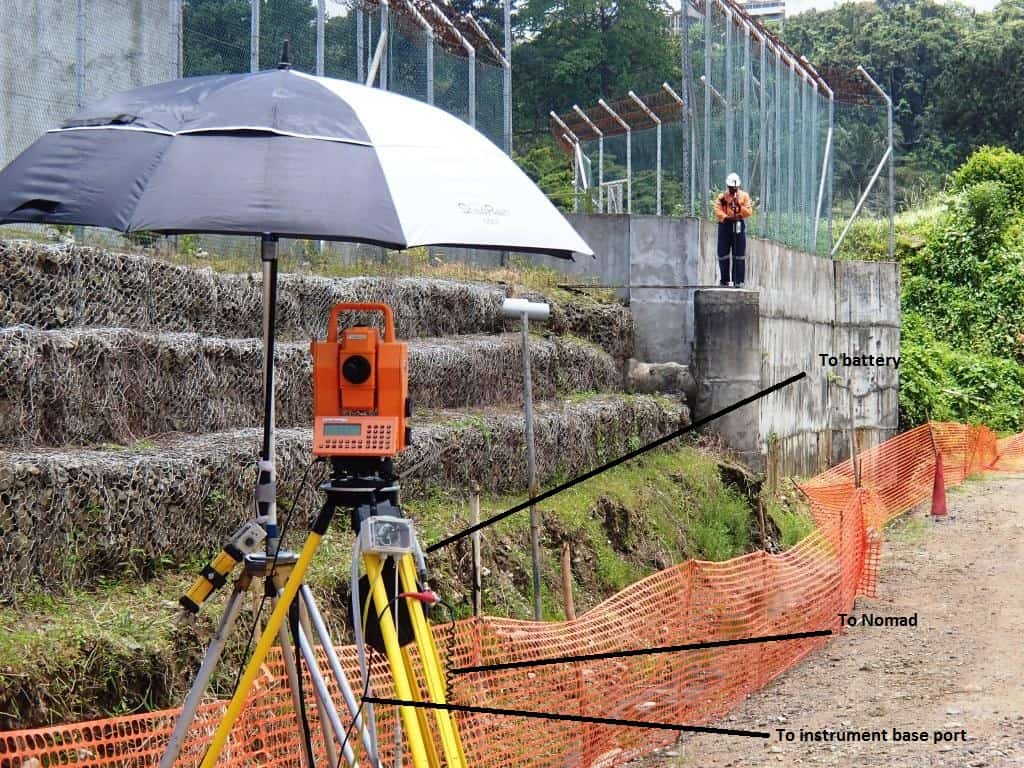
Mark O. You need the T-connector as shown in the photo (mine looks red because I have taped it permanently to one of the cables to minimise the risk of loosing the T, as it smaller than an AA battery) so that power and data is only connected at the instrument base port. If you connect the Nomad to the keyboard it wont work, and also if the robot spins you'll be in trouble with the cable.
In the photo, my config is actually running through the radios, so instead of the Nomad cable connection to the T, there is radio connected to it and this sends/receives data to the other radio which is wire connected to the Nomad. The radio at the T gets power (stepped down to 5V) from the 12V external (car) battery that runs the instrument, and the radio at the Nomad has its own 5V battery so it does not draw power off the Nomad.
Posted : April 22, 2016 1:08 pm
Translate
▼
English
Spanish
French
German
Italian
Portuguese
Russian
Chinese
Japanese
Korean
Arabic
Hindi
Dutch
Polish
Turkish
Vietnamese
Thai
Swedish
Danish
Finnish
Norwegian
Czech
Hungarian
Romanian
Greek
Hebrew
Indonesian
Malay
Ukrainian
Bulgarian
Croatian
Slovak
Slovenian
Serbian
Lithuanian
Latvian
Estonian
Richard, thank you very much for your help. I'm testing out this equipment that was delivered to my cabin (the photo in my profile, lol) this past week, but I've only had limited time on it as we're in the middle of staining the interior of the cabin.
I will pick up a Tee connector when I'm back in the office next week. Looking forward to doing a little testing and posting results.
Thanks again!
Mark O
Posted : April 22, 2016 9:32 pm
Translate
▼
English
Spanish
French
German
Italian
Portuguese
Russian
Chinese
Japanese
Korean
Arabic
Hindi
Dutch
Polish
Turkish
Vietnamese
Thai
Swedish
Danish
Finnish
Norwegian
Czech
Hungarian
Romanian
Greek
Hebrew
Indonesian
Malay
Ukrainian
Bulgarian
Croatian
Slovak
Slovenian
Serbian
Lithuanian
Latvian
Estonian
$131.56 for a tee connector (I think my hourly charge rate just went up, lol).
Posted : April 25, 2016 7:39 am