Reading RPLS is free for the whole profession. Members post, reply, and get the members-only rooms.


Notifications
Clear all
Software, CAD & Mapping
5
Posts
5
Users
0
Reactions
1,033
Views

Topic starter
Translate
▼
English
Spanish
French
German
Italian
Portuguese
Russian
Chinese
Japanese
Korean
Arabic
Hindi
Dutch
Polish
Turkish
Vietnamese
Thai
Swedish
Danish
Finnish
Norwegian
Czech
Hungarian
Romanian
Greek
Hebrew
Indonesian
Malay
Ukrainian
Bulgarian
Croatian
Slovak
Slovenian
Serbian
Lithuanian
Latvian
Estonian
I am working on a survey which requires me to put a 4 or 5 tables on the face of my plat. I have been provided a word document with the tables and values. When I copy from the word document and paste in Carlson with Intellicad, I get the values but no table. Anyone know how to have the table lines come in with the values?
Posted : July 18, 2016 7:26 am

Translate
▼
English
Spanish
French
German
Italian
Portuguese
Russian
Chinese
Japanese
Korean
Arabic
Hindi
Dutch
Polish
Turkish
Vietnamese
Thai
Swedish
Danish
Finnish
Norwegian
Czech
Hungarian
Romanian
Greek
Hebrew
Indonesian
Malay
Ukrainian
Bulgarian
Croatian
Slovak
Slovenian
Serbian
Lithuanian
Latvian
Estonian
Whenever I link tables, I use Excel. Things tend not to translate as well from Word documents. You might be able to copy or convert the Word doc to a spreadsheet and go that route if you want the files linked and updated from one another.
Otherwise I'd say print the table to PDF and insert it that way.
Posted : July 18, 2016 7:41 am

Translate
▼
English
Spanish
French
German
Italian
Portuguese
Russian
Chinese
Japanese
Korean
Arabic
Hindi
Dutch
Polish
Turkish
Vietnamese
Thai
Swedish
Danish
Finnish
Norwegian
Czech
Hungarian
Romanian
Greek
Hebrew
Indonesian
Malay
Ukrainian
Bulgarian
Croatian
Slovak
Slovenian
Serbian
Lithuanian
Latvian
Estonian
I used to use the OLE functionality under the insert menu in autocad 2000 to insert property descriptions and certifications into drawings. They're inserted in such a way that autocad will use the original application for editing and what you see in the original application is what you will see in autocad. I would hope that intellicad has duplicated that functionality. I'm not at my computer at the moment so I can't give more specific instructions. Search the help for insert and OLE.
Posted : July 18, 2016 11:48 am

Translate
▼
English
Spanish
French
German
Italian
Portuguese
Russian
Chinese
Japanese
Korean
Arabic
Hindi
Dutch
Polish
Turkish
Vietnamese
Thai
Swedish
Danish
Finnish
Norwegian
Czech
Hungarian
Romanian
Greek
Hebrew
Indonesian
Malay
Ukrainian
Bulgarian
Croatian
Slovak
Slovenian
Serbian
Lithuanian
Latvian
Estonian
you might try a snip. i use it to drop in vicinity maps. works ok, just ctrl v
Posted : July 18, 2016 2:47 pm

Translate
▼
English
Spanish
French
German
Italian
Portuguese
Russian
Chinese
Japanese
Korean
Arabic
Hindi
Dutch
Polish
Turkish
Vietnamese
Thai
Swedish
Danish
Finnish
Norwegian
Czech
Hungarian
Romanian
Greek
Hebrew
Indonesian
Malay
Ukrainian
Bulgarian
Croatian
Slovak
Slovenian
Serbian
Lithuanian
Latvian
Estonian
Stephen Ward, post: 381563, member: 1206 wrote: I used to use the OLE functionality under the insert menu in autocad 2000 to insert property descriptions and certifications into drawings. They're inserted in such a way that autocad will use the original application for editing and what you see in the original application is what you will see in autocad. I would hope that intellicad has duplicated that functionality. I'm not at my computer at the moment so I can't give more specific instructions. Search the help for insert and OLE.
To get to the command, issue Settings -- Carlson Menus -- IntelliCAD Menu and look for the "Object" command as shown in the following:
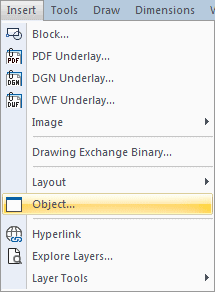
Otherwise, issue the INSERTOBJ key-in command.
Posted : July 19, 2016 4:16 pm