

Thanks i will send you an email as soon as i am in a desktop pc in my office.

For a test I uploaded this project to Pix4D cloud to let their PC's do the post processing without GCP's.
I can send a link to cloud results. It requires no large downloads, and uses the online Pix4d cloud viewer.

David C. Newell RPLS LS CFM, post: 407051, member: 6347 wrote: Lee,
Do the prop guards you use interfere with obstacle avoidance?
Thanks
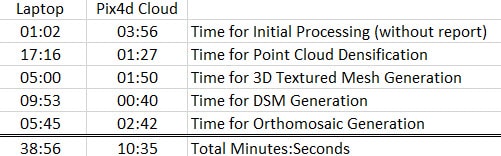
Comparison of processing time for the above small test project.
å±5.8ac at å±280' AGL with 40 photos.
39 minutes on my Laptop
CPU: Intel(R) Core(TM) i7-6700K CPU @ 4.00GHz (4 cores)
RAM: 32GB
GPU: NVIDIA GeForce GTX 980M (Driver: 21.21.13.6909)
OS: Windows 10
Pix4Dmapper Pro v3.01.18
10.5 minutes on Pix4d's Cloud PC
CPU: Intel(R) Xeon(R) CPU E5-2666 v3 @ 2.90GHz (10 cores)
RAM: 59GB
GPU: Cirrus Logic GD 5446 (Driver: unknown)
OS: Linux 3.13.0-91-generic x86_64
Pix4Dmapper Pro v3.01.18

leegreen, post: 407142, member: 2332 wrote: Comparison of processing time for the above small test project.
å±5.8ac at å±280' AGL with 40 photos.39 minutes on my Laptop
CPU: Intel(R) Core(TM) i7-6700K CPU @ 4.00GHz (4 cores)
RAM: 32GB
GPU: NVIDIA GeForce GTX 980M (Driver: 21.21.13.6909)
OS: Windows 10
Pix4Dmapper Pro v3.01.1810.5 minutes on Pix4d's Cloud PC
CPU: Intel(R) Xeon(R) CPU E5-2666 v3 @ 2.90GHz (10 cores)
RAM: 59GB
GPU: Cirrus Logic GD 5446 (Driver: unknown)
OS: Linux 3.13.0-91-generic x86_64
Pix4Dmapper Pro v3.01.18
What about upload/download times to Pix4D's Cloud Server? How big are all the different files for this project that were uploaded and downloaded?
Thanks
Using the same very small sample project.
0.35 GB UPLOAD for 40 photos
2.99 GB DOWNLOAD for Mesh, Point Cloud, DSM, Contours (DXF) and Orthomosaic
On average my projects have about 400 photos
leegreen, post: 407807, member: 2332 wrote: Using the same very small sample project.
0.35 GB UPLOAD for 40 photos
2.99 GB DOWNLOAD for Mesh, Point Cloud, DSM, Contours (DXF) and OrthomosaicOn average my projects have about 400 photos
Thanks. So for your average 400 photo project ~3.5 GB upload and ~30 GB download? That's about a 25 min upload and 45 min download at my office. That works for me.
Not quite linear on the DOWNLOAD, it was only 10Gb
leegreen, post: 407812, member: 2332 wrote: Not quite linear on the DOWNLOAD, it was only 10Gb
Even better! Thanks
Andrew,
If you are planning to use Pix4D cloud processing, be aware it currently does not process GCP's online. There is no online interference for end user to enter GCP's. So you need to have installed Pix4dMapper Pro on your PC, enter your GCP's, then process step 1 yourself. Then you upload Project and Images for processing. Step one is only the Initial Processing which took just one minute for the small project example.
Thanks for the tip Lee. I do have another server that I use for GIS web applications development that I could easily install Pix4D. Its got Dual Xeon 2.5 GHz 10-core processors, 32GB RAM, and several TBs of hard drive space. Should I just use that instead of their cloud server?
Andrew,
Yes, that server should do fine so long as it has very fast hard drive?
Yesterday I finished my PC upgraded:
CPU from 4 core 3.6Ghz, to 10 core 4.2Ghz(O.C.)
SDD from 560MB/s to M.2 PCIe 2266MB/s
Graphics from GTX 980 4GB to GTX 1080 8GB
Now the processing time is 2x faster
It is 4x faster than the laptop specs shown here
It is now equal to the Pix4D cloud processing time.
It has 4 2TB Serial Attached SCSI (SAS) 6Gbps drives in a RAID 5 configuration.
With dual 10-core processors hyperthreaded, I actually see 40 individual processors in task manager!

I'm pretty excited about my new VTOL/quad plane I'm having built.
It will have vertical take off and landing capabilites and outfitted with a Sony a6000. I'm considering putting RTK on it after I've used it for a while. I'll post some pics after my guy gets it built.
Sent from my SAMSUNG-SM-N920A using Tapatalk

Sweet, the a6000 is an awesome camera for the money.
Looks like a custom build DIY project. Lots of possibilities there. What software will you for missions?
Here is cool video of how the VTOL Quad planes fly.
"http://player.vimeo.com/video/91537229?title=0&byline=0&portrait=0&apos ;">//player.vimeo.com/video/91537229?title=0&byline=0&portrait=0"

Anyone getting into the field, I'd recommend the following beginner package:
DJI Phantom 3 Advanced
Drone Deploy for mapping
Pix 4D Discovery
Quad core, 16GB memory, 512GB SSD laptop/desktop for processing
If you have GPS, you're all set for setting CGP's.
My setup will allow me to map upto about 40 acre sites. Here in my neck of the woods that's 90% of the sites I map. Have only once had to fly a site twice due to size. Still trying to justify a way to make Pix4D purchase worthwhile. But at 8k, I don't see it's value yet due to my limited mapping.
Mark O,
It appears Pix4D Discovery is no longer supported or available for download.
How are you able to use it for anything productive?
Discovery exports only the:
- Quality Report.
- 3D video animation (fly-through).
Discovery cannot generate/visualize/export:
- Classified Point Clouds.
- Contour lines.
- DTM.
- Indices (the Index Calculator can not be used).
- DSM and Mosaics (the Mosaic Editor can not be used).
leegreen, post: 409643, member: 2332 wrote: Mark O,
It appears Pix4D Discovery is no longer supported or available for download.
How are you able to use it for anything productive?
Discovery exports only the:
- Quality Report.
- 3D video animation (fly-through).
Discovery cannot generate/visualize/export:
- Classified Point Clouds.
- Contour lines.
- DTM.
- Indices (the Index Calculator can not be used).
- DSM and Mosaics (the Mosaic Editor can not be used).
I run it to create the orthomosaic and also to verify survey and/or missed points. I still find the errors are too great for general surveying, but it does work as a great resource/back up. 10 minutres to fly a site, I'll process the images at lunch/down time and use the orthomosaic as a background while drafting. But you are right,other than that it's just not that productive. Also, at $8k it's outrageously expensive. It's a new technology and others will enter the game and the price will drop to a reasonable price.
Mark,
So you are doing a screen capture then you rubber banding the image to fit into your CAD file. That's a real professional procedure.
If you were to map 40 acres in an 18 minute drone flight, spend 2 more hours of field time to set and locate targets. You could get 1ft contours, and orthomosaic with 1" pixels, and charge $$. Can easily do one or 2 of these jobs per day. It would not take long to pay for the Pix4D software ($8700) and P4P drone ($1500). It's worked for me.
Some are just too cheap, with poor business sense!!! It takes $$ to make $$$, and you need to take a little risk.