Reading RPLS is free for the whole profession. Members post, reply, and get the members-only rooms.


Notifications
Clear all

Topic starter
Translate
▼
English
Spanish
French
German
Italian
Portuguese
Russian
Chinese
Japanese
Korean
Arabic
Hindi
Dutch
Polish
Turkish
Vietnamese
Thai
Swedish
Danish
Finnish
Norwegian
Czech
Hungarian
Romanian
Greek
Hebrew
Indonesian
Malay
Ukrainian
Bulgarian
Croatian
Slovak
Slovenian
Serbian
Lithuanian
Latvian
Estonian
Hello,
new stuff to me.
I'm running a demo version of the full TBC and would reproces a drone flight as in this Youtube guide
[MEDIA=youtube]HTbUv45bk7c[/MEDIA]
I have the jpg files with GPS info in it but TBC won't read that as georeferenced info, more data is not available to me, we did not do the flight ourselves and the data was processed with Pix4d.
I converted already to Tiff files but no joy so fare.
Is there a way to process this data in TBC without additional flight data?
Can I extract the needed data from the jpg files?
thanks,
Christof.
Posted : November 16, 2017 1:01 am

Translate
▼
English
Spanish
French
German
Italian
Portuguese
Russian
Chinese
Japanese
Korean
Arabic
Hindi
Dutch
Polish
Turkish
Vietnamese
Thai
Swedish
Danish
Finnish
Norwegian
Czech
Hungarian
Romanian
Greek
Hebrew
Indonesian
Malay
Ukrainian
Bulgarian
Croatian
Slovak
Slovenian
Serbian
Lithuanian
Latvian
Estonian
I don't have the TBC advanced UAS module yet but you shouldn't need any flight data other than the images. All the extra geodata does is to speed up the initial alignment process and reduce the number of images which don't align. It can also slightly improve accuracy if alignment problems occur.
When we use the camera from the UAV for ground photography of building frontages the only control is ID points on the building - no camera georeferencing. Pix4D and Photoscan both process the images as they come: I would have thought that TBC would have an option to do that. Once the images are knitted together then the control is imported and you follow through the procedure the video outlines.
Posted : November 16, 2017 2:14 am

Translate
▼
English
Spanish
French
German
Italian
Portuguese
Russian
Chinese
Japanese
Korean
Arabic
Hindi
Dutch
Polish
Turkish
Vietnamese
Thai
Swedish
Danish
Finnish
Norwegian
Czech
Hungarian
Romanian
Greek
Hebrew
Indonesian
Malay
Ukrainian
Bulgarian
Croatian
Slovak
Slovenian
Serbian
Lithuanian
Latvian
Estonian
I haven't tried bringing in data from any platform other than our UX5 to TBC; when you import UX5 data it comes in as a JXL file and contains the flight trajectory from the E-box. I have some data from Microdrones and DJI that I can experiment with but I don't have time right now.
I only use TBC for UX5 flights, I use Pix4D for everything else.
Posted : November 16, 2017 7:54 am
Topic starter
Translate
▼
English
Spanish
French
German
Italian
Portuguese
Russian
Chinese
Japanese
Korean
Arabic
Hindi
Dutch
Polish
Turkish
Vietnamese
Thai
Swedish
Danish
Finnish
Norwegian
Czech
Hungarian
Romanian
Greek
Hebrew
Indonesian
Malay
Ukrainian
Bulgarian
Croatian
Slovak
Slovenian
Serbian
Lithuanian
Latvian
Estonian
Thanks for the info so far,
Lee, why do you prefer Pix4D for everything else,
I also have access to Pix4D but thought since TBS is for surveyors it would be more survey friendly and less hassle with projection settings and so. (pure guess from my side)
Chr.
Posted : November 16, 2017 8:00 am
Translate
▼
English
Spanish
French
German
Italian
Portuguese
Russian
Chinese
Japanese
Korean
Arabic
Hindi
Dutch
Polish
Turkish
Vietnamese
Thai
Swedish
Danish
Finnish
Norwegian
Czech
Hungarian
Romanian
Greek
Hebrew
Indonesian
Malay
Ukrainian
Bulgarian
Croatian
Slovak
Slovenian
Serbian
Lithuanian
Latvian
Estonian
Pix4D is just an easier workflow. I can bring the photos from a Phantom 4 Pro in and go straight to processing without having to do any manipulation or pre-processing. I haven't seen much difference in the quality of the point clouds and imagery produced by the two.
I'm a novice at best with Pix4D and am even less proficient with UAS Master, so my experiences may not reflect the best practice.
Even when I create the point cloud in Pix4D, I still bring it into TBC to extract point data. The new release of TBC does a pretty good job of handling point clouds and when it comes to the survey side I definitely prefer it.
Posted : November 16, 2017 8:21 am
Translate
▼
English
Spanish
French
German
Italian
Portuguese
Russian
Chinese
Japanese
Korean
Arabic
Hindi
Dutch
Polish
Turkish
Vietnamese
Thai
Swedish
Danish
Finnish
Norwegian
Czech
Hungarian
Romanian
Greek
Hebrew
Indonesian
Malay
Ukrainian
Bulgarian
Croatian
Slovak
Slovenian
Serbian
Lithuanian
Latvian
Estonian
Agreed Pix4D is an easier workflow. although we do all our processing in Photoscan as we find that gives better results, although a little more work. We used to use the Trimble pointcloud viewer (RealWorks) for extracting specific hard detail as our software had an add-on which read the displayed info from the mouse pointer in Trimble. The latest version of the survey software takes in the point cloud directly so we can do everything AFTER the point cloud direct in the survey model. I think the only use we make of TBC is for the initial GPS processing, both for flying and conventional ground survey.
Perhaps that's just habit; perhaps its an inherent distrust of the way Trimble "discontinue" things and expect payment for the new improved version.
Posted : November 16, 2017 8:48 am

Translate
▼
English
Spanish
French
German
Italian
Portuguese
Russian
Chinese
Japanese
Korean
Arabic
Hindi
Dutch
Polish
Turkish
Vietnamese
Thai
Swedish
Danish
Finnish
Norwegian
Czech
Hungarian
Romanian
Greek
Hebrew
Indonesian
Malay
Ukrainian
Bulgarian
Croatian
Slovak
Slovenian
Serbian
Lithuanian
Latvian
Estonian
I am trying to work through the same thing myself. Do you also have the demo for UASMaster?
Posted : November 16, 2017 5:47 pm
Topic starter
Translate
▼
English
Spanish
French
German
Italian
Portuguese
Russian
Chinese
Japanese
Korean
Arabic
Hindi
Dutch
Polish
Turkish
Vietnamese
Thai
Swedish
Danish
Finnish
Norwegian
Czech
Hungarian
Romanian
Greek
Hebrew
Indonesian
Malay
Ukrainian
Bulgarian
Croatian
Slovak
Slovenian
Serbian
Lithuanian
Latvian
Estonian
I do, updated yesterday to version 8.1 ... no help files available, the help takes you to some training videos.
Will investigate some more over the weekend, for the moment I can't even figure out how to import the jpgs in UASMaster!
Chr.
Posted : November 17, 2017 12:28 am
Translate
▼
English
Spanish
French
German
Italian
Portuguese
Russian
Chinese
Japanese
Korean
Arabic
Hindi
Dutch
Polish
Turkish
Vietnamese
Thai
Swedish
Danish
Finnish
Norwegian
Czech
Hungarian
Romanian
Greek
Hebrew
Indonesian
Malay
Ukrainian
Bulgarian
Croatian
Slovak
Slovenian
Serbian
Lithuanian
Latvian
Estonian
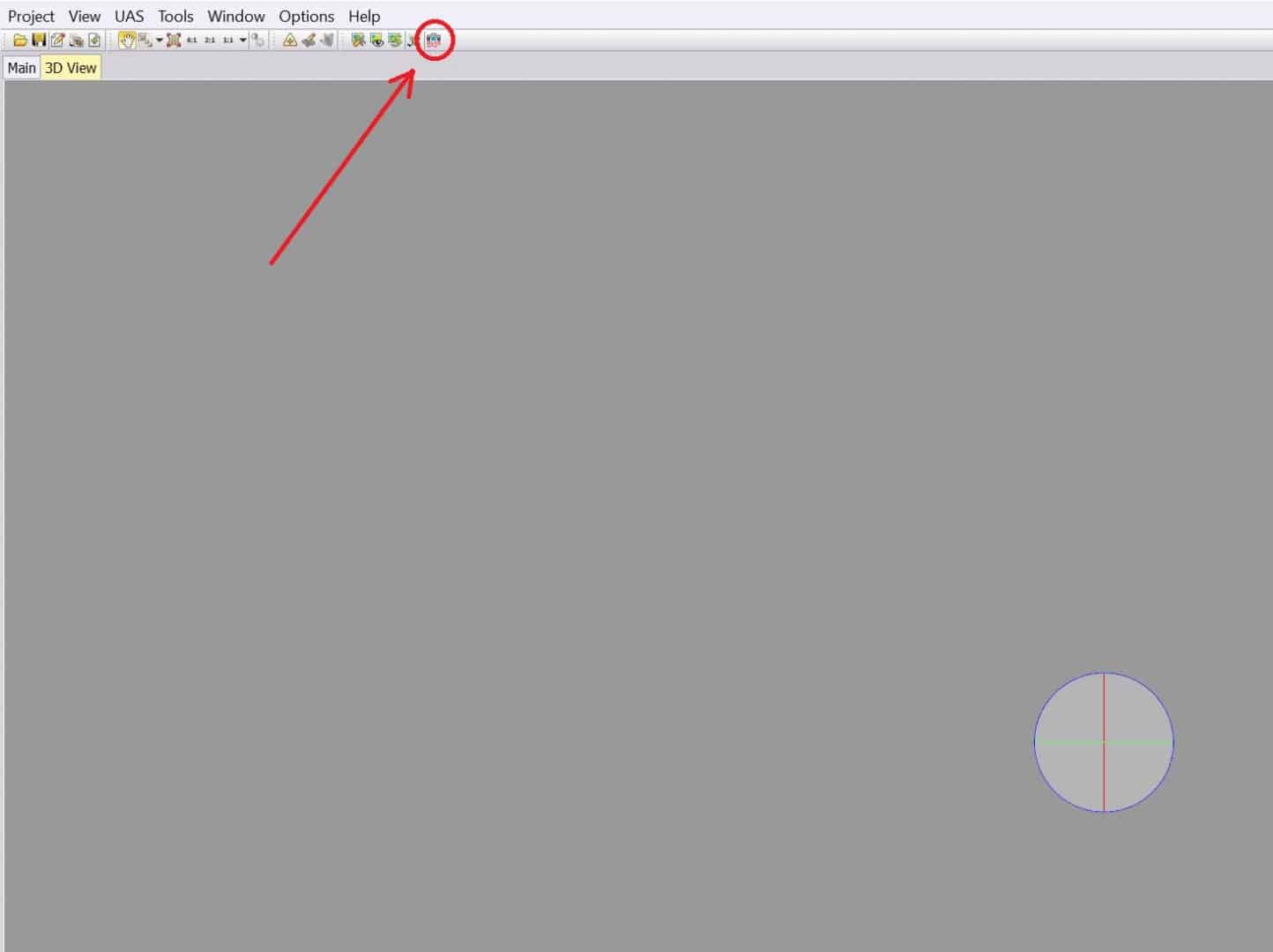
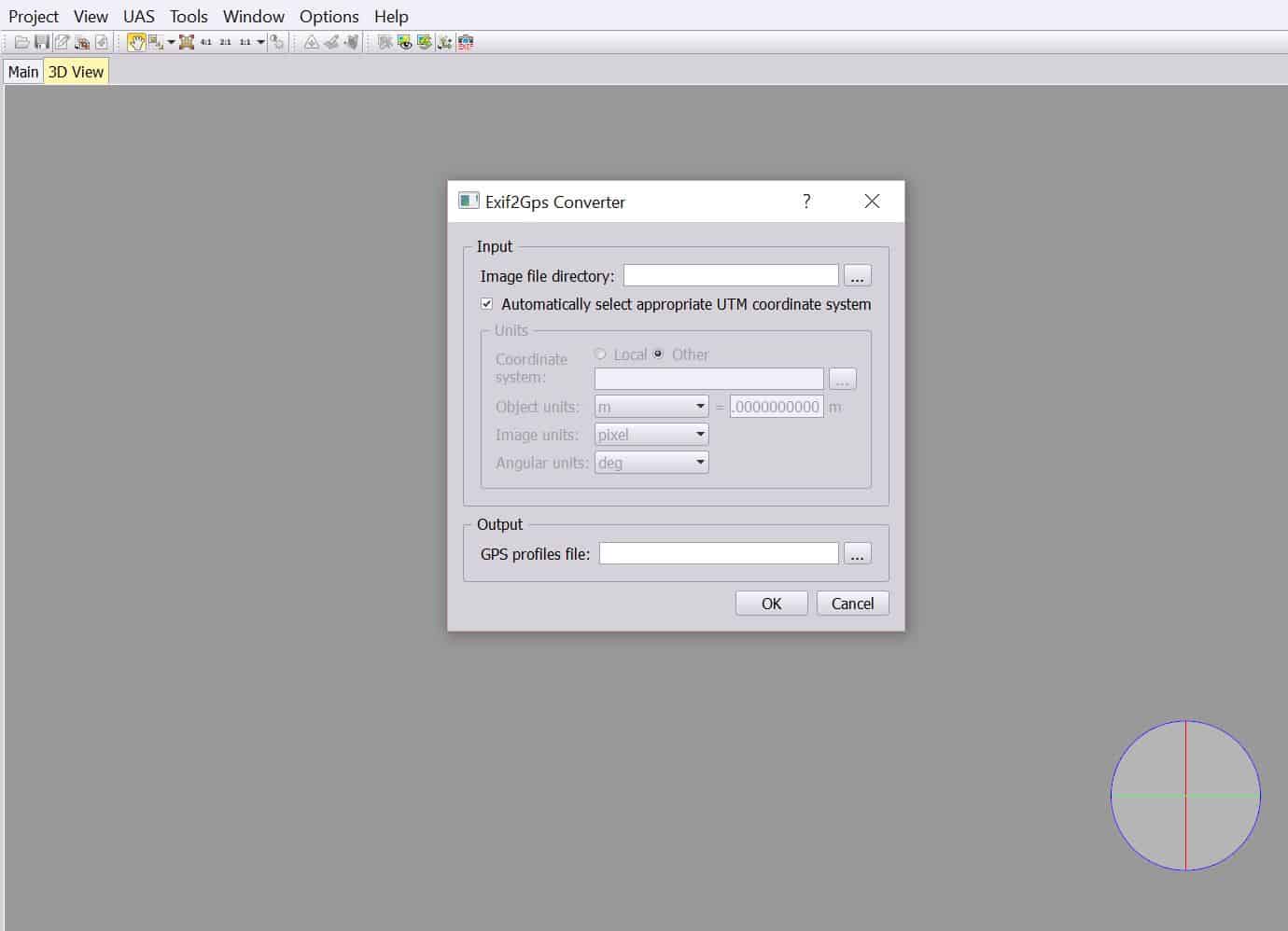
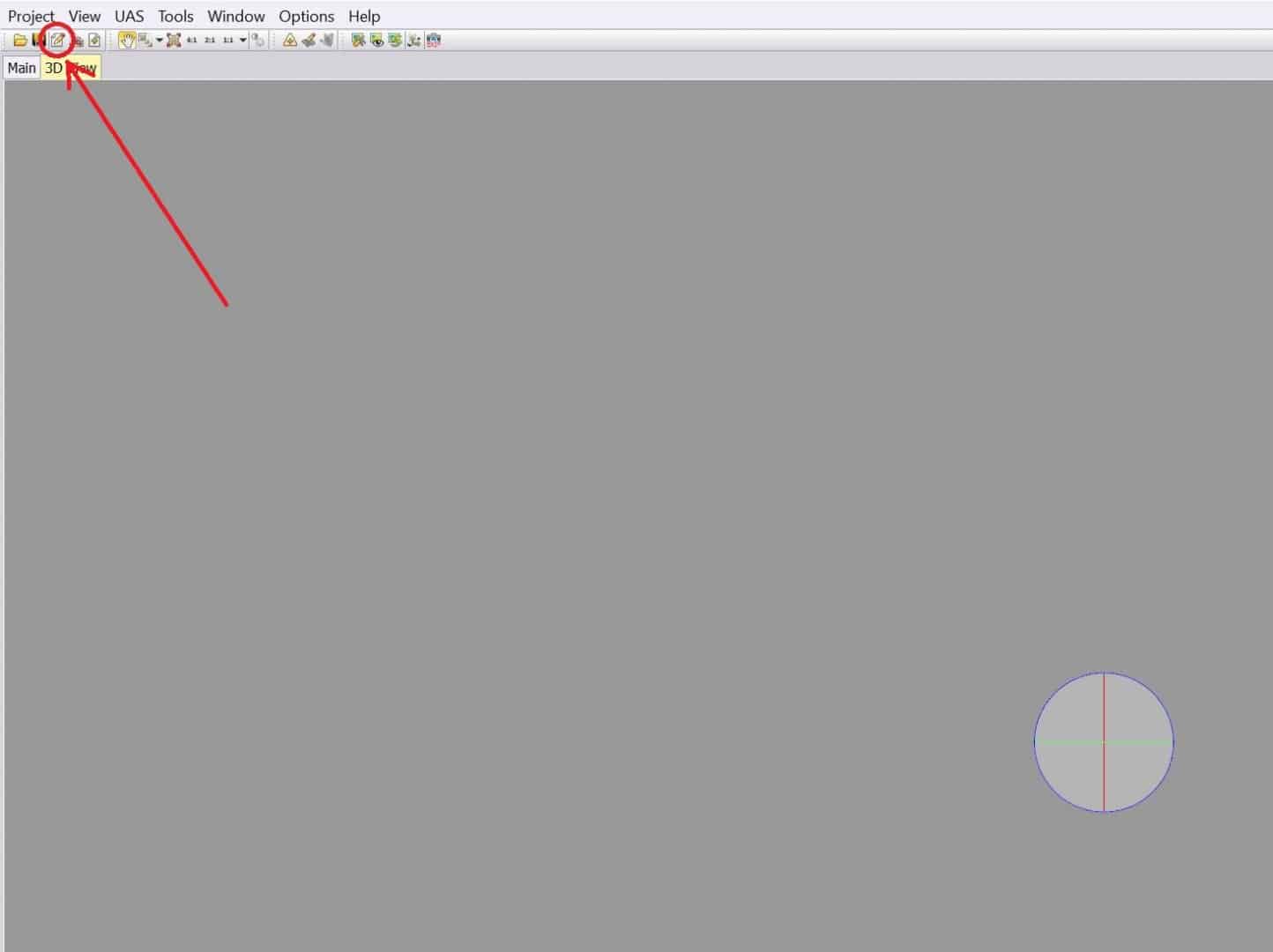
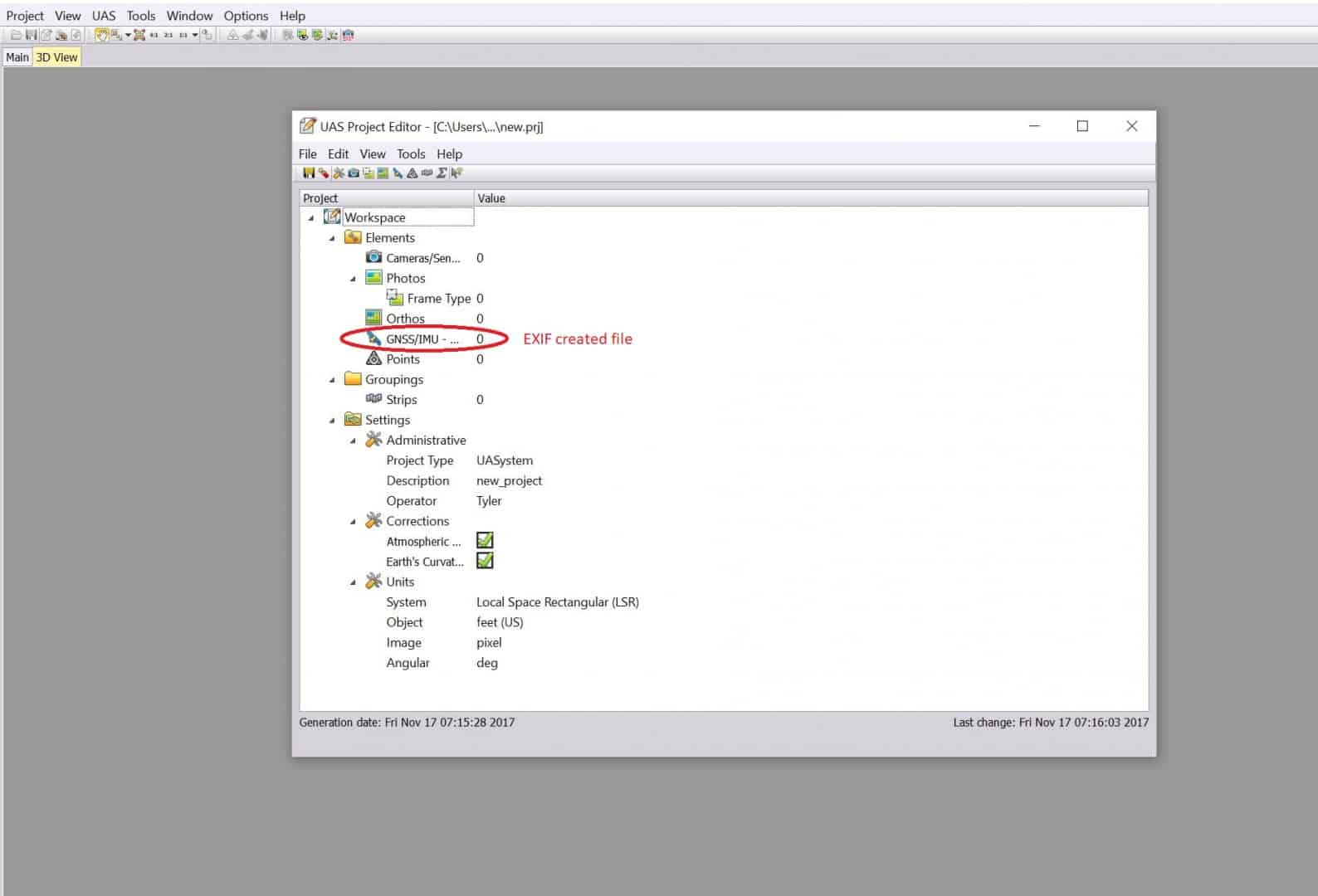
Below are some screen shots for importing photos and generating the GNSS info from the photos.
Click on EXIF to create GNSS file from images
Click on properties to insert camera info, photos, GNSS info, and points
Posted : November 17, 2017 7:43 am
Translate
▼
English
Spanish
French
German
Italian
Portuguese
Russian
Chinese
Japanese
Korean
Arabic
Hindi
Dutch
Polish
Turkish
Vietnamese
Thai
Swedish
Danish
Finnish
Norwegian
Czech
Hungarian
Romanian
Greek
Hebrew
Indonesian
Malay
Ukrainian
Bulgarian
Croatian
Slovak
Slovenian
Serbian
Lithuanian
Latvian
Estonian
If you can access the Trimble Geospatial webinars they have one that walks you through the entire process.
Posted : November 17, 2017 9:01 am