Reading RPLS is free for the whole profession. Members post, reply, and get the members-only rooms.


Notifications
Clear all
GNSS & Geodesy
6
Posts
4
Users
0
Reactions
622
Views

Topic starter
Translate
▼
English
Spanish
French
German
Italian
Portuguese
Russian
Chinese
Japanese
Korean
Arabic
Hindi
Dutch
Polish
Turkish
Vietnamese
Thai
Swedish
Danish
Finnish
Norwegian
Czech
Hungarian
Romanian
Greek
Hebrew
Indonesian
Malay
Ukrainian
Bulgarian
Croatian
Slovak
Slovenian
Serbian
Lithuanian
Latvian
Estonian
For everyone, or just for me?
Posted : November 16, 2015 9:54 pm
Topic starter
Translate
▼
English
Spanish
French
German
Italian
Portuguese
Russian
Chinese
Japanese
Korean
Arabic
Hindi
Dutch
Polish
Turkish
Vietnamese
Thai
Swedish
Danish
Finnish
Norwegian
Czech
Hungarian
Romanian
Greek
Hebrew
Indonesian
Malay
Ukrainian
Bulgarian
Croatian
Slovak
Slovenian
Serbian
Lithuanian
Latvian
Estonian
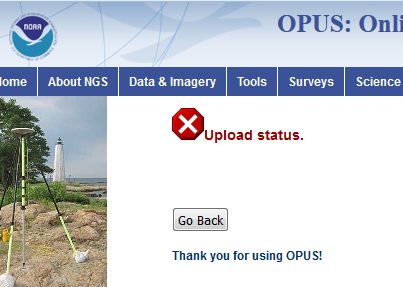
Hmmm...after getting the page shown above, I got email from OPUS with an OPUS-RS solution showing a start time of 19:32:00 and a stop time of 19:59:45. TBC, on the other hand, shows a start time of 19:31:43 (close enough) and a duration of 02:18:15. But in the File Name tab it shows 2 sequential T01 file names. Is it possible that the receiver (a 5800) split the file and TBC reassembled the data to be contiguous? (I'm not familiar with the 5800, these files are being provided by a client.)
Posted : November 16, 2015 10:10 pm

Translate
▼
English
Spanish
French
German
Italian
Portuguese
Russian
Chinese
Japanese
Korean
Arabic
Hindi
Dutch
Polish
Turkish
Vietnamese
Thai
Swedish
Danish
Finnish
Norwegian
Czech
Hungarian
Romanian
Greek
Hebrew
Indonesian
Malay
Ukrainian
Bulgarian
Croatian
Slovak
Slovenian
Serbian
Lithuanian
Latvian
Estonian
My experience with Trimble is that any break in power supply (crappy cable) will result in a separate file being logged, even for just a second or two. Ex 12343180.to1 then 12343181.to1. Opus was working as of 2-3 hours ago. Not sure of an automatic "merging".
Posted : November 16, 2015 10:28 pm

Translate
▼
English
Spanish
French
German
Italian
Portuguese
Russian
Chinese
Japanese
Korean
Arabic
Hindi
Dutch
Polish
Turkish
Vietnamese
Thai
Swedish
Danish
Finnish
Norwegian
Czech
Hungarian
Romanian
Greek
Hebrew
Indonesian
Malay
Ukrainian
Bulgarian
Croatian
Slovak
Slovenian
Serbian
Lithuanian
Latvian
Estonian
You should be able to manually merge two files. OPUS should take it even if a required epoch is missing.
Paul in PA
Posted : November 16, 2015 10:38 pm
Topic starter
Translate
▼
English
Spanish
French
German
Italian
Portuguese
Russian
Chinese
Japanese
Korean
Arabic
Hindi
Dutch
Polish
Turkish
Vietnamese
Thai
Swedish
Danish
Finnish
Norwegian
Czech
Hungarian
Romanian
Greek
Hebrew
Indonesian
Malay
Ukrainian
Bulgarian
Croatian
Slovak
Slovenian
Serbian
Lithuanian
Latvian
Estonian
I learned a couple of things today:
1. 5800 receivers can be glitchy with regard to file continuity. All 3 of today's 5800s split their files.
2. DAT files can be concatenated simply by using the Windows TYPE command, e.g.
[pre] type 48673200.DAT 48673201.DAT > ALGO3201.DAT[/pre]
OPUS-S processed the concatenated file without complaint.
Posted : November 16, 2015 11:17 pm

Translate
▼
English
Spanish
French
German
Italian
Portuguese
Russian
Chinese
Japanese
Korean
Arabic
Hindi
Dutch
Polish
Turkish
Vietnamese
Thai
Swedish
Danish
Finnish
Norwegian
Czech
Hungarian
Romanian
Greek
Hebrew
Indonesian
Malay
Ukrainian
Bulgarian
Croatian
Slovak
Slovenian
Serbian
Lithuanian
Latvian
Estonian
This is a recent and known web issue for the OPUS group.
An update caused the warning messages which usually appear, to get stuck up in your browser's address bar.
So, if you see the
look up at the web address, e.g., http://geodesy.noaa.gov/OPUS/upload.jsp&error= This%20dataset%20is%20too%20short
Posted : November 17, 2015 6:59 am