Reading RPLS is free for the whole profession. Members post, reply, and get the members-only rooms.


Notifications
Clear all

Topic starter
Translate
▼
English
Spanish
French
German
Italian
Portuguese
Russian
Chinese
Japanese
Korean
Arabic
Hindi
Dutch
Polish
Turkish
Vietnamese
Thai
Swedish
Danish
Finnish
Norwegian
Czech
Hungarian
Romanian
Greek
Hebrew
Indonesian
Malay
Ukrainian
Bulgarian
Croatian
Slovak
Slovenian
Serbian
Lithuanian
Latvian
Estonian
Chat Conversation Start
6:04PM
Im bein an idiot a while ago. I was configuring my R10 using the webUI but i input a password on my network configuration without changing the username. now when i reboot the R10 i can't access the webUI because it needs the username and password for the site. anybody can give an information about the default username of the "network configuration" of R10? i would be much thankful for the help.
Posted : April 14, 2017 6:14 pm

Translate
▼
English
Spanish
French
German
Italian
Portuguese
Russian
Chinese
Japanese
Korean
Arabic
Hindi
Dutch
Polish
Turkish
Vietnamese
Thai
Swedish
Danish
Finnish
Norwegian
Czech
Hungarian
Romanian
Greek
Hebrew
Indonesian
Malay
Ukrainian
Bulgarian
Croatian
Slovak
Slovenian
Serbian
Lithuanian
Latvian
Estonian
I'm betting that the R10 has a reset procedure that'll allow you to start over with the network config, but I'll note that product designers don't always cover their bases in this regard. I learned this the hard way.
The Netgear AC791L mobile hotspot allows the user to disable both the DHCP server and the front panel access, which means that upon reboot you've got no way to configure the device. Most products like this have some kind of mechanical reset procedure (e.g. a paper-clip-through-the-pinhole switch), but Netgear left that off of this one. Verizon had to issue me a new one after I stumbled into that mess.
Posted : April 14, 2017 6:38 pm

Translate
▼
English
Spanish
French
German
Italian
Portuguese
Russian
Chinese
Japanese
Korean
Arabic
Hindi
Dutch
Polish
Turkish
Vietnamese
Thai
Swedish
Danish
Finnish
Norwegian
Czech
Hungarian
Romanian
Greek
Hebrew
Indonesian
Malay
Ukrainian
Bulgarian
Croatian
Slovak
Slovenian
Serbian
Lithuanian
Latvian
Estonian
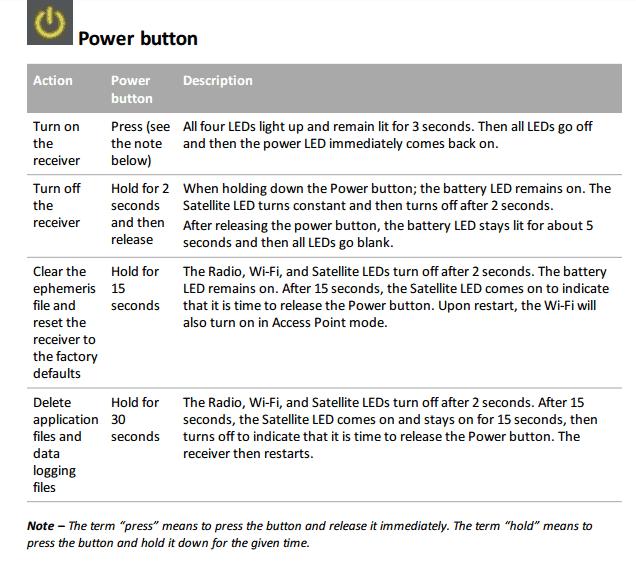
Yes I have had to do this on an R10.
Posted : April 14, 2017 7:07 pm
Topic starter
Translate
▼
English
Spanish
French
German
Italian
Portuguese
Russian
Chinese
Japanese
Korean
Arabic
Hindi
Dutch
Polish
Turkish
Vietnamese
Thai
Swedish
Danish
Finnish
Norwegian
Czech
Hungarian
Romanian
Greek
Hebrew
Indonesian
Malay
Ukrainian
Bulgarian
Croatian
Slovak
Slovenian
Serbian
Lithuanian
Latvian
Estonian
squowse, post: 423537, member: 7109 wrote: Yes I have had to do this on an R10.
Did you have the same problem on the webUI? the situation is that when i tried to connect to 192.168.142.1 it ask me the username and password. but as i remember i did supply admin and the password. the password is changed the same as what i used on my R8S webUI.
Posted : April 14, 2017 8:32 pm
Topic starter
Translate
▼
English
Spanish
French
German
Italian
Portuguese
Russian
Chinese
Japanese
Korean
Arabic
Hindi
Dutch
Polish
Turkish
Vietnamese
Thai
Swedish
Danish
Finnish
Norwegian
Czech
Hungarian
Romanian
Greek
Hebrew
Indonesian
Malay
Ukrainian
Bulgarian
Croatian
Slovak
Slovenian
Serbian
Lithuanian
Latvian
Estonian
Jim Frame, post: 423535, member: 10 wrote: I'm betting that the R10 has a reset procedure that'll allow you to start over with the network config, but I'll note that product designers don't always cover their bases in this regard. I learned this the hard way.
The Netgear AC791L mobile hotspot allows the user to disable both the DHCP server and the front panel access, which means that upon reboot you've got no way to configure the device. Most products like this have some kind of mechanical reset procedure (e.g. a paper-clip-through-the-pinhole switch), but Netgear left that off of this one. Verizon had to issue me a new one after I stumbled into that mess.
Hi Jim!
You mean you replace the wifi adapter inside your Trimble R10?
Posted : April 14, 2017 8:34 pm
Translate
▼
English
Spanish
French
German
Italian
Portuguese
Russian
Chinese
Japanese
Korean
Arabic
Hindi
Dutch
Polish
Turkish
Vietnamese
Thai
Swedish
Danish
Finnish
Norwegian
Czech
Hungarian
Romanian
Greek
Hebrew
Indonesian
Malay
Ukrainian
Bulgarian
Croatian
Slovak
Slovenian
Serbian
Lithuanian
Latvian
Estonian
Emmanuel, post: 423544, member: 12658 wrote: Did you have the same problem on the webUI? the situation is that when i tried to connect to 192.168.142.1 it ask me the username and password. but as i remember i did supply admin and the password. the password is changed the same as what i used on my R8S webUI.
I had the same problem that i could not login. So I reset and started again.
Jim is talking about a different device where he had the same problem, but could not reset.
Posted : April 14, 2017 8:45 pm
Topic starter
Translate
▼
English
Spanish
French
German
Italian
Portuguese
Russian
Chinese
Japanese
Korean
Arabic
Hindi
Dutch
Polish
Turkish
Vietnamese
Thai
Swedish
Danish
Finnish
Norwegian
Czech
Hungarian
Romanian
Greek
Hebrew
Indonesian
Malay
Ukrainian
Bulgarian
Croatian
Slovak
Slovenian
Serbian
Lithuanian
Latvian
Estonian
squowse, post: 423546, member: 7109 wrote: I had the same problem that i could not login. So I reset and started again.
Jim is talking about a different device where he had the same problem, but could not reset.
oh i see... ill try your solution and let you know... thank you
Posted : April 14, 2017 8:49 pm
Topic starter
Translate
▼
English
Spanish
French
German
Italian
Portuguese
Russian
Chinese
Japanese
Korean
Arabic
Hindi
Dutch
Polish
Turkish
Vietnamese
Thai
Swedish
Danish
Finnish
Norwegian
Czech
Hungarian
Romanian
Greek
Hebrew
Indonesian
Malay
Ukrainian
Bulgarian
Croatian
Slovak
Slovenian
Serbian
Lithuanian
Latvian
Estonian
squowse, post: 423546, member: 7109 wrote: I had the same problem that i could not login. So I reset and started again.
Jim is talking about a different device where he had the same problem, but could not reset.
oh man! thank you so much! it works! i drained my battery and brain for almost 2 hours figuring out how to fix my problem.... than you so much again!
Posted : April 14, 2017 8:56 pm
Translate
▼
English
Spanish
French
German
Italian
Portuguese
Russian
Chinese
Japanese
Korean
Arabic
Hindi
Dutch
Polish
Turkish
Vietnamese
Thai
Swedish
Danish
Finnish
Norwegian
Czech
Hungarian
Romanian
Greek
Hebrew
Indonesian
Malay
Ukrainian
Bulgarian
Croatian
Slovak
Slovenian
Serbian
Lithuanian
Latvian
Estonian
Posted : April 14, 2017 9:50 pm
Topic starter
Translate
▼
English
Spanish
French
German
Italian
Portuguese
Russian
Chinese
Japanese
Korean
Arabic
Hindi
Dutch
Polish
Turkish
Vietnamese
Thai
Swedish
Danish
Finnish
Norwegian
Czech
Hungarian
Romanian
Greek
Hebrew
Indonesian
Malay
Ukrainian
Bulgarian
Croatian
Slovak
Slovenian
Serbian
Lithuanian
Latvian
Estonian
squowse, post: 423552, member: 7109 wrote: no probs
https://www.trimble.com/globalTRLTAB.asp?nav=Collection-90570
how about for R8s?
Posted : June 18, 2017 2:52 pm
Topic starter
Translate
▼
English
Spanish
French
German
Italian
Portuguese
Russian
Chinese
Japanese
Korean
Arabic
Hindi
Dutch
Polish
Turkish
Vietnamese
Thai
Swedish
Danish
Finnish
Norwegian
Czech
Hungarian
Romanian
Greek
Hebrew
Indonesian
Malay
Ukrainian
Bulgarian
Croatian
Slovak
Slovenian
Serbian
Lithuanian
Latvian
Estonian
squowse, post: 423552, member: 7109 wrote: no probs
https://www.trimble.com/globalTRLTAB.asp?nav=Collection-90570
Hi bud! i have a question regarding the setup between Trimmark 3 and my base R8s and my rover R10. i purchased my trimmark 3 on ebay months ago then i try to use it now but my problem is that the trimmark 3 installed frequencies is totally not a single the same as the preload frequencies on my R8s and R10. i've tried to configure the trimmark as 464.75000 and add a frequency of 464.75000 on my R10 but the the internal radio frequency my R8s is 445.50000 because i can't add a new frequency on a "base" mode.
my question is, do i need to make the radio frequency of my base R8s internal radio the same as the trimmark 3 setup as base with no repeater so i can connect on my r10 rover?
Posted : June 18, 2017 5:38 pm
Translate
▼
English
Spanish
French
German
Italian
Portuguese
Russian
Chinese
Japanese
Korean
Arabic
Hindi
Dutch
Polish
Turkish
Vietnamese
Thai
Swedish
Danish
Finnish
Norwegian
Czech
Hungarian
Romanian
Greek
Hebrew
Indonesian
Malay
Ukrainian
Bulgarian
Croatian
Slovak
Slovenian
Serbian
Lithuanian
Latvian
Estonian
Emmanuel, post: 433158, member: 12658 wrote: Hi bud! i have a question regarding the setup between Trimmark 3 and my base R8s and my rover R10. i purchased my trimmark 3 on ebay months ago then i try to use it now but my problem is that the trimmark 3 installed frequencies is totally not a single the same as the preload frequencies on my R8s and R10. i've tried to configure the trimmark as 464.75000 and add a frequency of 464.75000 on my R10 but the the internal radio frequency my R8s is 445.50000 because i can't add a new frequency on a "base" mode.
my question is, do i need to make the radio frequency of my base R8s internal radio the same as the trimmark 3 setup as base with no repeater so i can connect on my r10 rover?
Sorry I haven't had much to do with external radios. Maybe you configure the frequency after you connect to the external radio?
Posted : June 19, 2017 1:30 am
Topic starter
Translate
▼
English
Spanish
French
German
Italian
Portuguese
Russian
Chinese
Japanese
Korean
Arabic
Hindi
Dutch
Polish
Turkish
Vietnamese
Thai
Swedish
Danish
Finnish
Norwegian
Czech
Hungarian
Romanian
Greek
Hebrew
Indonesian
Malay
Ukrainian
Bulgarian
Croatian
Slovak
Slovenian
Serbian
Lithuanian
Latvian
Estonian
squowse, post: 433186, member: 7109 wrote: Sorry I haven't had much to do with external radios. Maybe you configure the frequency after you connect to the external radio?
nope coz i need to connect the trimmark 3 on TSC3 when im setting up the base radio link and after that thats the time im going to connect the lemo 7pin connecting the base and the trimmark 3. i already contact sitech to provide me a frequency file to update the frequency of my trimmark 3 same as my base and rover, hope it will work this time. i dont have problems with internal radio they connect right away but R8s effective range is only 3km and i need to boost the signal to get me far more coverage. in my country, internet signal on mountain side is hard to get so i need the extended radio signal just in case.
Posted : June 19, 2017 10:18 am

Translate
▼
English
Spanish
French
German
Italian
Portuguese
Russian
Chinese
Japanese
Korean
Arabic
Hindi
Dutch
Polish
Turkish
Vietnamese
Thai
Swedish
Danish
Finnish
Norwegian
Czech
Hungarian
Romanian
Greek
Hebrew
Indonesian
Malay
Ukrainian
Bulgarian
Croatian
Slovak
Slovenian
Serbian
Lithuanian
Latvian
Estonian
You are SOL with that radio unless a dealer can reprogram it. But I don't think TM3s in the 430 - 450 band support 450 - 470.
Posted : June 19, 2017 12:24 pm
Topic starter
Translate
▼
English
Spanish
French
German
Italian
Portuguese
Russian
Chinese
Japanese
Korean
Arabic
Hindi
Dutch
Polish
Turkish
Vietnamese
Thai
Swedish
Danish
Finnish
Norwegian
Czech
Hungarian
Romanian
Greek
Hebrew
Indonesian
Malay
Ukrainian
Bulgarian
Croatian
Slovak
Slovenian
Serbian
Lithuanian
Latvian
Estonian
Lee D, post: 433234, member: 7971 wrote: You are SOL with that radio unless a dealer can reprogram it. But I don't think TM3s in the 430 - 450 band support 450 - 470.
yeah sitech told me to that they are going to send a frequency file for me to upload on the TM3. my R8s, R10 and the TM
Lee D, post: 433234, member: 7971 wrote: You are SOL with that radio unless a dealer can reprogram it. But I don't think TM3s in the 430 - 450 band support 450 - 470.
yes your right and im a lucky idiot because my R8s and R10 is within the range of the TM3 i purchased. but do you know anyone knows how to create a Frequency file for my R8s and R10 which is exactly the same as my TM3?
Posted : June 19, 2017 7:15 pm
Translate
▼
English
Spanish
French
German
Italian
Portuguese
Russian
Chinese
Japanese
Korean
Arabic
Hindi
Dutch
Polish
Turkish
Vietnamese
Thai
Swedish
Danish
Finnish
Norwegian
Czech
Hungarian
Romanian
Greek
Hebrew
Indonesian
Malay
Ukrainian
Bulgarian
Croatian
Slovak
Slovenian
Serbian
Lithuanian
Latvian
Estonian
You should be able to create receive frequencies on the R8 and R10 as long as their radios support 430 - 450MHz. I can't pull it up at my desk but I know it can be done through Access and probably through the Web GUI.
Posted : June 20, 2017 6:43 am
Topic starter
Translate
▼
English
Spanish
French
German
Italian
Portuguese
Russian
Chinese
Japanese
Korean
Arabic
Hindi
Dutch
Polish
Turkish
Vietnamese
Thai
Swedish
Danish
Finnish
Norwegian
Czech
Hungarian
Romanian
Greek
Hebrew
Indonesian
Malay
Ukrainian
Bulgarian
Croatian
Slovak
Slovenian
Serbian
Lithuanian
Latvian
Estonian
Lee D, post: 433332, member: 7971 wrote: You should be able to create receive frequencies on the R8 and R10 as long as their radios support 430 - 450MHz. I can't pull it up at my desk but I know it can be done through Access and probably through the Web GUI.
yes i can create a frequency on the access and on thw winflash but when im setting up the radio of my R8s as base it wont show the frequency added but only those pre-installed frequencies.
Posted : June 20, 2017 10:06 am
Translate
▼
English
Spanish
French
German
Italian
Portuguese
Russian
Chinese
Japanese
Korean
Arabic
Hindi
Dutch
Polish
Turkish
Vietnamese
Thai
Swedish
Danish
Finnish
Norwegian
Czech
Hungarian
Romanian
Greek
Hebrew
Indonesian
Malay
Ukrainian
Bulgarian
Croatian
Slovak
Slovenian
Serbian
Lithuanian
Latvian
Estonian
You can't add transmit frequencies to your receiver, only someone authorized (a dealer, for instance) can do that. But if you're using the TM3 all that matters is that your rover has the same frequency in it that the TM3 is transmitting on.
Posted : June 20, 2017 10:25 am
Topic starter
Translate
▼
English
Spanish
French
German
Italian
Portuguese
Russian
Chinese
Japanese
Korean
Arabic
Hindi
Dutch
Polish
Turkish
Vietnamese
Thai
Swedish
Danish
Finnish
Norwegian
Czech
Hungarian
Romanian
Greek
Hebrew
Indonesian
Malay
Ukrainian
Bulgarian
Croatian
Slovak
Slovenian
Serbian
Lithuanian
Latvian
Estonian
Lee D, post: 433363, member: 7971 wrote: You can't add transmit frequencies to your receiver, only someone authorized (a dealer, for instance) can do that. But if you're using the TM3 all that matters is that your rover has the same frequency in it that the TM3 is transmitting on.
you mean that even my receiver has different frequency with my TM3 is transmitting as long as the rover is the same as the TM3 is that gonna work? i've tried it but when i start doing the measure point im stuck on the building base list and the icon on the radio is "X". there is an option on the winflash when i connect my receiver that says upload frequency file? so you mean i cant update the frequency of my receiver/base? sorry for being annoying i just want to clarify...
Posted : June 20, 2017 12:04 pm
Topic starter
Translate
▼
English
Spanish
French
German
Italian
Portuguese
Russian
Chinese
Japanese
Korean
Arabic
Hindi
Dutch
Polish
Turkish
Vietnamese
Thai
Swedish
Danish
Finnish
Norwegian
Czech
Hungarian
Romanian
Greek
Hebrew
Indonesian
Malay
Ukrainian
Bulgarian
Croatian
Slovak
Slovenian
Serbian
Lithuanian
Latvian
Estonian
Lee D, post: 433363, member: 7971 wrote: You can't add transmit frequencies to your receiver, only someone authorized (a dealer, for instance) can do that. But if you're using the TM3 all that matters is that your rover has the same frequency in it that the TM3 is transmitting on.
Lee i have a question just to confirm. is it Trimtalk V.1 9600bps is the as Trimtalk 450s 9600bps? coz my TM3 is operating on Trimtalk 450svbut both my receiver and rover is on Trimtalk V.1.
Posted : June 20, 2017 1:22 pm
Page 1 / 2
Next