Reading RPLS is free for the whole profession. Members post, reply, and get the members-only rooms.


Notifications
Clear all
GNSS & Geodesy
11
Posts
3
Users
0
Reactions
535
Views

Topic starter
Translate
▼
English
Spanish
French
German
Italian
Portuguese
Russian
Chinese
Japanese
Korean
Arabic
Hindi
Dutch
Polish
Turkish
Vietnamese
Thai
Swedish
Danish
Finnish
Norwegian
Czech
Hungarian
Romanian
Greek
Hebrew
Indonesian
Malay
Ukrainian
Bulgarian
Croatian
Slovak
Slovenian
Serbian
Lithuanian
Latvian
Estonian
I am having trouble connecting my LT30 to my iPhone personal hotspot. The DC recognizes my iPhone and starts "connecting" which turns my iPhone screen partially blue, which is a good thing, BUT the DC never actually goes from "connecting" to "CONNECTED".
Posted : June 28, 2014 1:14 pm

Translate
▼
English
Spanish
French
German
Italian
Portuguese
Russian
Chinese
Japanese
Korean
Arabic
Hindi
Dutch
Polish
Turkish
Vietnamese
Thai
Swedish
Danish
Finnish
Norwegian
Czech
Hungarian
Romanian
Greek
Hebrew
Indonesian
Malay
Ukrainian
Bulgarian
Croatian
Slovak
Slovenian
Serbian
Lithuanian
Latvian
Estonian
Set your Hotspot to no password, some data collectors have trouble with modern encryption. Such is the case with our TSC2's.
Posted : June 28, 2014 4:52 pm
Topic starter
Translate
▼
English
Spanish
French
German
Italian
Portuguese
Russian
Chinese
Japanese
Korean
Arabic
Hindi
Dutch
Polish
Turkish
Vietnamese
Thai
Swedish
Danish
Finnish
Norwegian
Czech
Hungarian
Romanian
Greek
Hebrew
Indonesian
Malay
Ukrainian
Bulgarian
Croatian
Slovak
Slovenian
Serbian
Lithuanian
Latvian
Estonian
Thanks. I do not think my iPhone 5s will allow me to turn off the password?
Posted : June 28, 2014 5:41 pm
Translate
▼
English
Spanish
French
German
Italian
Portuguese
Russian
Chinese
Japanese
Korean
Arabic
Hindi
Dutch
Polish
Turkish
Vietnamese
Thai
Swedish
Danish
Finnish
Norwegian
Czech
Hungarian
Romanian
Greek
Hebrew
Indonesian
Malay
Ukrainian
Bulgarian
Croatian
Slovak
Slovenian
Serbian
Lithuanian
Latvian
Estonian
You are correct. iOS doesn't allow open hotspots.
Unless you have access to an Android phone,
The only way to know for sure is to locate an open WiFi hotspot, perhaps temporarily disabling your home routers security. If it connects then you will know for sure.
Our TSC2's only support TKIP, which none of our current generation of phones or MiFi's support. It's a nuisance to be sure.
Posted : June 28, 2014 7:05 pm

Translate
▼
English
Spanish
French
German
Italian
Portuguese
Russian
Chinese
Japanese
Korean
Arabic
Hindi
Dutch
Polish
Turkish
Vietnamese
Thai
Swedish
Danish
Finnish
Norwegian
Czech
Hungarian
Romanian
Greek
Hebrew
Indonesian
Malay
Ukrainian
Bulgarian
Croatian
Slovak
Slovenian
Serbian
Lithuanian
Latvian
Estonian
Look for a security mode called WPA2-Personal Mixed or similar. It allows the router/hotspot to negotiate with the device that is trying to connect to use the highest level of security that both devices support. I simply set one SSID and password and then it uses the best protocol that the devices have in common. With this setting I'm able to connect my WinCE DC which only supports TKIP as well as my tablet, laptop, etc that support more modern protocols.
My Samsung hotspot from USCellular is a couple of years old and has it. I also noticed that a recent firmware update to my 5 year old home router added this option.
Posted : June 29, 2014 10:46 am
Topic starter
Translate
▼
English
Spanish
French
German
Italian
Portuguese
Russian
Chinese
Japanese
Korean
Arabic
Hindi
Dutch
Polish
Turkish
Vietnamese
Thai
Swedish
Danish
Finnish
Norwegian
Czech
Hungarian
Romanian
Greek
Hebrew
Indonesian
Malay
Ukrainian
Bulgarian
Croatian
Slovak
Slovenian
Serbian
Lithuanian
Latvian
Estonian
Thanks for your help Stephen. After struggling 1.5 hours on site in the field with the client (a friend thankfully) watching yesterday I took Mark Silver's advice and shut down the LT30 and my iPhone, called it a day and have now slept on it. I am still having the same problem today. Here are the option settings available (I think(?) maybe I have tried most combinations by now:

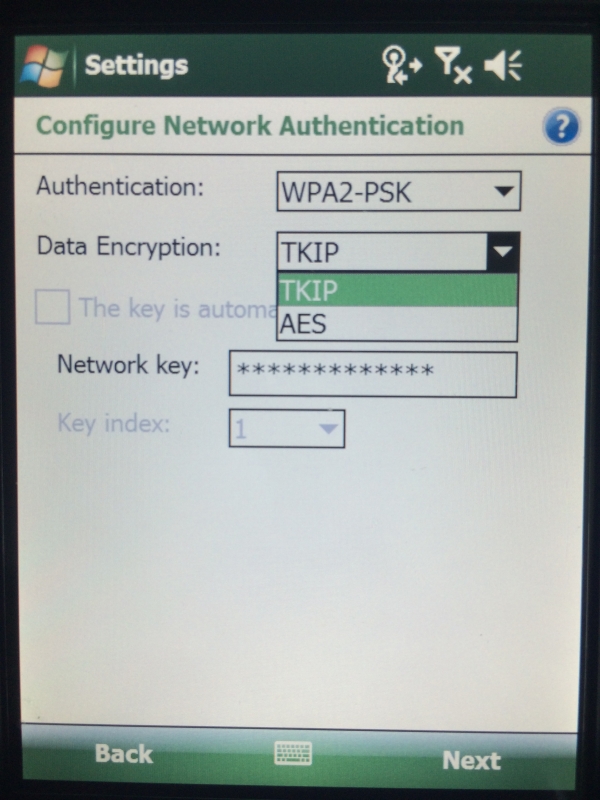
EDIT: This iPhone LT30 setup has been working totally fine for the entire time I have owned it.
I last used it in the next state over a couple weeks ago. I "think" I have all the geoid separation files,, state plane zones, etc set correctly...
Posted : June 29, 2014 10:58 am
Translate
▼
English
Spanish
French
German
Italian
Portuguese
Russian
Chinese
Japanese
Korean
Arabic
Hindi
Dutch
Polish
Turkish
Vietnamese
Thai
Swedish
Danish
Finnish
Norwegian
Czech
Hungarian
Romanian
Greek
Hebrew
Indonesian
Malay
Ukrainian
Bulgarian
Croatian
Slovak
Slovenian
Serbian
Lithuanian
Latvian
Estonian
WPA2-PSK with AES encryption should work with your iPhone......
Hmmm
Posted : June 29, 2014 11:03 am
Topic starter
Translate
▼
English
Spanish
French
German
Italian
Portuguese
Russian
Chinese
Japanese
Korean
Arabic
Hindi
Dutch
Polish
Turkish
Vietnamese
Thai
Swedish
Danish
Finnish
Norwegian
Czech
Hungarian
Romanian
Greek
Hebrew
Indonesian
Malay
Ukrainian
Bulgarian
Croatian
Slovak
Slovenian
Serbian
Lithuanian
Latvian
Estonian
> WPA2-PSK with AES encryption should work with your iPhone......
>
> Hmmm
Yes, hmmm, ten four.
With those settings the iPhone tells me that is has connected:

But the LT30 never gets past this "Connecting" phase...

Posted : June 29, 2014 11:10 am
Translate
▼
English
Spanish
French
German
Italian
Portuguese
Russian
Chinese
Japanese
Korean
Arabic
Hindi
Dutch
Polish
Turkish
Vietnamese
Thai
Swedish
Danish
Finnish
Norwegian
Czech
Hungarian
Romanian
Greek
Hebrew
Indonesian
Malay
Ukrainian
Bulgarian
Croatian
Slovak
Slovenian
Serbian
Lithuanian
Latvian
Estonian
I suspect that the iphone downloaded an update or the carrier made a change that broke your setup. Have you tried to connect the LT30 to your home or office wifi network? If you don't have wifi at the home or office, find restaurant or coffee shop that offers free wifi and test it there. That would confirm that the LT30 is okay and the issue is in the iphone. To test the iphone you could try to connect a different device to the iphone's hotspot like a laptop or tablet to see if other devices have the same trouble using the hotspot. Isolate the problem then figure out who/what is causing it.
Posted : June 29, 2014 11:20 am
Topic starter
Translate
▼
English
Spanish
French
German
Italian
Portuguese
Russian
Chinese
Japanese
Korean
Arabic
Hindi
Dutch
Polish
Turkish
Vietnamese
Thai
Swedish
Danish
Finnish
Norwegian
Czech
Hungarian
Romanian
Greek
Hebrew
Indonesian
Malay
Ukrainian
Bulgarian
Croatian
Slovak
Slovenian
Serbian
Lithuanian
Latvian
Estonian
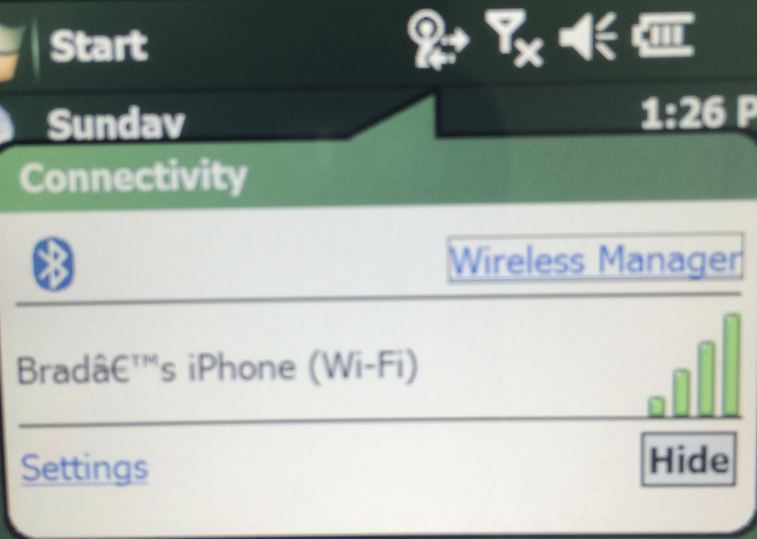
Success!! Thanks Guys!!
I am good. It is connect"ED"!
OPERATOR ERROR.
ID 10 T error.
I was allowing the autocorrect to complete my network key when I started typing it which was adding a blank space to the end.
Doh!


Posted : June 29, 2014 11:21 am
Translate
▼
English
Spanish
French
German
Italian
Portuguese
Russian
Chinese
Japanese
Korean
Arabic
Hindi
Dutch
Polish
Turkish
Vietnamese
Thai
Swedish
Danish
Finnish
Norwegian
Czech
Hungarian
Romanian
Greek
Hebrew
Indonesian
Malay
Ukrainian
Bulgarian
Croatian
Slovak
Slovenian
Serbian
Lithuanian
Latvian
Estonian
Success!! Thanks Guys!!
:good: :good:
Posted : June 29, 2014 11:25 am