

which ever equipment I use I put it on stiff tripod not on soft rubber. sorry I appear to be rude this way.
I also though truimph remembers your truck position (to mm level) exactly at the time you tie it in to a nail nearby, and than it account for all oscillations of the truck base some how, but this is not the case.

Yuriy Lutsyshyn, post: 351289, member: 2507 wrote: which ever equipment I use I put it on stiff tripod not on soft rubber. sorry I appear to be rude this way.
I also though truimph remembers your truck position (to mm level) exactly at the time you tie it in to a nail nearby, and than it account for all oscillations of the truck base some how, but this is not the case.
Just did a two section survey a few weeks ago on the friday before the big weather change, the base was on the truck for security reasons. There was a record survey from 2012 done by another surveyor showing the locations of the 13 section corners, while I didn't need them all, I tied into 11 of them with RTK. I was within 4" of all his bearings (SP) and .05' of all his distances (surface).
Most of the distances were .02' or less and most of the bearings were within 2".
For the work I do, I just don't care about a mm.
Tiny oscillations don't effect GPS the way they do a total station.
This time of year I'm going to get more oscillations on a tripod on frozen ground than I ever will on the truck, even when the legs are packed, although that is the best defense against a frozen set-up.

Shawn Billings, post: 351177, member: 6521 wrote: Actually, with "Shift" you don't have to return to base, it applies the dX,dY,dZ shift to the rover position.
So, I was mistaken about how it handles the base coord.
OK, so we set the base up autonomously. Presumably, it has the right Lat/Lon, with a tolerance of less than 12' (The worst dpos shift I have yet to experience, is a 10' horizontal shift. The worst vertical was worse than that. Something like 20', but I don't remember)
So, base is on approx geodetic location.
We set up, and TIE into a GOOD Lat Lon, with the LS.
Now, it applies a "Shift" to each coord as you tie each point? So, lets say the shift is S22å¡15'59.23"E 4.85', and down 9.886'.
OK, when you get to the office, what do you get? Does the BASE remain in it's autonomous location? But, all shots are "Corrected"?
Or, does it also shift the base coord? At what point is the relationship between the Autonomous base, and the Corrected base applied?
I can see it sort of not mattering, if you never set a nail at that autonomous base point. BUT, I can see me setting a nail there. Then what?
Since my data flow had a problem, Now I want to know exactly the point that the base is corrected, and how the data is handled.
Also, another thing that comes to mind, is when such a paradigm is used, we are also going to dpos that base. So, we now have a correction from the LS shot on a "Good geodetic control point". And, we will have another from DPOS. If we dpos it, and USE the dpos, (ignoring the local tie) because it was an OLD NGS marker, set in the 1960's, and it is close, but needs it's coord updated, how does all this work out? We are assuming that our dpos observation was not a short observation. Maybe 6 hrs plus.
What HI do you use, for a "Shift"? How does that wind up making the elev for the BASE? Maybe the old NGS marker has a BETTER elev, than the horizontal, of the dpos, so we only want to use the horizontal, (NGS was not as good in horiz, but was a very good vert).
I spoke with another user of Javad equip, and he said he "Does not use shift, because he does not understand it". I can see why he would say that... but now I am wondering EXACTLY how this works. (I made a mitsake in my data flow above) So, now I want a better understanding, b-4 using it!
Thanks!
Nate

In the database, every surveyed point is stored as WGS84 (ITRF08) coordinates, epoch at time of creation, as latitude, longitude and ellipsoid height. The base coordinates are also stored. (Technically speaking, we now have the vector base>rover). Furthermore, there is a space in the database with each surveyed point for shifted positions. So, if the base gets shifted, the rover point gets shifted as well. Anytime there is a shift (either from DPOS, Save Base Position under localization, or Shift in Collect), the software searches for all points using the same base position and shifts all of them. So now, in the database, every surveyed point has:
Original Rover Position
Original Base Position
Shifted Rover Position
Shifted Base Position
If the shift needs to be undone, then the original coordinates are already stored ready for retrieval.
If a new shift is being done, such as going from a Collect>Shift shifted position to a DPOS shifted position, the Collect>Shifted shift coordinates are dropped in the database and replaced with the DPOS shift coordinates as determined from the original positions. Notice the original positions are still maintained. This allows the software to shift and unshift a dozen times without any loss, because the original position is maintained.
As for the Collect>Shift routine. It works at the geodetic level dX, dY, dZ, before projection to grid coordinates (think Earth Center Earth Fixed). You set up the base with autonomous position. You collect points 1, 2, 3, 4, 5. Point number 4 is a point with known coordinates. The database looks like this for points 1-3.
1
Original Rover Position - N32å¡...,W95å¡...,1001m
Original Base Position - N32å¡...,W95å¡...,1010m
Shifted Rover Position -
Shifted Base Position -
2
Original Rover Position - N32å¡...,W95å¡...,1002m
Original Base Position - N32å¡...,W95å¡...,1010m
Shifted Rover Position -
Shifted Base Position -
3
Original Rover Position - N32å¡...,W95å¡...,1003m
Original Base Position - N32å¡...,W95å¡...,1010m
Shifted Rover Position -
Shifted Base Position -
Then you get to point 4 and you shoot it as a Shift Point in Collect. The software determines the difference in X, Y, Z (ECEF) between the surveyed position and the known position. The software stores the original rover position and the original base position, but it also populates the shifted position of the rover and base.
4
Original Rover Position - N32å¡...,W95å¡...,1004m
Original Base Position - N32å¡...,W95å¡...,1010m
Shifted Rover Position - N32å¡...,W95å¡...,1011m
Shifted Base Position - N32å¡...,W95å¡...,1017m
The software then retroactively looks for any survey points with the same original base coordinates as the base coordinate used for point 4 (+/-1mm). In this case it would find that 1, 2, and 3 used the same base coordinate. It then applies the shift to these points and now each of them have shifted base and rover positions. Going forward, while shift is active, all subsequent points will have the shift applied to them as well. So point 5 will have an original rover position and an original base position that are based on the autonomous position of the base, it will also have shifted coordinates that are based on the shift determined at point 4.
Now, you get back to the office and decide to use the DPOS position. All of the points you collected, 1-5, have the original coordinates stored as if you never shifted anything, using the autonomous base position. DPOS comes back with a different set of shift values (hopefully very close to the shift values of point 4, but different nonetheless). The DPOS shift is applied to the original rover position and original base position to determine new shifted rover and shifted base positions. These new DPOS based shifted positions replace the shifted positions from point 4. The original rover and base positions are preserved.
This is functionally different from a localization. A localization determines transformation in seven parameters relative to the grid. Some of these parameters may be omitted, so that you end up with only 3 or 4 parameters. Commonly this would be dN, dE, rotation around U axis. The geodetic positions are not changed though, so the underlying lat/long are never changed for any points, only the perception of the grid values (North, East, Up) for those points. It's a useful fiction, but a fiction. Within the useful area of a projection, a grid coordinate is equivalent to one geodetic coordinate. So the SPC coordinate for a point N1, E1 are equal to only one geodetic position ë?1, ëÈ1. A localization bends this such that N1+dN, E1+dE = ë?1, ëÈ1, such that dN and dE are the difference in the autonomous position of N1 and E1 with the "true" position of N1 and E1. But notice that ë?1, ëÈ1 is still ë?1, ëÈ1. The geodetic position has not changed. Because the geodetic position has not changed, dN and dE can be any value. So when you want to localize to a N 5000, E 5000 system, but your State Plane values are N 1,000,000 and E 200,000, you can have a translation of dN: -995,000 and dE -195,000. The latitude and longitude for this point has not changed, it's still at ë?1, ëÈ1 even though the N and E are drastically different. This is important because the mapping angle and scale factor are unchanged. If we applied the dN and dE values to the geodetic position, we'd be in a drastically different place on the Earth from where we truly are and the mapping angle and scale factor would drastically change as well.
So, when we exported coords, we'd see the BASE coord updated. Not the autonomous one, generated, at the beginning?
After seeing all this, I don't think I'm so good at maths!
🙂
N
Nate The Surveyor, post: 351326, member: 291 wrote: So, when we exported coords, we'd see the BASE coord updated. Not the autonomous one, generated, at the beginning?
Yes, the export will always be the shifted positions unless there is no shifted position, in which the export will be the original position.
Nate The Surveyor, post: 351326, member: 291 wrote: After seeing all this, I don't think I'm so good at maths!
It's really not so much a matter of math as it is logistics. Personally, I like shift because I don't like mucking with coordinate systems (which is what a localization does). I prefer the geodetic position (lat/long or ë?/ëÈ) match the grid coordinate (N,E). But there is a time for localization that shift is not suited for. In my opinion, localization works excellently for unknown coordinate systems, retracing a survey that was done on an assumed bearing relation with an assumed grid coordinate origin (such as a total station survey with a 5k,5k origin and a compass bearing orientation). Localizations do a great job at determining the rotation and translation between a defined coordinate system (such as State Plane) and an assumed coordinate system. Shift would not do well for this task.
I seem to recall (in localize) a page I have passed through, a number of times, that said UPDATE BASE POSITION.
Yet, that is what shift does.
Are these 2 things the same? Is shift a truncated version of "Localize", that does not allow all the "Stuff" localize can do?
As to the "Maths" comment, I was referring to the algebraic symbols in your post. Don't see those too often!
I hope you are having a great end of year.
Nate
Nate The Surveyor, post: 351338, member: 291 wrote: I seem to recall (in localize) a page I have passed through, a number of times, that said UPDATE BASE POSITION.
Yet, that is what shift does.
Are these 2 things the same? Is shift a truncated version of "Localize", that does not allow all the "Stuff" localize can do?
That Update Base Position applies the shift to the original rover and original base points already collected. Currently the shift from Update Base Position doesn't work forward though, so points collected after the update don't have the shift applied to them. In my example above, if points 2 and 4 were used in the localization to determine the Update Base Position, then points 1, 2, 3 and 4 would get shifted, but if we shot point 5 after this, the shift wouldn't apply. That's why currently, you'd need to return to the base and start it over with the newly determined, updated, shifted base coordinate.
We've been discussing applying the shift from update base position forward so that you could perform a shift using several points in localize instead of the one in Collect>Shift as it currently works now.
Shawn Billings, post: 351327, member: 6521 wrote: Yes, the export will always be the shifted positions unless there is no shifted position, in which the export will be the original position.
It's really not so much a matter of math as it is logistics. Personally, I like shift because I don't like mucking with coordinate systems (which is what a localization does). I prefer the geodetic position (lat/long or ë?/ëÈ) match the grid coordinate (N,E). But there is a time for localization that shift is not suited for. In my opinion, localization works excellently for unknown coordinate systems, retracing a survey that was done on an assumed bearing relation with an assumed grid coordinate origin (such as a total station survey with a 5k,5k origin and a compass bearing orientation). Localizations do a great job at determining the rotation and translation between a defined coordinate system (such as State Plane) and an assumed coordinate system. Shift would not do well for this task.
Sometime I'd like to see what this "localization" thing is,,,,,,,,
It mucks with coordinate systems? that sounds like a very bad thing,,,
Same with calibrations, I do know how they work, kinda, that's why I don't use them.
All I do is locate a near control point and recalculate the base from the vector, usually within a 100' or so, restart the base with the new value and recheck the control point, then like always check into other points.
The points are generally less than .02' "off".
At no time do I mess with the coordinate system, that doesn't make any sense to me.
Localization=Calibration
Calibration is just an asinine way of saying the same thing. I say asinine because we don't really "calibrate" precision GNSS. I guess it's a matter of semantics that only Paul in PA would appreciate, but it still bugs me.
A localization approximates the transformation, in seven parameters, between two Cartesian Coordinate Systems. The seven parameters are translation in North, East, and Up, rotation around each axis, North East and Up, and a single scale factor.
USUALLY, surveyors working in 2D will be most concerned with translation in North and East with a rotation around the Up axis. Some will throw in the scale factor which is appropriate when dealing with two systems at different ellipsoid heights. The danger is when allowing the Helmert transformation to determine the scale factor instead of the geodesy. If the Helmert is used, then errors in the determination of the coordinates of the two systems will be applied to the scale determination. If the geodesy is used, then the actual difference in scale factors should be applied and the errors in the coordinates themselves won't affect the localization.
Rotation in around the North and East axes can be dangerous if geometry is not carefully considered and the project doesn't remain inside the box. Similar to rotating around the Up axis to a line that is 100 meters long and projecting it 1000 meters.
People use localizations to accomplish what you are doing, but I think it's bad business because a localization is basically a projection with an asterisk. It's State Plane, plus a translation in North, plus a translation in East, plus a little rotation, plus a little scale factor. Like I said, it has its place. Great for retracing an unknown coordinate system. But to "buck in" on State Plane (or similarly known coordinate system) using localization is poor form in my opinion, because the underlying geodetic positions are left behind. The grid values have the appearance of properly translated known Coordinate System coordinates, but the underlying geodetic positions are still over where they started out being.
What you describe is what Javad does with "Shift". It leaves the coordinate system untouched and translates the geodetic positions (dX, dY, and dZ). It's exactly what you are doing, but it does all the math for you, does it automatically, doesn't require the base to be restarted, and can be appended at any time. So if you use a suspect monument to get close, you can rework the Shift with a new better monument later, just as if it was the one you started with.
Shawn Billings, post: 351346, member: 6521 wrote: Localization=Calibration
Calibration is just an asinine way of saying the same thing. I say asinine because we don't really "calibrate" precision GNSS. I guess it's a matter of semantics that only Paul in PA would appreciate, but it still bugs me.
A localization approximates the transformation, in seven parameters, between two Cartesian Coordinate Systems. The seven parameters are translation in North, East, and Up, rotation around each axis, North East and Up, and a single scale factor.
USUALLY, surveyors working in 2D will be most concerned with translation in North and East with a rotation around the Up axis. Some will throw in the scale factor which is appropriate when dealing with two systems at different ellipsoid heights. The danger is when allowing the Helmert transformation to determine the scale factor instead of the geodesy. If the Helmert is used, then errors in the determination of the coordinates of the two systems will be applied to the scale determination. If the geodesy is used, then the actual difference in scale factors should be applied and the errors in the coordinates themselves won't affect the localization.
Rotation in around the North and East axes can be dangerous if geometry is not carefully considered and the project doesn't remain inside the box. Similar to rotating around the Up axis to a line that is 100 meters long and projecting it 1000 meters.
People use localizations to accomplish what you are doing, but I think it's bad business because a localization is basically a projection with an asterisk. It's State Plane, plus a translation in North, plus a translation in East, plus a little rotation, plus a little scale factor. Like I said, it has its place. Great for retracing an unknown coordinate system. But to "buck in" on State Plane (or similarly known coordinate system) using localization is poor form in my opinion, because the underlying geodetic positions are left behind. The grid values have the appearance of properly translated known Coordinate System coordinates, but the underlying geodetic positions are still over where they started out being.
What you describe is what Javad does with "Shift". It leaves the coordinate system untouched and translates the geodetic positions (dX, dY, and dZ). It's exactly what you are doing, but it does all the math for you, does it automatically, doesn't require the base to be restarted, and can be appended at any time. So if you use a suspect monument to get close, you can rework the Shift with a new better monument later, just as if it was the one you started with.
Localization=Calibration
Then I don't like it:-(
Calibration was sold really hard back when GPS first got going,,,,it was a way to "get on" older control systems, we learned early on about all the problems using it.
If I could I found it better to update the existing control to a modern system and rotate the existing data to it rather than going backwards
It was more attuned to "solving" the issues created by GPS and vertical control. Of course it creates a plane and if you project a calibration it gets messy quickly and inside the area calibrated there is no undulation of the geoid that is necessary.
Shifting vertically and models work much better than a calibration for vertical solutions.
And for horizontal unless I HAVE to I never do it.
Shifting makes more sense to me.........
When we do a "normal" survey, we set up our base, and use a "Here" Autonomous solution. Work all day, Come home and DPOS it.
Our whole survey shifts, and now it is BASED on true SPC. (IF we have a localization, that is a small aberration, on another page, of the pages system, of Javad LS)
When we do a SHIFT, and back the base coord in, from another local "Known" coord, and then update the job.....
Are these 2 things essentially the same, BUT one is coming from DPOS, and the other is coming from "Backing the base coord in". ?
OR are these 2 things biologically different? Or biologically the same, but slightly different information sources?
N
DPOS or Shift from on-site known coordinate, internally it is the same in Javad's J-Field. Both are shifts applied to original coordinates, they just come from different sources.
Got it. Thanks!

dmyhill, post: 350039, member: 1137 wrote: http://javad.com/jgnss/javad/news/pr20151113.html
Comments anyone? Has anyone done this?
Heres a pick of my setup.
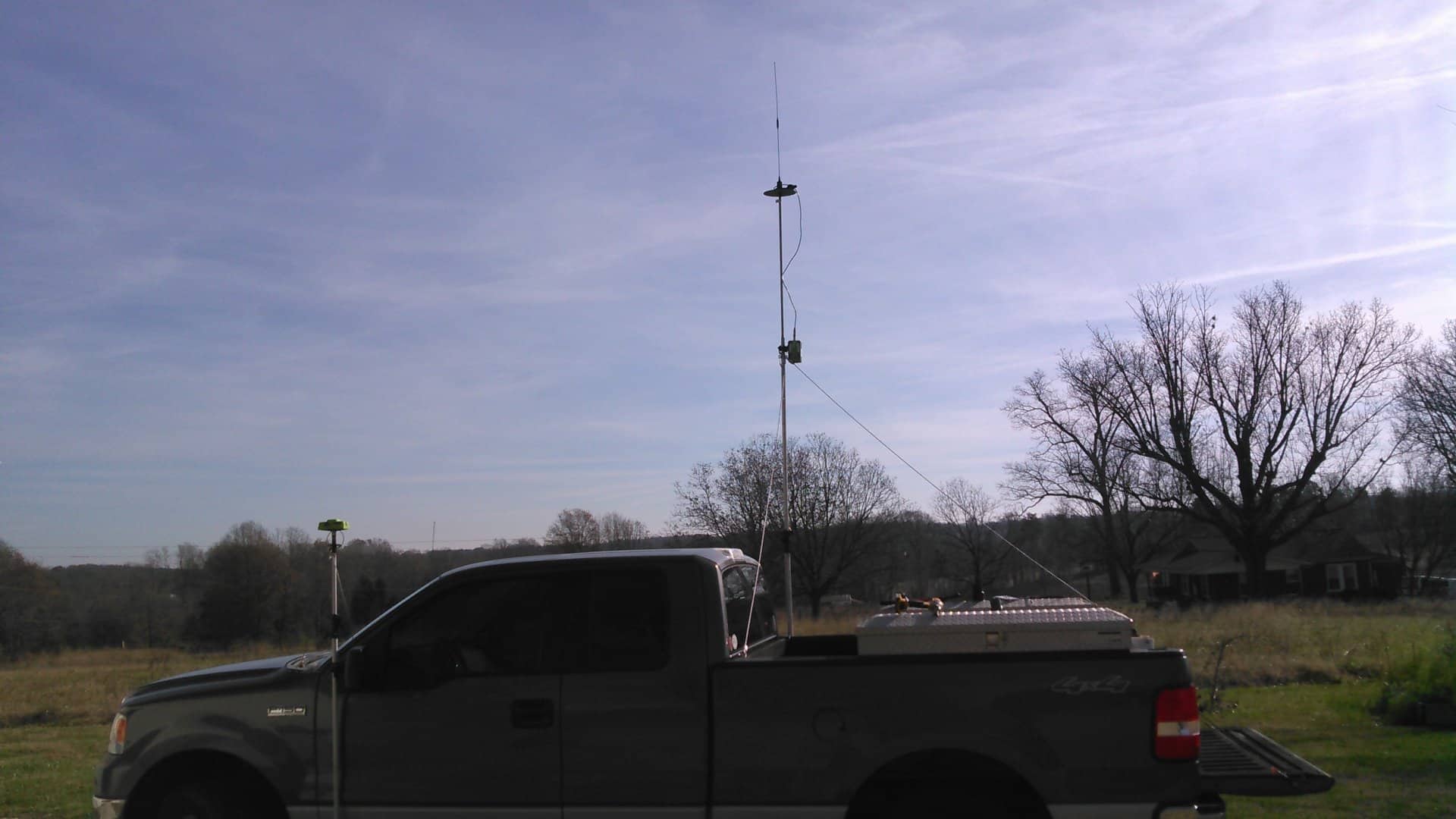
Heres a PDF of a few more picks.
Hmmm, thanks for the ideas.
With this new shift base, I think that could be useful.
I have a great network to get on in NC. I set a point using the network, then shift to it. DPOS it too for a check. Sometimes I mount a prism under the base.

Adam, post: 354688, member: 8900 wrote: Heres a pick of my setup.
What do you do with that? What sort of movement do you get at the top there (in wind especially)?
Adam, post: 354688, member: 8900 wrote: Heres a pick of my setup.
What do you do with this? (What sort of work?)
Assuming that you have done some sort of study, what sort of movement do you get at the top there? (Wind, getting into and out of the truck, etc.)